Last Updated on March 1, 2026 by Craig Allen Keefner
Why Multimodal Interaction Is Replacing Single-Interface Design
For more than three decades, interactive systems—from kiosks to digital signage to self-checkout—were defined by a simple formula: screen plus touch. That model powered the first wave of self-service and automated interaction across retail, healthcare, transportation, and government. But it is no longer sufficient.
Today’s interactive environments demand more flexibility, greater accessibility, and deeper personalization than a single interface can deliver. As a result, the industry is shifting toward a multimodal interaction stack, where display, touch, voice, gesture, and mobile work together to create adaptive, context-aware experiences. The screen is no longer the interface—it is just one surface in a broader interaction model.
Display: From Output Device to Context Engine
Displays remain central, but their role has evolved. Rather than serving as static output devices, modern displays provide visual context that adapts in real time. Content can change based on who is present, what stage a transaction is in, or which modality is being used at the moment.
In retail and QSR, displays increasingly reflect personalization, dynamic pricing, and real-time inventory awareness. In healthcare and transportation, they anchor wayfinding, status updates, and accessibility-friendly layouts. The display has become the orchestrator of context, not merely the place where buttons appear.
Touch: Still Essential, No Longer Dominant
Touch interaction is not disappearing—but it is being repositioned. Instead of driving every step of a transaction, touch is increasingly used for confirmation, precision input, and exception handling.
PIN entry, consent acknowledgment, and final confirmation are areas where touch still excels. At the same time, hygiene concerns, accessibility requirements, and speed expectations have reduced reliance on touch as the primary interaction method. In modern systems, touch often validates intent rather than initiating it.
Voice: The Invisible Interface
Voice has re-emerged as a serious interface layer thanks to improvements in microphones, edge AI, and natural language processing. Voice excels where hands-free interaction, accessibility, or natural language input are important.
In healthcare check-in, voice can reduce friction for patients with mobility or vision challenges. In QSR and wayfinding, it enables faster discovery and guidance. Voice works best when it complements visual context rather than replacing it—users want to see options even when they speak them.
Noise, privacy, and multilingual accuracy remain challenges, but voice is now a practical and valuable layer in the interaction stack.
Gesture: Subtle, Sensor-Driven Interaction
Gesture interaction today looks very different from early, overhyped implementations. Rather than dramatic hand movements, practical gesture systems rely on proximity detection, directional cues, and simple motion triggers.
Gesture works well for waking systems, navigating large displays, or enabling touch-free interaction in public environments. When implemented subtly, it reduces friction without demanding user training. When overused, it quickly becomes awkward. The key to gesture’s success is invisibility—it should feel natural, not performative.
Mobile: The Personal Interface
Mobile devices represent the most powerful interface users already carry. Mobile interaction extends kiosks and displays beyond the physical endpoint by providing identity, payment, loyalty, and continuity across sessions.
QR-initiated experiences, mobile-assisted checkout, and phone-as-controller models are increasingly common. Mobile does not replace kiosks; it personalizes and completes them, allowing interactions to begin in one place and finish in another.
Here is nice article by KMA on Using A Mobile To Access Smart City kiosk. It is not as cut and dry as many think.
Biometrics: The Identity and Trust Layer
Biometrics deserve inclusion—but not as a peer interaction modality. Biometrics do not define how users interact; they confirm who is interacting.
Facial recognition, fingerprints, palm scans, and voiceprints are best understood as identity and trust layers that support multimodal systems. When used appropriately and with consent, biometrics can streamline authentication, enable personalization, and enhance security—particularly in healthcare, payments, and government environments.
Poorly implemented biometrics, however, introduce regulatory risk and erode trust. Successful deployments are optional, transparent, and designed to degrade gracefully when biometric features are disabled.
The Real Shift: From Interfaces to Orchestration
The most important change is not the addition of new inputs—it is the orchestration of multiple modalities. Modern interactive systems manage transitions between display, voice, touch, gesture, and mobile based on context and user intent.
A transaction might begin with mobile identification, continue with voice navigation, and conclude with a touch confirmation. This layered approach creates faster, more inclusive, and more resilient experiences.
What This Means for the Industry
Multimodal interaction is no longer experimental. It is becoming table stakes. Hardware designs must account for sensors, audio, and edge compute. Software platforms must manage states and transitions across modalities. Operators must measure experience quality, not just uptime.
Single-mode systems increasingly look dated—and brittle—in a world that expects adaptability.
The future of interactive technology will not be defined by any one interface. It will be defined by how seamlessly multiple modalities work together to meet users where they are.
Executive Recommended Actions
Advice for Executives and Technology Leaders
With interactive tools now built around multiple ways of engaging, leadership groups find older tech strategies falling short. Not simply tacking on functions – this change demands seeing user exchanges as connected pieces. How decisions unfold, how success gets measured, how rollouts happen – all shifting at once. It’s less about extra buttons, more about timing, context, flow.
1. Stop Evaluating Interfaces in Isolation
Not every tool works alone. Picture teams shifting focus – checking off single functions like chat or call systems one by one. Watch suppliers show how voice links with screen actions through an entire task. See steps flow without hiccups when mobile meets desktop. Think about buying what connects pieces smoothly. Value the rhythm between parts more than any part itself.
2. Accessibility First in Design
Starting fresh means thinking ahead about who will use your product.
- Voice controls work better when planned from day one, just like high-contrast visuals.
- Font sizes should adjust easily because some people need them larger. Other ways to interact – like switches or eye tracking – matter just as much.
- Mobile experiences must support tools like screen readers without extra steps. Skip the idea of tacking on features later; build them in right away.
3. Treating Biometrics as One of Several Trust Options
Starting off carefully helps when rolling out biometric systems. Where fitting, they can speed things up – yet paper-based or password options must still exist. People need to see how to say no before anything begins. Without obvious exit routes, trust slips away fast. Making space for choice keeps penalties and backlash at bay. Smooth fallbacks matter just as much as the login itself.
4. Software that handles state instead of just screens
Switching between voice, touch, or gesture means software must track purpose and situation carefully. When one action triggers another response, the system stays ready through events rather than fixed steps. Designs built around APIs allow pieces to connect without rigid dependencies. As tools change over time, flexibility keeps performance steady. Future updates fit easier when structure expects change instead of resisting it.
5. Track Performance Indicators That Go Past Just Uptime
Now outdated, old measures like machine running time and number of deals fall short. To grasp how people actually experience systems, track where tasks finish or stall, how often access tools get used, whether help was needed – all seen through different ways users engage.
6. Pilot multimodal experiences in high impact areas
Start small instead of going wide. Pick tough moments like check-in or paying, then test mixed–method tools right where things grind. Watch how they work in real time. Learning comes quick that way. Trust grows too when teams see it actually running.
Bottom line:
Now it’s normal to mix different ways of interacting. Teams building around coordination, access for everyone, flexibility tend to pull ahead – while others stay stuck on one–way tools. What matters most shows up later: how fast they adjust.
InfoGraphic
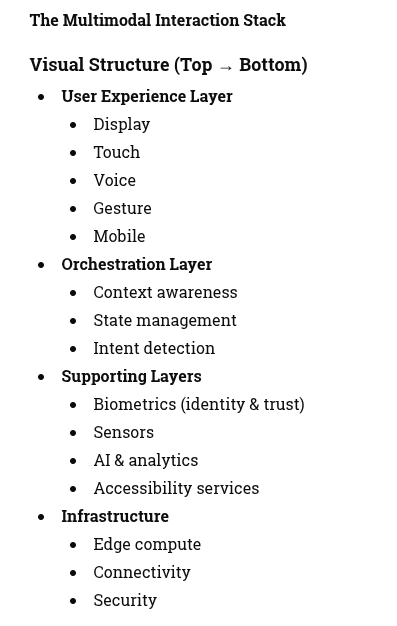
Modern interactive systems rely on coordinated interaction across multiple modalities, supported by orchestration, identity, and intelligent software layers
Related Resources on KioskIndustry.org
End of content