Last Updated on March 28, 2026 by Craig Allen Keefner
Self-service kiosks are not disposable devices
Nice writeup on planning longterm by Olea Kiosks — Successful large-scale kiosk deployments must be designed from the start for long lifecycles, operational stability, and real-world constraints—prioritizing enterprise-grade edge computing, serviceability, and risk reduction over short-term cost or speed.
Summary
Self-service kiosks are not disposable devices but long-term operational infrastructure, especially in retail, healthcare, travel, and regulated environments. As deployments scale from pilots to hundreds or thousands of locations, early design choices optimized for speed or cost often fail under real-world pressures such as uptime demands, security, compliance, supply-chain volatility, and limited IT support.
The article explains that most kiosk challenges are not about raw performance—they’re about lifecycle predictability, remote manageability, hardware consistency, and field serviceability over 5–7 years. Teams must navigate tradeoffs between cost and durability, flexibility and standardization, cloud reliance and local edge processing.
The recommended design philosophy emphasizes:
-
Enterprise-grade, off-the-shelf components
-
Long hardware lifecycles with stable roadmaps
-
Minimal SKU variation to reduce operational risk
-
Platforms that can absorb future software, security, and edge-AI demands
Olea Kiosks is an example of this approach, integrating standardized kiosk platforms with enterprise OEM compute—often leveraging Dell Technologies—to ensure global availability, supportability, and compliance over time.
It also notes that this architecture is not ideal for ultra-low-cost or short-term deployments, reinforcing that the model fits best where uptime, customer experience, and regulatory accountability matter.
Bottom line: Edge-based kiosk systems should be designed for durability and operational reality, not just initial deployment success.
Enterprise-Scale Kiosk Deployment Checklist
Designed for lifecycle stability, operational reliability, and real-world constraints
1. Deployment Context & Risk
-
☐ Is the kiosk mission-critical to revenue, throughput, or patient/customer experience?
-
☐ Will downtime be highly visible to customers or staff?
-
☐ Is the environment regulated (healthcare, payments, government, travel)?
-
☐ Are deployments planned for dozens, hundreds, or thousands of locations?
-
☐ Is on-site IT support limited or nonexistent?
2. Lifecycle & Longevity (5–7 Year Reality Check)
-
☐ Is the hardware roadmap stable for 5–7 years?
-
☐ Can the platform survive OS upgrades and security hardening over time?
-
☐ Are replacement parts guaranteed to be form-fit-function compatible?
-
☐ Is there a defined refresh and requalification strategy?
-
☐ Can assumptions made today change without forcing full hardware replacement?
3. Compute & Edge Architecture
-
☐ Is the kiosk designed as edge infrastructure, not a consumer device?
-
☐ Is there sufficient performance headroom for future workloads (AI, vision, sensors)?
-
☐ Can core workloads run locally if cloud connectivity is degraded?
-
☐ Are power and thermal constraints appropriate for 24/7 operation?
-
☐ Is compute standardized across the fleet?
4. Security, Compliance & Auditability
-
☐ Does the platform support consistent patching and firmware management?
-
☐ Are security updates available for the entire lifecycle?
-
☐ Is there a clear audit trail for changes and updates?
-
☐ Are vendor responsibilities clearly defined and enforceable?
-
☐ Are consumer-grade components explicitly avoided?
5. Operations & Remote Management
-
☐ Can the kiosk be monitored, updated, and diagnosed remotely?
-
☐ Are failures detectable before customers notice?
-
☐ Can IT teams manage the fleet with lean staffing?
-
☐ Are logs, alerts, and telemetry standardized?
-
☐ Is device behavior predictable across locations?
6. Field Serviceability & Maintenance
-
☐ Can peripherals be replaced in the field without major downtime?
-
☐ Are components modular and tool-accessible?
-
☐ Can parts be swapped without requalifying the entire system?
-
☐ Is enclosure downtime minimized during repairs?
-
☐ Are service procedures consistent across all models?
7. Supply Chain & SKU Discipline
-
☐ Are hardware SKUs limited and standardized?
-
☐ Are components available globally and consistently?
-
☐ Can replacements be sourced years after initial deployment?
-
☐ Is supply-chain risk treated as an architectural concern, not just procurement?
-
☐ Will minor component changes trigger re-certification or software changes?
8. Vendor & OEM Ecosystem
-
☐ Does the vendor support enterprise-scale deployments?
-
☐ Is there a clear roadmap across multiple hardware generations?
-
☐ Are support models designed for distributed environments?
-
☐ Is there a single accountable party for hardware lifecycle ownership?
-
☐ Are enterprise OEM platforms (e.g., Dell Technologies) available if required?
9. Fit Assessment — When This Model Makes Sense
-
☐ High-traffic, customer-facing environments
-
☐ Long deployment horizons (5+ years)
-
☐ Uptime, compliance, and experience are critical
-
☐ Operational risk matters more than initial cost
-
☐ Edge intelligence is expected to grow over time
10. Fit Assessment — When This Model Does Not Apply
-
☐ Ultra-low-cost or disposable kiosks
-
☐ Short-term pilots or pop-up deployments
-
☐ Environments tolerant of frequent manual intervention
-
☐ Rapid hardware turnover is expected
-
☐ Compliance and auditability are minimal concerns
Final Reality Check
-
☐ Are you optimizing for long-term risk reduction rather than short-term savings?
-
☐ Will this kiosk still be supportable, secure, and useful five years from now?
-
☐ Can your organization live with the operational consequences of this design choice?
If most answers are “yes,” this lifecycle-first, edge-based kiosk architecture is likely the right fit.
Executive Takeaways
- Never forget — the cheap pilot → expensive regret” trap
- If your kiosk architecture cannot survive seven years of OS updates, supply-chain disruption, and staff turnover, it is not enterprise-ready — regardless of how fast it shipped.”
-
OS version fragmentation after 24 months — See Windows versions and patch cycles
-
Peripherals going EOL mid-deployment
-
Cloud dependency killing uptime in regulated environments
-
Field techs unable to service sealed consumer hardware
Useful Resources
- Kiosk Design Checklist
- ANSI’s U.S. Standards Strategy 2026(Opens in a new browser tab)
- Self-Service Awards 2026 The Industry Group (TIG)
- Kiosk Price – Self-Service Kiosk Cost
-
The Hidden Cost of “Cheap” Kiosks
A CEO’s Guide to Lifecycle Economics
-
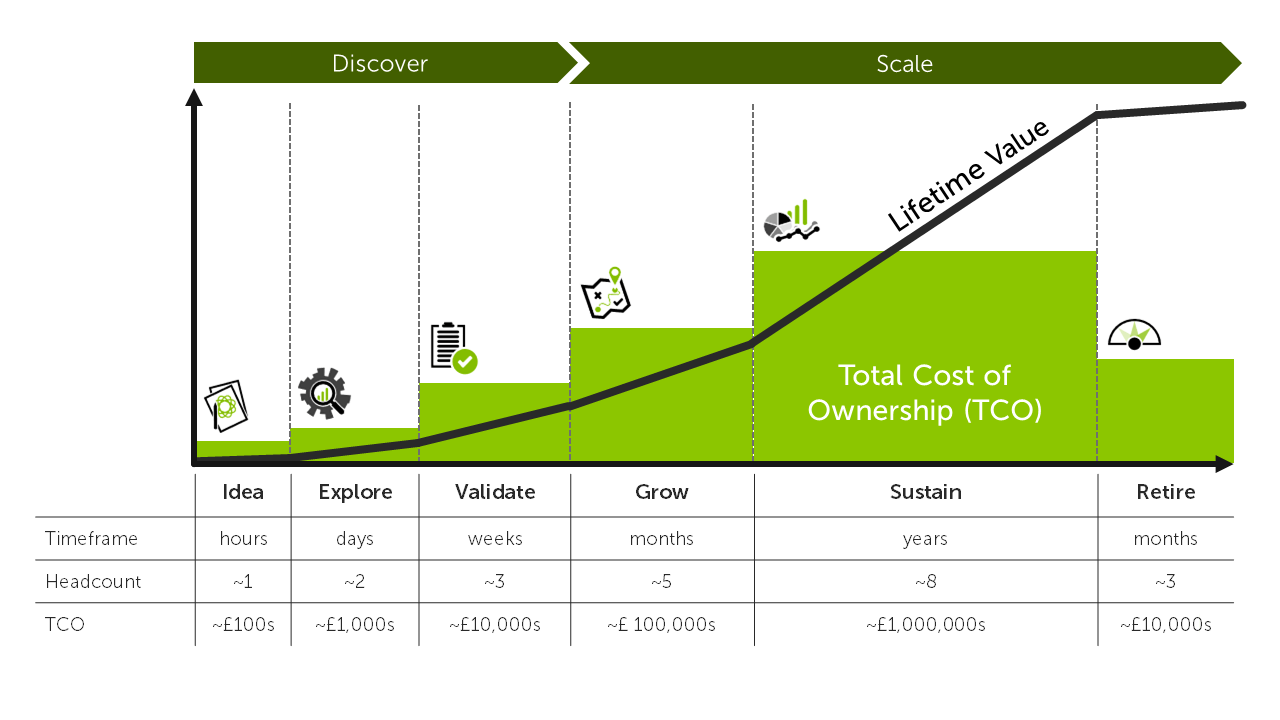
Kiosk TCO — a look at the kiosk deployment cycles
-
kiosk lifecycle best practices
-
enterprise self-service kiosk design
-

The simple truth
The purchase price of a kiosk is usually the smallest cost over its life.
What determines success—or failure—is how that device performs, survives, and gets serviced over 5–7 years of real-world operation.Executives often approve kiosks based on:
-
Unit cost
-
Speed to deploy
-
Feature checklists
But large deployments fail (or quietly bleed money) because of lifecycle costs that were never modeled upfront.
Think of kiosks like infrastructure, not devices
A useful mental model for CEOs:
A kiosk is closer to an ATM, EV charger, or POS terminal than to a tablet or digital sign.
Once deployed at scale, kiosks become:
-
Revenue-critical
-
Customer-visible
-
Operationally expensive to touch
Every design shortcut compounds over time.
Where lifecycle costs really come from
Below is a non-technical breakdown of where money is actually spent over a kiosk’s lifetime.
1. Downtime (the silent killer)
When a kiosk goes down:
-
Transactions stop
-
Lines form
-
Staff intervene
-
Customer trust erodes
Even small failure rates become material at scale.
CEO lens:
“What is the revenue or throughput impact if 3–5% of kiosks are unavailable on any given day?”
2. Field service & truck rolls
Each on-site service visit can cost $300–$800+, depending on geography and urgency.
Poor design decisions drive service calls:
-
Sealed consumer hardware
-
Inconsistent SKUs
-
Non-standard peripherals
-
No remote diagnostics
CEO lens:
“How many times per year will someone physically touch this device—and why?”
3. Security & compliance remediation
Over a 5–7 year lifecycle:
-
Operating systems age
-
Security requirements tighten
-
Regulations change (especially in healthcare, payments, government)
Short-lifecycle hardware often cannot:
-
Accept OS upgrades
-
Support new security baselines
-
Pass audits without replacement
CEO lens:
“Will this platform still be compliant three years from now—or will we be forced into early replacement?”
4. Supply chain & EOL shocks
Consumer-grade or fast-turn hardware often hits:
-
End-of-Life (EOL)
-
Peripheral discontinuation
-
Form-factor changes
This creates:
-
Mixed fleets
-
Incompatible replacements
-
Higher support costs
CEO lens:
“Can we still buy the same parts in four years?”
5. Internal operational drag
Every unstable kiosk creates work:
-
IT escalation
-
Operations exceptions
-
Store-level improvisation
-
Vendor finger-pointing
This doesn’t show up as a line item—but it consumes leadership attention.
-

end of content{“@context”:”https://schema.org”,”@graph”:[{“@type”:”WebPage”,”@id”:”https://kioskindustry.org/kiosk-design-long-lifecycles/#webpage”,”url”:”https://kioskindustry.org/kiosk-design-long-lifecycles/”,”name”:”Self-service kiosks are not disposable devices”,”description”:”Successful large-scale kiosk deployments must be designed from the start for long lifecycles, operational stability, and real-world constraints — prioritizing enterprise-grade edge computing, serviceability, and risk reduction over short-term cost or speed.”,”isPartOf”:{“@id”:”https://kioskindustry.org/#website”},”about”:[{“@type”:”Thing”,”name”:”Self-service kiosks”},{“@type”:”Thing”,”name”:”Edge computing”},{“@type”:”Thing”,”name”:”Remote device management”},{“@type”:”Thing”,”name”:”Field serviceability”},{“@type”:”Thing”,”name”:”Compliance and security”}]},{“@type”:”WebSite”,”@id”:”https://kioskindustry.org/#website”,”url”:”https://kioskindustry.org/”,”name”:”The Industry Group — Kiosk Industry”,”publisher”:{“@id”:”https://kioskindustry.org/#organization”}},{“@type”:”Organization”,”@id”:”https://kioskindustry.org/#organization”,”name”:”The Industry Group”,”url”:”https://kioskindustry.org/”,”logo”:{“@type”:”ImageObject”,”url”:”https://kioskindustry.org/wp-content/uploads/2024/01/kiosk-industry-logo.png”}},{“@type”:”BlogPosting”,”@id”:”https://kioskindustry.org/kiosk-design-long-lifecycles/#article”,”mainEntityOfPage”:{“@id”:”https://kioskindustry.org/kiosk-design-long-lifecycles/#webpage”},”headline”:”Self-service kiosks are not disposable devices”,”alternativeHeadline”:”Planning long-term kiosk deployments for lifecycle stability, serviceability, and enterprise edge computing”,”description”:”Self-service kiosks are long-term operational infrastructure. This article outlines a lifecycle-first design philosophy and an enterprise-scale deployment checklist.”,”articleSection”:[“Self-Service”,”Kiosk Deployment”,”Edge Computing”,”Operations”,”Security & Compliance”],”keywords”:[“kiosk lifecycle”,”enterprise kiosk deployment”,”edge computing”,”remote management”,”field service”,”SKU standardization”,”kiosk security”,”kiosk compliance”],”inLanguage”:”en-US”,”datePublished”:”2026-01-30T08:00:00-07:00″,”dateModified”:”2026-01-30T08:00:00-07:00″,”author”:{“@type”:”Organization”,”name”:”Olea Kiosks”},”publisher”:{“@id”:”https://kioskindustry.org/#organization”},”image”:[{“@type”:”ImageObject”,”url”:”https://kioskindustry.org/wp-content/uploads/2026/01/kiosk-lifecycle-enterprise-checklist.jpg”,”caption”:”Enterprise-scale kiosk deployment checklist”}],”mentions”:[{“@type”:”Organization”,”name”:”Olea Kiosks”},{“@type”:”Organization”,”name”:”Dell Technologies”}],”hasPart”:[{“@type”:”HowTo”,”@id”:”https://kioskindustry.org/kiosk-design-long-lifecycles/#checklist”,”name”:”Enterprise-Scale Kiosk Deployment Checklist”,”description”:”Checklist for lifecycle stability, operational reliability, and real-world constraints in kiosk deployments.”,”inLanguage”:”en-US”,”step”:[{“@type”:”HowToStep”,”name”:”Deployment Context & Risk”,”itemListElement”:[{“@type”:”HowToDirection”,”text”:”Is the kiosk mission-critical to revenue, throughput, or patient/customer experience?”},{“@type”:”HowToDirection”,”text”:”Will downtime be highly visible to customers or staff?”},{“@type”:”HowToDirection”,”text”:”Is the environment regulated (healthcare, payments, government, travel)?”},{“@type”:”HowToDirection”,”text”:”Are deployments planned for dozens, hundreds, or thousands of locations?”},{“@type”:”HowToDirection”,”text”:”Is on-site IT support limited or nonexistent?”}]},{“@type”:”HowToStep”,”name”:”Lifecycle & Longevity (5–7 Year Reality Check)”,”itemListElement”:[{“@type”:”HowToDirection”,”text”:”Is the hardware roadmap stable for 5–7 years?”},{“@type”:”HowToDirection”,”text”:”Can the platform survive OS upgrades and security hardening over time?”},{“@type”:”HowToDirection”,”text”:”Are replacement parts guaranteed to be form-fit-function compatible?”},{“@type”:”HowToDirection”,”text”:”Is there a defined refresh and requalification strategy?”},{“@type”:”HowToDirection”,”text”:”Can assumptions made today change without forcing full hardware replacement?”}]},{“@type”:”HowToStep”,”name”:”Compute & Edge Architecture”,”itemListElement”:[{“@type”:”HowToDirection”,”text”:”Is the kiosk designed as edge infrastructure, not a consumer device?”},{“@type”:”HowToDirection”,”text”:”Is there sufficient performance headroom for future workloads (AI, vision, sensors)?”},{“@type”:”HowToDirection”,”text”:”Can core workloads run locally if cloud connectivity is degraded?”},{“@type”:”HowToDirection”,”text”:”Are power and thermal constraints appropriate for 24/7 operation?”},{“@type”:”HowToDirection”,”text”:”Is compute standardized across the fleet?”}]},{“@type”:”HowToStep”,”name”:”Security, Compliance & Auditability”,”itemListElement”:[{“@type”:”HowToDirection”,”text”:”Does the platform support consistent patching and firmware management?”},{“@type”:”HowToDirection”,”text”:”Are security updates available for the entire lifecycle?”},{“@type”:”HowToDirection”,”text”:”Is there a clear audit trail for changes and updates?”},{“@type”:”HowToDirection”,”text”:”Are vendor responsibilities clearly defined and enforceable?”},{“@type”:”HowToDirection”,”text”:”Are consumer-grade components explicitly avoided?”}]},{“@type”:”HowToStep”,”name”:”Operations & Remote Management”,”itemListElement”:[{“@type”:”HowToDirection”,”text”:”Can the kiosk be monitored, updated, and diagnosed remotely?”},{“@type”:”HowToDirection”,”text”:”Are failures detectable before customers notice?”},{“@type”:”HowToDirection”,”text”:”Can IT teams manage the fleet with lean staffing?”},{“@type”:”HowToDirection”,”text”:”Are logs, alerts, and telemetry standardized?”},{“@type”:”HowToDirection”,”text”:”Is device behavior predictable across locations?”}]},{“@type”:”HowToStep”,”name”:”Field Serviceability & Maintenance”,”itemListElement”:[{“@type”:”HowToDirection”,”text”:”Can peripherals be replaced in the field without major downtime?”},{“@type”:”HowToDirection”,”text”:”Are components modular and tool-accessible?”},{“@type”:”HowToDirection”,”text”:”Can parts be swapped without requalifying the entire system?”},{“@type”:”HowToDirection”,”text”:”Is enclosure downtime minimized during repairs?”},{“@type”:”HowToDirection”,”text”:”Are service procedures consistent across all models?”}]},{“@type”:”HowToStep”,”name”:”Supply Chain & SKU Discipline”,”itemListElement”:[{“@type”:”HowToDirection”,”text”:”Are hardware SKUs limited and standardized?”},{“@type”:”HowToDirection”,”text”:”Are components available globally and consistently?”},{“@type”:”HowToDirection”,”text”:”Can replacements be sourced years after initial deployment?”},{“@type”:”HowToDirection”,”text”:”Is supply-chain risk treated as an architectural concern, not just procurement?”},{“@type”:”HowToDirection”,”text”:”Will minor component changes trigger re-certification or software changes?”}]},{“@type”:”HowToStep”,”name”:”Vendor & OEM Ecosystem”,”itemListElement”:[{“@type”:”HowToDirection”,”text”:”Does the vendor support enterprise-scale deployments?”},{“@type”:”HowToDirection”,”text”:”Is there a clear roadmap across multiple hardware generations?”},{“@type”:”HowToDirection”,”text”:”Are support models designed for distributed environments?”},{“@type”:”HowToDirection”,”text”:”Is there a single accountable party for hardware lifecycle ownership?”},{“@type”:”HowToDirection”,”text”:”Are enterprise OEM platforms (e.g., Dell Technologies) available if required?”}]}]}]},{“@type”:”ItemList”,”@id”:”https://kioskindustry.org/kiosk-design-long-lifecycles/#resources”,”name”:”Useful Resources”,”itemListOrder”:”https://schema.org/ItemListUnordered”,”itemListElement”:[{“@type”:”ListItem”,”position”:1,”name”:”Kiosk Design Checklist”,”url”:”https://kioskindustry.org/kiosk-design-checklist/”},{“@type”:”ListItem”,”position”:2,”name”:”ANSI’s U.S. Standards Strategy 2026″,”url”:”https://kioskindustry.org/ansi-us-standards-strategy-2026/”},{“@type”:”ListItem”,”position”:3,”name”:”Self-Service Awards 2026 (The Industry Group)”,”url”:”https://kioskindustry.org/self-service-awards-2026/”},{“@type”:”ListItem”,”position”:4,”name”:”Kiosk Price – Self-Service Kiosk Cost”,”url”:”https://kioskindustry.org/kiosk-price/”}]}]}