

Last Updated on October 22, 2026 by Craig Allen Keefner
Notes From The Underground 🙂
2026 October
- Google changing programmable search. We use for select site search so not much effect on us. Programmable Search 10-22-2026
- 10/21/2026 – major PHP bleeping CVEs. I actually run later version but updated to 8.3 today. Cloudflare stepped in and extended protection as soon as noted. Sites using unsupported PHP (50%) will need to update, or use Cloudflare. Most dramatic consequences will be ecommerce in consumer/corporate and then government services and IDs. Pretty bad.
- For e-commerce sites — generally, you hope people find you, navigate your site, and buy a product. The “next big thing”? They will send a shopping agent to query and manage the purchase. What that means is that agents will now have a separate discussion with your website. They won’t use the interface like people. Making that possible is WebMCP, a new protocol for “agent conversations”.
- An interesting side angle to that is the spec x402 — x402, an open payment standard built around HTTP 402 that lets agents and services automatically pay for access without subscriptions or checkout flows. The mechanism is x402, an open payment standard from Coinbase built on HTTP 402 (Payment Required), a status code reserved in the spec since 1997 and almost never used.
- So, you let them shop efficiently, but you charge them a fee. Everybody wants a cut it seems..
- You use Yoast but the free version and want to code your social OG title and description?
- Code Snippets is free and easy to add PHP snippets. I use it on kioskeurope.org — it’s cheap, and it’s economical.
- Q: Is your content analyzed as 100% AI? Is that bad?
- Sometimes you want a quick placeholder, with your point of view and basis. I’ve done that on ala carte adhoc basis. I checked one with panagram and it declared 100% (Grammarly said 35%). Google top-rated the post in search results and it’s a very popular page. Numbers and outcomes are what matter, not what someone prefers to think. I did revise the page and tune it up (since it was so popular and a top result).
- Improper screen scaling on mobile — <meta name=“viewport” content=“width=device-width, initial-scale=1.0” /> — Omitting
initial-scale=1.0in the viewport tag is one of those subtle mobile browser edge cases that selectively bites mobile WebKit and privacy browser engines on high-DPI devices like the Pixel.
2026 August Update
- very nice faq loaded as an addendum on content structure (feeding the AIs)
2026 July Update
-
“Building a website is only half the battle. To see real ROI, you need the right audience—not just more sessions in Analytics. For the self‑service and kiosk industry, that means a specialized approach to technical SEO, accessibility, and how both humans and AI systems discover content.”
-
“For a complete overview of our content strategy, see our FAQ Overview.”
-
“Our core question is simple: do we want to chase leads, or do we want to be the authority that everyone—buyers, partners, and industry media—relies on? In 2026, we choose authority first and let qualified leads be the consequence, not the goal.”
-
“Content isn’t a one‑and‑done job. I’d love to ‘change this or that’ and declare victory—dream on. AI tools are helpful, but the real value is in the tension between different viewpoints: where they disagree, and where they converge. That’s where expert commentary and industry context still win.”
- This article first published in Feb 2025 and multiple updates since then, including this on in May 2026.
- Bear in mind it is multiple tools and several of them do the same thing, differently. Perfmatters handles RUCSS better than WP-Rocket but if both are trying to do it then neither do it very well.
- Some resources
Common Pitfalls in Web Development
Many industry sites fail because they ignore the “plumbing” of their digital presence. Avoid these frequent mistakes:
-
Never upgrade your main site with the latest release. Upgrade secondary and wait for “fixes” in next dot release.
-
Underestimating Executive Creeps — Get a battle plan and stick to it. You are designing for customers and investors.
- Source data — The worst is Microsoft Word. Keep the old trust text editor hand and let it filter out the garbage.
-
Missing Structured Data: If you don’t use Schema, Google is guessing what your product is. Don’t leave your “Self-Checkout Solutions” or “Outdoor Kiosks” to chance. And schema is generally page type and article type. I have several pages with article type set to NONE with no side injection of schema. Just the page type.
- Use https://developers.google.com/search/docs/appearance/structured-data
- Wordpress Caveat – best to use structured data plugin or functions rather than manually adding script schema in content. Wordpress will let you do that but after the next edit it will strip out the script tag rendering useless.
- Be careful with dates. That can be flagged by Google.
-
Mobile-Secondary Thinking: While kiosk buyers often use desktops for deep research, Google indexes the mobile version first. If it’s broken on a phone, it’s invisible on a PC.
-
Ignoring Site Mechanics: Fast office internet hides the truth. Use PageSpeed Insights or GTMetrix to see how your site performs for a lead on a spotty 5G connection.
- Snippets – Google likes snippets. Two sentence summary
- Cloudflare — probably the best CDN on the planet, plus the best protection against DDOS. Great bot protection which speeds up site. Bear in mind you may need to whitelist certain spiders. Google pagespeed uses a revolving DNS address complicating things.
-
Asset Bloat: High-res spec sheets and non-optimized graphics are “bandwidth killers.” Optimize every image before upload.
-
Underutilizing Free Tools: Tools like Accessibility Insights (Edge browser) are free, powerful, and often ignored. Use them.
- Designing For Themselves and Not Their Users — when you ask your CEO to sign off on new website, make them use their mobile to view. And remember, CEOs don’t fax in POs….
- Simple fixes for WCAG-related “Accessibility” fixes. Use your stylesheets in power mode. Make it speakable.
- Kitchen Sink Morass — web developers like to have specific templates they support along with specific plugins they use. Your site gets overloaded with plugins. The developers are more skilled in modifying a template than actual coding. They take longer. Support takes longer. You are much more open to attack (CVEs or new hacks into plugins).
- The fewer the plugins, the better. If you use a plugin but only on occasion, then deactivate it between use.
- Posting Content — I let anybody post just my sending me their content in email. If they want I will also let them into the CMS. I simply moderate the posts. The more content the better and limiting posting to one authorized person is a bad idea in many ways.
- Authority — build your authority. That is one use for Linkedin
- Good Database Habits — Websites evolve. Plugins get used and then they are deactivated and presumably deleted. You wish…. Garbage collection and removal is the worst trait of developers. Phpadmin is good for reviewing your database and deleting all the unused junk fields to optimize.
- Worst of the worst is Jetpack fyi* They are like a multiheaded hydra cactus that embeds itself in everything.
- Security — subscribe to bleepingcomputer. They are always first. Krebs on LinkedIn recommended.
- Github — often used by your developers as source control. Here is a writeup — github security
-
How GitHub risk shows up for WordPress sites
-
Malicious tools/scripts posing as “helpers.”
-
There have been campaigns where “WordPress tools” or PoC exploits on GitHub were trojanized to steal over 390,000 WordPress credentials via phished or compromised users.
-
-
Stolen or leaked credentials in repos.
-
Common issues include putting wp‑config.php contents, database passwords, API keys, or SFTP/SSH creds into GitHub and accidentally exposing them, especially in public repos or forks.
-
-
Pulling unvetted code or plugins from GitHub.
-
Developers sometimes grab random themes/snippets from GitHub without reviewing code quality or update history, which can introduce backdoors, RCE bugs, or insecure practices into a WordPress site.
-
-
Dependency and supply‑chain issues.
-
Attacks increasingly focus on public repos and package managers; if your developers import libraries or tools from GitHub without checks, they inherit those vulnerabilities.
-
-
GSC “Hacks” for 2026
-
Improve CTR: Tweak meta titles for pages with high impressions but low clicks.
-
Optimize “Nearly There” Keywords: Focus on keywords ranking in positions 4–10.
-
Content Gap Analysis: Find new ideas based on what users are searching for.
-
Sales Funnel Completion: Identify where users drop off.
-
Core Web Vitals: Fix “LCP” issues to stay in Google’s good graces.
-
Mobile Keyword Optimization: See if mobile users use different terms than desktop users.
-
Internal Link Boost: Link your high-traffic posts to your “money” (product) pages.
-
Backlink Hunting: Find who links to competitors but not you.
-
Rich Results: Use Schema to get those “stars” and “FAQs” in the search results.
-
Compare Performance: Use the “Compare” date feature to see if your latest update actually helped.
-
Sitemap Submission: Ensure Google sees your newest pages instantly.
The “Kiosk Ratio”: Why Our Data Is Different
General SEO advice says “60% of traffic is mobile.” In the kiosk world, we often see the opposite.
Case Study: At kioskindustry.org, out of 500,000 requests, only about 150,000 are mobile. In a month figure 15,000,000 requests and 35% of those are mobile.
May 2026 Scan — 77% desktop and 16% mobile.
The Insight: Our audience does the “heavy lifting” (comparing specs, downloading RFPs) on desktops. However, because Google’s primary focus is mobile, your site must be flawless on both to rank at all. For trade shows your mobile usage will triple .
Maximizing Google Search Console (GSC)
We rely on GSC because 95% of organic traffic originates from Google. While LinkedIn is great for “endorphin hits” and keeping supporters happy, it rarely drives the volume that a well-indexed Google page does. For every 10 visits from LinkedIn, we get 1,000 visits from Google.
Pro Tip — GSC is much like a rear-view mirror. It will usually see where you site “was”. Use validator.schema.org to check now (and make sure site and CDN cache cleared)
Why We Use GSC for Kiosk Sites:
-
Identify Intent: We found our top topic was “Walmart Replacing Self-Checkout.” GSC tells you exactly what people are typing so you can create content they actually want.
-
Re-Indexing: When you update a product spec or a press release, don’t wait for Google. Use GSC to tell them: “I’ve updated this, come look again.”
-
Health Checks: GSC monitors your Core Web Vitals and security. For an industry that handles sensitive data, a “Security Error” in GSC is a business-killer.
-
Backlink Audits: See who is talking about you. High-authority links (like AVIXA) are the “gold” that pushes you above competitors.
Accessibility: Beyond the Checklist
Accessibility isn’t just about compliance; it’s about usability.
-
Quick Scan: Use the built-in Accessibility functions in Chrome/Edge or PageSpeed Dev.
- Lighthouse by Google is good. PSD can have cache problems
-
Deep Dive: Use GT Metrix for a “waterfall” view of how your site loads.
-
The Goal: A site that is easy for a screen reader to navigate is also a site that is easy for Google to index.
-
WCAG 2.2 AA
-
EAA (EU clients)
-
Section 504/HHS triggers (healthcare)
-
Structured data helping screen readers
-
Semantic HTML hierarchy
- GDPR — here is write up — EU Data Privacy
Pro Tips
Taking Control of Your Search
Use these expert search parameters to get the 2011-style “10 Blue Links” and verbatim results:
-
The “Web Only” Filter: Add
&udm=14to your search URL to bypass AI overviews. -
The Verbatim Hack: Add
&tbs=li:1to force Google to search your exact terms—no synonyms, no “fuzzy” matching. - We are big fans of Google Programmable Search which lets us let you search google for our content, without any added fluff. Just results.
- If you have strong Bot firewalls (typically Cloudflare) you’ll want to ensure rule set up for GoogleBot (and others probably)
Notifying Google Instantly
- Twice a day is ok, but when new content or changes happen it is ideal to let Google know instantly.
- Google Cloud Console (can be confusing for sure)
- Create project or use existing
- Enable Indexing API
- Add key (JSON) and download
- Add that email to GSC as user
- Use Google-friendly RSS plugin — it will want that JSON file
Things to Watch Out For
- Structured data can bite you in the butt too. Generally you can automatically insert or you can selectively insert custom. Chatgpt is very good at JSON but Google has little variances and then Yoast can add confusion. The wrong dates for modified and published can cause Google to see you as “bad site”. Be careful. Gemini makes mistakes with structured data which is surprising.
- Remember, GSC is a rear view mirror.
- You will run into CSS and caching. Be careful not to overlap. Let Cloudflare do that, and WP-Rocket do that and also let PerfMatters do what it does. PM is good for reducing unused CSS (RUCSS). Purpose built usually wins over kitchen sink.
Strategic AI Usage
Don’t fear the bot; direct it.
-
Strategic Scraping: Allow high-value AIs (ChatGPT, Gemini, Anthropic) to crawl your site so they can recommend your products in their chats.
-
Allowing AI crawlers ≠ guaranteed citation
-
Use llms.txt or schema reinforcement (Yoast provides that)
-
Monitor server logs
-
Consider rate limiting
-
-
Block the “Bandwidth Eaters”: Use your
robots.txtto shut the door on useless scrapers (like TikTok) that eat your server resources without providing ROI.
AI Engine Tips
- Check your site. How available is it?
- For my sites that are mainly non-interrogated information sites (with zero commerce) some things apply, others don’t
- Cloudflare will manage (combine) your robots which is handy
- I set up a Worker in 2 minutes to provide some useful JSON API Catalog) the AIs like
- I do Bing, Anthropic, Gemini, Chatgpt for sure. Grok not so much
- When I add API interface for data I’ll want to “advertise” that.
AEO vs GEO vs AIO: What These Terms Actually Mean and Why Your Business Needs to Care
Executive Summary — AEO vs GEO vs AIO
The article explains three emerging digital-visibility strategies that are replacing traditional SEO thinking in the age of AI search.
The core idea: people increasingly ask AI tools (ChatGPT, Perplexity, Google AI Overviews) for answers instead of clicking search results, so businesses must optimize their content for AI systems—not just search engines.
The Three Terms Explained
1. AEO — Answer Engine Optimization
Goal: Become the source AI systems choose when answering a question.
Focus areas:
-
Direct answers to questions
-
FAQ pages and structured Q&A content
-
Voice search queries
-
Featured snippets and AI summaries
Typical tactics:
-
Clear question/answer formatting
-
FAQ schema
-
concise explanations
-
conversational language
In short:
AEO tries to make your content “the answer.”
2. GEO — Generative Engine Optimization
Goal: Ensure your brand or content is cited by generative AI systems.
Focus areas:
-
ChatGPT
-
Perplexity
-
Gemini
-
AI-generated summaries
Typical tactics:
-
authoritative long-form content
-
structured information AI can extract
-
citations across the web
-
building topical authority
In short:
GEO tries to make your content “a trusted source” AI systems reference.
3. AIO — Artificial Intelligence Optimization
Goal: Prepare your entire digital presence to work with AI systems.
AIO is the strategic umbrella that includes both AEO and GEO.
It involves:
-
structured data (schema, entity signals)
-
authoritative brand presence
-
AI-readable content
-
tracking citations in AI answers
-
ensuring consistent knowledge graph information
In short:
AIO is the company-wide AI visibility strategy.
How They Fit Together
Think of it like layers:
| Layer | Role |
|---|---|
| SEO | Rank in traditional search results |
| AEO | Be selected as the answer |
| GEO | Be cited by AI systems |
| AIO | Overall AI-visibility strategy |
These approaches complement each other rather than replacing SEO.
Why Businesses Need to Care
AI search is rapidly changing how people discover information.
Key shifts:
-
“Zero-click” answers from AI reduce website visits.
-
AI models synthesize answers rather than listing links.
-
Visibility now depends on being cited or used by AI systems, not just ranking in Google.
Companies that adapt will remain visible in AI-driven discovery.
✔ Bottom line:
-
AEO = optimize content to be the answer
-
GEO = optimize content to be cited by AI
-
AIO = overall strategy for AI visibility
Here is the original article following from 2025.
Screenshots

Structured Data for this post
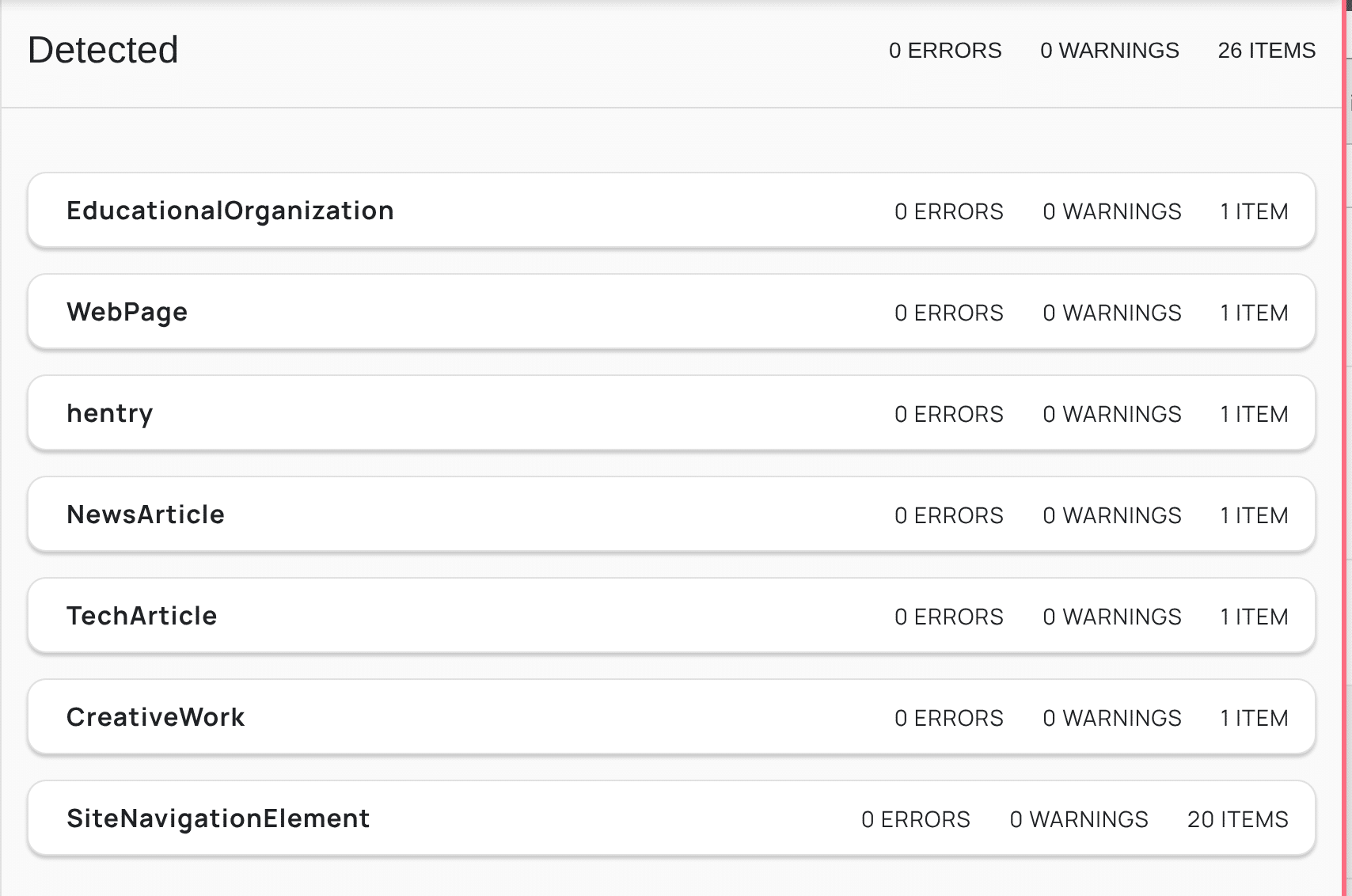
GSC structured data test
Recommended Tools for Websites (Wordpress as rule)
Support developers and be willing to pay upfront. I do but at some point most of the work is done or I have found something better. Plugins have a lifecycle. Some are longer than others. Be careful with subscription auto-renewals.
- Classic editor lets you inject easy ad-hoc json
- Classic widgets is good too
- GNPublisher is highly rated
- BetterSearchReplace — easy search replace for database
- LinkWhisper
- Imagify
- Yoast
- LovedByAI — seems pretty useful so far
- Reinvent WP Text to Speech — tricky
- CronControl
- Screaming Frog – nice tool. Free for 500 urls. It detected security details for me and I had to create some transform rules in Cloudflare. $285 and I recommend buying at least once to support the developers. Once you’ve gone thru it, it becomes less necessary as do most of these tools. It’s taking a jet and getting to cruising altitude…
- Post Views Counter
- List category posts
- WP Rocket is great with Cloudflare (along with PerfMatters)
- PerfMatters is excellent lightweight plugin for tuning posts and pages.
- Schema & Structured Data for WP & AMP — get the SASWP Pro Extension Manager
- TablePress is good for tables but it is high overhead. Only load on those pages.
- Fluent Forms is good for forms
- Images usually need alt text. There are tools with bulk edit that are available. Best advice is learn early on to properly document assets when you originally deploy them. Alttext.ai is well-liked and good business. I’ve never had much luck though with alt text. I blame it on Vispero 🙂
- Images — squoosh.app from Google is excellent
- PDFs — smallpdf is excellent
- Gumroad is a nice offsite purchase product channel. Don’t sell on your site.
- PhpAdmin is more severe but great for optimizing databases. Discarded plugins rarely clean up after themselves.
- Garbage collection and disposal is extremely important.
- AAA Option Optimizer — kill off the stupid preloads
- Advanced Database Cleaner — useful
- SEO
- Semrush is baseline these days.
- Ahrefs is very good.
- Wincher is pretty good
- Yoast is pretty much automatic
- SAWSP – Structured data from Magazine. Easy to inject custom schema
- GSC
- Rich Text Results
- Hosting
- Redundant backups — maybe even twice a year complete download locally
- Blue Host – Someone like me rarely needs technical support.
- WP Engine – spendy but if you like having top-notch support hard to beat
- Rackspace – grew up on Rackspace. Super nice for enterprises (Nestle, etc)
- Cloudflare Workers — free. I have 6 or 7 of these
- GoDaddy — I use them for static html archive sites. Cheap and easy.
- If worried about site attackers, probably need to remove historical DNS info and tune origin with Cloudflare. They will vector your actual IP if they can.
- Cannot recommend
- Accessibility plugins – generally a waste of money
- Multilingual — they create parallel databases. Bad idea.
- Sitekit by Google. Works but unless you are selling product too much overhead for simply stats
- Selling product on your site for that matter — instant bullseye for hackers
- Once your Domain Authority rises you will begin to get emails from SEO groups trying to build backlinks for their clients. They get paid for that. Personally we don’t engage them because they compromise our content. Google squints its eyes when it sees that. Not good. Best to just stay true and block/spam them. You’ll sleep better at night.
IF YOU MUST SELL ON YOUR SITE
If you have to sell products on a WordPress site, the biggest issue is not usually WordPress itself — it is the expanded attack surface from plugins, payment handling, customer data, abandoned extensions, and admin access sprawl. A compromised ecommerce site can turn into malware distribution, card-skimming (Magecart), SEO spam, ransomware, or full credential theft very quickly.
For a content-heavy industry site like Kiosk Industry Group, where editorial credibility matters, separating commerce from publishing is usually the safest long-term architecture.
Best Practice: Separate Commerce from Content
Instead of running ecommerce directly on your primary publishing site:
- Keep your editorial/content site separate
- Put commerce on:
- a subdomain (
shop.domain.com) - separate VPS/container
- or external platform
- a subdomain (
Example safer structures:
kioskindustry.org→ content onlyshop.kioskindustry.org→ ecommerce isolated- or external checkout:
This limits blast radius if commerce gets compromised.
Strong Recommendations
1. Avoid Self-Hosting Card Data Entirely
Never store:
- credit cards
- ACH data
- CVV
- payment tokens locally unless absolutely necessary
Use hosted checkout or tokenized payment systems:
Hosted checkout massively reduces PCI exposure.
2. Fewer Plugins = Safer
The #1 WordPress security problem:
- abandoned plugins
- poorly coded plugins
- plugin conflicts
- admin convenience plugins
Especially dangerous:
- nulled themes/plugins
- page builders with ecommerce add-ons
- old WooCommerce extensions
- inventory plugins from unknown vendors
Good rule:
- if a plugin is not mission critical, remove it
For ecommerce:
- WooCommerce core only
- minimal extensions
- trusted vendors only
3. Separate Admin Accounts
Do NOT use one admin for everything.
Create:
- publishing/editor role
- SEO role
- ecommerce fulfillment role
- technical admin role
Never browse casually while logged in as admin.
Use:
- unique passwords
- hardware MFA if possible
- IP restriction for admin panels
4. Use Cloudflare Aggressively
For WordPress commerce, Cloudflare is almost mandatory now.
Recommended:
- WAF enabled
- Bot Fight Mode
- rate limiting on:
- login
- XML-RPC
- cart/checkout
- country blocking if applicable
- challenge suspicious POST requests
For WooCommerce specifically:
exclude:
- cart
- checkout
- my-account
from aggressive caching.
5. Lock Down WordPress
Critical:
- disable XML-RPC unless needed
- disable file editing in wp-admin
- move login URL
- limit login attempts
- automatic security updates
- daily malware scanning
- immutable backups
In wp-config.php:
define('DISALLOW_FILE_EDIT', true);6. Backups Must Be External
Never trust:
- hosting backups alone
- same-server backups
Use:
- offsite backups
- versioned backups
- immutable snapshots
Recommended:
- Backblaze B2
- Amazon S3
- Wasabi
Test restore procedures regularly.
7. Watch for Magecart-Style Injection
Very common on WordPress commerce sites.
Attackers inject:
- JavaScript skimmers
- fake checkout overlays
- hidden redirects
Monitor:
- changed JS files
- injected scripts
- modified theme headers
- unauthorized admin accounts
Good tools:
8. Hosting Matters More Than Theme
Cheap shared hosting + WooCommerce = dangerous.
Prefer:
- isolated VPS
- managed WordPress hosting
- containerized deployments
Better choices:
9. Digital Products Are Safer Than Physical Inventory
For your TIG/KMA ecosystem:
- PDFs
- research reports
- calculators
- memberships
- sponsored listings
- gated downloads
are dramatically safer operationally than:
- inventory
- shipping
- warehousing
- tax complexity
This aligns well with:
- Gumroad
- Paddle
- Stripe links
- membership portals
rather than full WooCommerce retail.
10. Consider “Static Front End + External Checkout”
Very strong modern model:
- WordPress = content only
- ecommerce buttons link externally
- no cart stored locally
- no checkout locally
This preserves:
- SEO
- editorial workflow
- performance
- lower risk
while minimizing attack exposure.
ADDENDUMS
https://www.lovedby.ai/geo-information-gap-checklist
The strategy in one sentence
Feed the AI the What and the Why to earn the citation, but reserve the How, the proprietary data, and the interactive experience for the human visitor. The gap isn’t created by withholding the answer – it’s created by offering something beyond the answer that only the page can deliver.
01 · Ideal page structure
- 1
H1 – the exact topic or entity the page is about
One per page. Specific and answerable, not clever or abstract.
- 2
Introduction (50–100 words)
Answers what, why, and who it’s for. Works for a human and an LLM at once.
- 3
Quick Answer block
2–4 sentences. The most extractable, quotable version of the answer – this is what gets cited.
- 4
Why it matters / core components
A bulleted or numbered list of the key factors. LLM crawlers extract structured lists aggressively.
- 5
The Pivot Point
The most important sentence on the page. Introduces the complexity, data, or tool that only a visit resolves.
- 6
The deep dive
Full methodology, step-by-step processes, data tables, embedded media, downloadable assets, interactive tools.
- 7
Original research / proprietary data
Its own section with a clear heading. Content the AI can’t recreate from training data – outsized citation effect.
- 8
FAQ section
Clear question headings mapped to FAQPage JSON-LD. One of the most-cited block types in AI Overviews.
- 9
CTAs after major sections
Short, specific, tied to the depth just covered – referencing the gap you just created.
DOM scaffold (legible to Google, ChatGPT, Gemini, Claude, Perplexity, Bing)
<main>
  <section id="quick-answer"></section>
  <section id="explanation"></section>
  <section id="framework"></section>
  <section id="examples"></section>
  <section id="case-study"></section>
  <section id="original-research"></section>
  <section id="faq"></section>
  <section id="next-steps"></section>
</main>02 · Technical foundation checklist
Semantic HTML5 architecture
- Use <main>, <article>, <section>, <header>, <aside>, <nav> – not a flat stack of <div>s
- Each content block sits in a meaningfully named semantic element the LLM can read from raw DOM
Headings as a knowledge map
- Every H2 frames a specific user question or subtopic (not “Our Process” / “Overview”)
- Every H3 narrows to one concrete point
- Test: replace a heading with a placeholder – if meaning survives, the heading isn’t pulling its weight
JSON-LD structured data
- Article or TechArticle with headline, datePublished, dateModified, author, keywords
- FAQPage schema for any FAQ section
- BreadcrumbList for navigation context
- Product / SoftwareApplication when the page discusses a product, plugin, or tool
EEAT signals
- Named author with title, credentials, and a link to a bio/profile page
- “Reviewed by” attribution for technical or data-heavy content
- Visible datePublished AND dateModified, mirrored in Article JSON-LD
- Outbound links to primary sources (studies, docs, papers)
Technical SEO baseline
- Title tag: unique, 50–60 chars, primary query near the start
- Meta description: 150–160 chars
- Open Graph: og:title, og:description, og:image
- Canonical URL declaring the authoritative version
- Core Web Vitals: LCP < 2.5s, low CLS, responsive INP
AI-targeted summary block
- Directly below the opening paragraph, add a Quick Answer section (id=”quick-answer”)
- 2–4 sentences, answers the core query directly, no hedging – this is the version that gets cited
03 · Content formula
Build value density toward the bottom. Layers 1–2 win the citation; layers 3–5 win the click. Don’t invert this – never put original research up top where it’s extracted on the first crawl.
| Layer | Type | Share of page |
|---|---|---|
| 1 | Direct Answer | 10% |
| 2 | Explanation | 20% |
| 3 | Framework / Process | 20% |
| 4 | Examples | 20% |
| 5 | Case Studies | 15% |
| 6 | Original Research | 10% |
| 7 | CTAs | 5% |
04 · The five information levels
05 · GEO Mistakes Your Business Can’t Afford
- !Publishing only Level 1 facts the AI already has – give it nothing unique to cite you for
- !Putting your best data in the introduction – it gets extracted on the first crawl pass
- !Generic headings (“Benefits”, “Overview”, “Conclusion”) that carry no entity weight
- !Missing or incomplete schema – forcing the AI to infer structure it could have read
- !Referencing assets (templates, tools, benchmarks) without naming them in body text
- !No named author, sourced claims, or visible dates – reads as unsigned content
- !Treating GEO as one-time – update dateModified on every substantive change
Recommendation For Us
For a publishing/research organization like TIG/KMA:
Best balance:
- WordPress for content
- Gumroad/Paddle/Stripe for transactions
- minimal WooCommerce
- separate commerce subdomain if needed
- never store payment data
- aggressive Cloudflare + WAF
- offsite backups
- keep plugin count very low
That keeps the “industry publication” side insulated from ecommerce risk while still enabling report sales, memberships, calculators, and premium downloads.
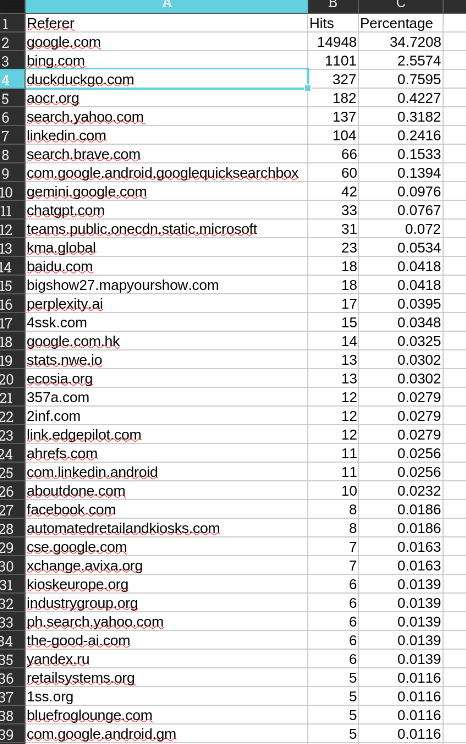
Referral Traffic (Where Does It Come From?)
Bear in mind this is an informational sites and has no ecommerce. I only spend time on LinkedIn to please my supporters. They like seeing their name and company and that’s cool. Maybe we get 15,000 visits from Google and 100 from LinkedIn. Data and outcome matter, but also endorphin hits for my supporters. They are smart kiosk people and fairly ignorant when it comes to internet. We get to deal with all factors and audiences which makes it interesting in fact.
Geography is important – Cloudflare Top Data Centers

last 30 days geography
Notes:
Interesting to see Ashburn so prominent. A closer look —
What your screenshot shows
Ashburn, Virginia (IAD), dominates at 1.08 million, followed by Paris at 416,530 and Atlanta at 219,030. Ashburn handled about 2.6 times the volume of Paris. The remaining leading locations span the United States, Europe, and Asia.Screenshot_2026-10-07_12-09-41.jpg
The screenshot doesn’t show the selected metric or reporting period, so we cannot say definitively whether these numbers represent requests or another measure. If this is the requests view, 1.08 million means HTTP requests—not 1.08 million readers. Cloudflare distinguishes requests, visits, and unique visitors in its reporting.developers.cloudflare
Why Ashburn is so prominent
Ashburn is a major data-center and network hub in Northern Virginia, so its prominence is not inherently surprising. However, this chart alone does not explain why so much of your traffic passed through that location.digitalrealty
Possible explanations include ordinary readership routed through that network location or automated traffic. The chart does not identify which explanation applies—and it does not establish that your audience is concentrated in Virginia.
What it means for your website
-
Audience geography: Use the countries/regions report rather than data-center locations. Cloudflare determines originating country from the request’s IP address, which is a different dimension from the data center handling it.developers.cloudflare
-
Traffic quality: Filter the Ashburn traffic and compare source ASN, paths, user agents, and security actions. Cloudflare exposes these filters, allowing you to investigate what produced the volume rather than infer it from location alone.developers.cloudflare
-
Hosting decisions: This panel is not sufficient evidence for moving your origin server to Ashburn. It describes the distribution of traffic across edge locations, not directly the geographic distribution of your readers.cloudflare+1
For your publishing sites, the useful question is whether Ashburn’s volume represents valuable readership or automated requests. This image flags a concentration worth examining; it does not, by itself, prove bots, an attack, or exceptional readership.