Last Updated on March 18, 2026 by Craig Allen Keefner
Why Enterprise Self-Service Must Be Built to Survive 5–7 Years of Reality
They are long-lived operational infrastructure—closer to POS systems or industrial equipment than to tablets on a stand.
Yet many kiosk programs still begin as cheap pilots, optimized for speed and aesthetics rather than lifecycle stability. Those pilots often succeed just long enough to justify expansion—then fail spectacularly when exposed to real-world conditions at scale.
Never forget the cheap pilot → expensive regret trap.
If your kiosk architecture cannot survive seven years of OS updates, supply-chain disruption, and staff turnover, it is not enterprise-ready—regardless of how fast it shipped.
We will try and explain why lifecycle design matters, where kiosk programs most commonly break down after 24–36 months, and provides a 52-point enterprise checklist to help organizations avoid predictable, costly mistakes.
Kiosks as Infrastructure, Not Projects
Once kiosks move beyond pilots and into hundreds or thousands of locations, the conversation changes:
-
Downtime becomes visible and expensive
-
Field service replaces IT experimentation
-
Compliance, auditability, and security take precedence over novelty
At that point, kiosks are no longer “screens with software.”
They are part of your operational backbone.
Most large-scale kiosk failures are not caused by insufficient CPU power or flashy UI design. They are caused by lifecycle blind spots—decisions made early that quietly undermine long-term stability.
Where Kiosk Deployments Commonly Fail After Year Two
1. OS Version Fragmentation After 24 Months
Operating systems evolve on timelines that do not align with kiosk deployment schedules.
Within two years, many kiosk fleets suffer from:
-
Mixed OS versions across locations
-
Inconsistent patch levels
-
Security updates that break drivers or peripherals
Windows, Android, and Linux each have distinct support and patch cycles, and consumer-grade planning often ignores how those cycles play out at scale.
If your kiosk software, drivers, and peripherals cannot survive multiple OS feature updates, your deployment will fracture operationally long before the hardware wears out.
Example — When Windows 10 support ended (Oct 14, 2025), the OS still works but stops getting security patches, bug fixes, and official support, which steadily increases your exposure to malware, data breaches, and system instability. Over time, new hardware and software will target Windows 11 and later, so you may lose access to compatible drivers and updated app versions. For businesses, staying on Windows 10 can create compliance and contractual issues because many security standards require supported, fully patched systems. Your main paths are to upgrade to Windows 11 on supported hardware, pay for Extended Security Updates for a limited extra window of critical patches, or isolate/repurpose older machines (for offline or low‑risk roles) so they are not exposed directly to the internet.
2. Peripheral End-of-Life in Mid-Deployment
Printers, payment devices, scanners, cameras, and ADA peripherals are among the highest failure and churn components in kiosk systems.
Common enterprise pain points:
-
Printers discontinued with no drop-in replacement
-
Payment devices forced into refresh cycles by certification changes
-
USB peripherals failing compatibility with newer OS builds
If your kiosk design relies on single-source or consumer peripherals, you are effectively building an expiration date into your deployment.
Example — Windows 7 kiosks and ATMs: Many self‑service kiosks and ATMs that stayed on Windows 7 after 2020 had to be replaced or reimaged because newer payment/security software and vendors refused to certify on an unsupported OS. For the next couple of years post‑Windows‑10, expect similar attrition: new card readers, printers, scanners, and kiosk/pay‑at‑the‑counter packages may only ship drivers and support statements for Windows 11+, even if the USB/serial hardware technically works.
3. Cloud Dependency Killing Uptime in Regulated Environments
Cloud services are powerful—but mandatory cloud dependency is a liability in many kiosk use cases.
In healthcare, government, travel, and other regulated or mission-critical environments:
-
Network interruptions are unavoidable
-
Cloud outages are not hypothetical
-
Latency directly impacts user experience and throughput
Kiosks that cannot operate locally and degrade gracefully during connectivity issues will fail operational audits and frontline acceptance.
Edge computing is not about performance—it is about resilience and autonomy.
Example — In the last two years, several major cloud and SaaS outages have taken down retail and restaurant POS systems for hours at a time, leaving merchants unable to process card payments and in some cases forcing stores to close or go cash‑only. High‑profile events include a major Square outage in 2023 that crippled small‑business POS, a faulty CrowdStrike update in 2024 that crashed Windows‑based terminals worldwide, and multiple 2025 outages involving AWS and platforms like Shopify that disrupted both online and in‑store transactions during peak periods.
4. Field Technicians Unable to Service Consumer Hardware
Many early-stage kiosk designs favor:
-
Sealed consumer tablets
-
Proprietary enclosures
-
Minimal internal access
These choices look clean on the showroom floor—but collapse under real-world service conditions.
Field technicians need to:
-
Swap components quickly
-
Diagnose failures remotely
-
Service devices without full disassembly
If your kiosk cannot be serviced with standard tools and documented procedures, maintenance costs will overwhelm any upfront savings.
Example — Kiosk repair case studies describe clients with decentralized, ad‑hoc repair processes where multiple vendors, missing parts, and lack of inventory tracking led to long downtimes and multiple service visits before issues were resolved. Field‑service blogs also emphasize that emergency kiosk calls for payment failures, network problems, or vandalism often require skilled technicians and sometimes multiple trips, because diagnosing the root cause can be much harder than swapping a simple component.
ATM maintenance providers point out that software‑stack issues (out‑of‑date OS/firmware, complex added software, and non‑regression‑tested updates) can create intermittent failures and memory leaks that are hard for field techs to reproduce and fix, sometimes requiring repeated resets or deeper engineering intervention. Guides for ATM troubleshooting explicitly distinguish simple first‑line fixes (paper jams, basic error codes) from second‑line work that demands highly trained technicians and specialized tools, highlighting that more advanced software issues are not “quick fixes.”
The Enterprise Kiosk Lifecycle Design Philosophy
Successful long-lifecycle kiosk programs share a common mindset:
-
Predictability over novelty
-
Serviceability over aesthetics
-
Standardization over customization
They treat kiosks as systems designed to endure:
-
OS evolution
-
Vendor churn
-
Staff turnover
-
Supply-chain disruptions
This requires intentional design choices from day one.
Enterprise-Scale Kiosk Deployment Checklist (52-Point Framework)
Below is a condensed version of the lifecycle checklist. Each item is designed to expose future risk, not just present-day functionality.
Architecture & Compute
-
Enterprise-grade compute with defined lifecycle availability
-
OS roadmap aligned to 5–7 year deployment horizon
-
BIOS and firmware update strategy documented
-
Local processing for critical workflows
Operating System & Software
-
Long-term OS support guarantees
-
Controlled update cadence (not auto-consumer updates)
-
Driver compatibility validated across OS versions
-
Remote device management and monitoring
Peripherals & I/O
-
Multi-vendor peripheral options validated
-
Replacement models identified before deployment
-
Certification and compliance refresh planning
-
Field-replaceable components
Security & Compliance
-
Secure boot and hardware-rooted trust
-
Patch management aligned to regulatory requirements
-
Audit logs retained locally when offline
-
Physical tamper detection
Field Service & Operations
-
Tool-less or low-tool service access
-
Remote diagnostics and alerting
-
Clear MTTR (mean time to repair) targets
-
Technician documentation and training materials
Supply Chain & Longevity
-
Component availability guarantees
-
SKU discipline across the fleet
-
Avoidance of consumer-only hardware dependencies
-
Second-source strategies documented
Examples — The most common Dell computer for kiosks historically has beens Intel Core CPUs (13th/14th gen i3). No NPU so no TOPS
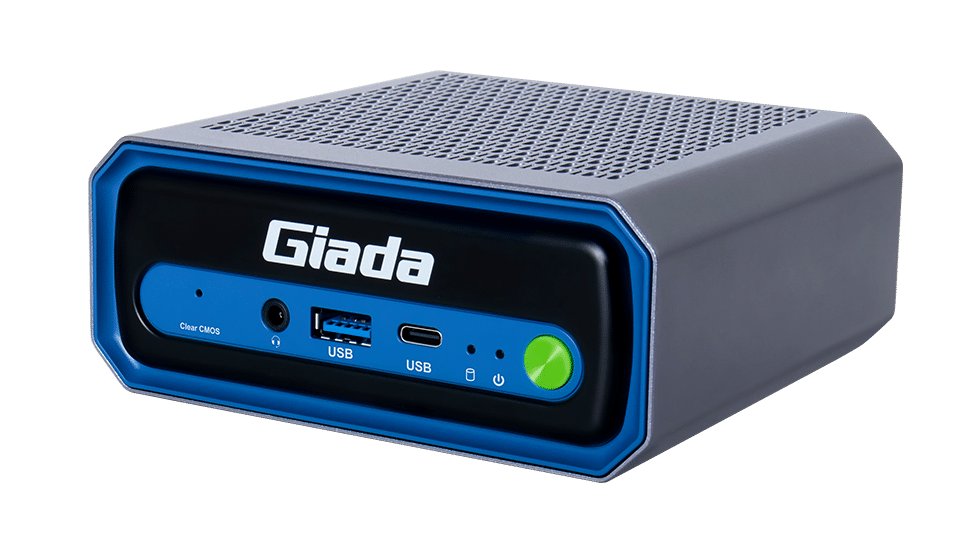
AI Computer Giada N620
rating (or less than 1). Intel’s Core Ultra 5 125H NPU is rated at about 11 TOPS, with Intel quoting up to roughly 34 TOPS total when you add CPU and GPU contributions. Good choice is Giada N602 miniPC. 13 TOPS AI Boost NPU Intel Arrow Lake Thunderbolt 4 Support Wi-Fi 7
AI going away? Very unlikely.
Who This Framework Is For
This lifecycle approach is designed for:
-
Multi-location retail and QSR brands
-
Healthcare systems and government agencies
-
Transportation hubs and regulated venues
-
Enterprise IT and operations teams
It is not optimized for:
-
One-off marketing kiosks
-
Short-term experiential installs
-
Consumer tablet repurposing
Clarity here prevents misaligned expectations.
Final Thought: Longevity Is a Design Decision
Kiosk failures rarely come from a single catastrophic event.
They emerge gradually—from OS drift, peripheral churn, service friction, and architectural shortcuts.
The irony is that many of these failures were avoidable at the pilot stage.
Designing for long lifecycle does not mean slower innovation.
It means fewer resets, fewer surprises, and lower total cost of ownership over time.
In enterprise self-service, durability is not a constraint.
It is a competitive advantage.
For Execs: Why Kiosk Lifecycle Design Determines ROI
Self-service kiosks are no longer experiments or marketing devices. In enterprise environments, they are long-lived operational infrastructure with expected service lives of 5–7 years or more.
Yet many deployments begin with cheap pilots—designed to prove concept speed, not operational durability. These pilots often succeed just long enough to justify scale, then fail under real-world conditions.
The cheap pilot → expensive regret trap
If your kiosk architecture cannot survive seven years of OS updates, supply-chain disruption, and staff turnover, it is not enterprise-ready—regardless of how fast it shipped.
The Four Predictable Failure Modes
-
OS fragmentation after 24 months
Mixed operating systems, broken drivers, inconsistent security posture. -
Peripheral end-of-life mid-deployment
Printers, payment devices, scanners discontinued with no drop-in replacements. -
Cloud dependency killing uptime
Regulated environments cannot tolerate outages or latency-driven failures. -
Unserviceable consumer hardware
Sealed tablets and proprietary enclosures inflate field service costs.
Executive Takeaway
Lifecycle success is not about higher performance or flashier UI.
It is about predictability, serviceability, and architectural discipline.
Organizations that design kiosks as infrastructure:
-
Lower total cost of ownership
-
Reduce operational risk
-
Avoid forced refresh cycles
-
Maintain uptime through disruption
Longevity is not a constraint.
It is a competitive advantage.
Resources
Good Context to read about Service and Warranty
- Kiosk Service – Kiosk Warranty and Kiosk Maintenance
Understand Kiosk Service Options The service side of self-service is always separate from the self-service kiosk …
- Service Offerings Kiosk OEMs: Why They Matter & How to Build Them
Why Kiosk OEMs Should Build Field Service Offerings I continue to be surprised as to why …
- Kiosk Rollout Chronicles – Ten Steps to Success
A Framework for Successful Kiosk Rollouts An article on kiosk deployment by Ken Rogers – Principal/General …
- Understanding Soft and Hard Services
Kiosk Service and Kiosk Installation are red-headed stepchild Update for kiosk service and kiosk warranty, November …
End of content{“@context”:”https://schema.org”,”@graph”:[{“@type”:”Organization”,”@id”:”https://kioskindustry.org/#organization”,”name”:”Kiosk Industry Group”,”url”:”https://kioskindustry.org/”,”logo”:{“@type”:”ImageObject”,”url”:”https://kioskindustry.org/wp-content/uploads/2024/01/kiosk-industry-group-logo.png”},”sameAs”:[“https://www.linkedin.com/company/kiosk-industry-group/”]},{“@type”:”WebSite”,”@id”:”https://kioskindustry.org/#website”,”url”:”https://kioskindustry.org/”,”name”:”Kiosk Industry”,”publisher”:{“@id”:”https://kioskindustry.org/#organization”}},{“@type”:”WebPage”,”@id”:”https://kioskindustry.org/kiosk-design-long-lifecycles/#webpage”,”url”:”https://kioskindustry.org/kiosk-design-long-lifecycles/”,”name”:”Kiosk Design for Long Lifecycle”,”isPartOf”:{“@id”:”https://kioskindustry.org/#website”}},{“@type”:”Article”,”@id”:”https://kioskindustry.org/kiosk-design-long-lifecycles/#article”,”headline”:”Kiosk Design for Long Lifecycle: Avoiding the Cheap Pilot, Expensive Regret Trap”,”description”:”Enterprise guide to designing self-service kiosks for 5–7 year lifecycles, avoiding OS fragmentation, peripheral EOL, cloud dependency failures, and unserviceable consumer hardware.”,”author”:{“@type”:”Person”,”name”:”Craig Keefner”},”publisher”:{“@id”:”https://kioskindustry.org/#organization”},”mainEntityOfPage”:{“@id”:”https://kioskindustry.org/kiosk-design-long-lifecycles/#webpage”},”datePublished”:”2026-01-30″,”dateModified”:”2026-01-30″},{“@type”:”FAQPage”,”@id”:”https://kioskindustry.org/kiosk-design-long-lifecycles/#faq”,”mainEntity”:[{“@type”:”Question”,”name”:”What is kiosk lifecycle design?”,”acceptedAnswer”:{“@type”:”Answer”,”text”:”Kiosk lifecycle design is the practice of architecting self-service kiosks to remain operational, secure, and serviceable over 5–7 years, accounting for OS updates, hardware availability, and field service realities.”}},{“@type”:”Question”,”name”:”Why do kiosk pilots fail at scale?”,”acceptedAnswer”:{“@type”:”Answer”,”text”:”Most pilots optimize for speed and cost, not longevity. At scale, OS fragmentation, peripheral end-of-life, cloud outages, and unserviceable hardware drive downtime and escalating costs.”}},{“@type”:”Question”,”name”:”Why is edge computing important for kiosks?”,”acceptedAnswer”:{“@type”:”Answer”,”text”:”Edge computing allows kiosks to operate locally during network disruptions, which is critical in regulated and mission-critical environments where uptime and auditability matter.”}},{“@type”:”Question”,”name”:”How long should enterprise kiosks last?”,”acceptedAnswer”:{“@type”:”Answer”,”text”:”Properly designed enterprise kiosks should operate reliably for 5–7 years or more, with planned refresh cycles rather than forced replacements.”}}]}]}