Kiosk software defines how users interact with the system—and how operators manage it at scale. This includes application software, remote device management, content control, analytics, security, and integration with POS, EHR, CRM, or payment platforms.
Self-service kiosks are not defined by hardware alone. They succeed or fail based on software—the layer that governs user experience, uptime, security, integration, and lifecycle control. Example: large project like Verizon bill pay. $40M in hardware, $200M in software.
Kiosk software is not a single product category. It is an ecosystem of interdependent software components that together determine whether a deployment can scale from pilot to enterprise infrastructure.
This page provides a vendor-neutral overview of all major kiosk software categories, how they interact, and what decision-makers should demand from each.
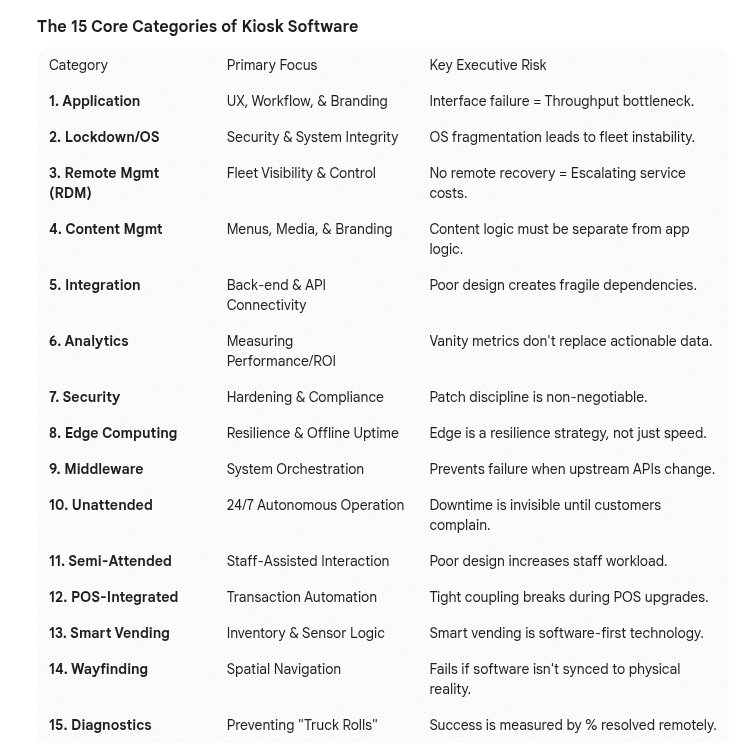
Main Categories and Focus with Executive Risk
KIosk software summary
What Is Kiosk Software?
Kiosk software refers to the collection of applications, platforms, and management tools that enable a kiosk to:
Interact with users
Control the operating system and hardware
Integrate with enterprise systems
Operate securely and reliably over years
Have its data centrally reported in terms of analytics
In enterprise deployments, kiosk software must assume:
Minimal on-site IT support
Public and often hostile environments
Regulatory and accessibility requirements
Long lifecycles with changing hardware and OS versions
Core Categories of Kiosk Software
1. Kiosk Application Software
The User Experience Layer
This is the software users actually see and interact with. It defines workflows, navigation, transactions, and error handling.
Common functions
Ordering, check-in, registration, wayfinding
Identity capture and verification
Payments and receipts
Language and accessibility modes
Key considerations
UX consistency across locations
Graceful error handling and recovery
Accessibility (visual, auditory, physical)
Offline or degraded-mode operation
Executive risk
A beautiful interface that cannot recover from errors or outages becomes a throughput bottleneck at scale.
2. Operating System & Kiosk Lockdown Software
Stability, Security, and Control
This layer controls how the underlying OS behaves and prevents misuse or tampering.
Common platforms
Windows IoT / Enterprise
Linux-based kiosk OS
Android (managed mode)
Typical capabilities
Application whitelisting
System lockdown and restricted access
Automatic reboot and watchdog services
OS update and patch control
Key considerations
Long-term OS support and update cadence
Compatibility with peripherals and drivers
Ability to roll back failed updates
Executive risk
OS fragmentation after 18–24 months is one of the most common causes of fleet instability.
Update reliability during low-connectivity periods
Governance: who can publish and approve changes
5. Integration & Middleware
Connecting Kiosks to the Enterprise
Kiosks rarely operate in isolation. Integration software connects them to back-end systems.
Common integrations
POS and payments
Healthcare systems (EHR, EMR)
Identity and access management
CRM, loyalty, and analytics platforms
Key considerations
API stability and documentation
Latency tolerance and caching
Security and data privacy
Executive risk
Poor integration design creates fragile dependencies that fail under real-world conditions.
6. Analytics & Monitoring Software
Measuring Performance, Not Guessing
Analytics software provides insight into usage, failures, and ROI.
Typical metrics
Uptime and downtime events
Transaction success rates
Abandonment and error frequency
Peripheral and consumable usage
Key considerations
Actionable vs vanity metrics
Correlation between failures and revenue impact
Integration with enterprise BI tools
7. Security & Compliance Software
Protecting Systems, Data, and Reputation
Security software protects against misuse, tampering, and data exposure.
Typical functions
Application and OS hardening
Payment security and encryption
Logging and audit trails
Compliance reporting
Key considerations
PCI, HIPAA, and regulatory alignment
Patch management discipline
Incident detection and response
8. Edge Computing & Offline Resilience
Designing for the Real World
Increasingly, kiosks rely on edge processing to maintain uptime when connectivity is limited or unavailable.
Key capabilities
Local transaction processing
Cached content and workflows
Deferred synchronization with cloud systems
Executive insight
Edge computing is not a performance feature—it is a resilience strategy.
9. Middleware & Orchestration Software
The Glue Between Systems
Middleware enables kiosks to communicate reliably with POS, inventory, identity, payments, and cloud services—without hard-coding fragile dependencies.
Typical functions
API orchestration and message routing
Data normalization across systems
Retry logic and failure handling
Event queuing during outages
Why it matters
Without middleware, kiosks fail when any upstream system changes or slows.
10. Unattended Kiosk Software
Fully Autonomous Operation
Unattended kiosks operate without on-site staff intervention—often 24/7.
Typical use cases
Payments and bill pay
Check-in and access control
EV charging, parking, ticketing
Software requirements
High fault tolerance and self-recovery
Offline or degraded-mode operation
Automated alerts and escalation
Strong security and tamper detection
Executive risk
If unattended kiosks cannot recover themselves, downtime becomes invisible until customers complain.
11. Semi-Attended Kiosk Software
Shared Responsibility Between Machine and Staff
Semi-attended kiosks are designed to handle most tasks independently, with staff available for exception handling. For benefit of PCI regulations self-service terminals are often termed “semi-attended” in comparison to “unattended”. Unattended and Attended are the two PCI classes.
Typical use cases
QSR ordering
Retail self-checkout
Healthcare check-in
Software requirements
Fast recovery and reset
Clear staff intervention flows
Queue management and handoff logic
Operational insight
Poor semi-attended design increases staff workload instead of reducing it.
12. POS-Integrated Kiosk Software
Front-End Automation for Transaction Systems
POS-integrated kiosk software connects self-service interfaces directly to transaction engines.
Common functions
Menu and pricing synchronization
Order routing and payment handling
Inventory and fulfillment signals
Key considerations
Latency tolerance
Version compatibility with POS updates
Offline transaction handling
Executive risk
Tightly coupled POS integrations often break during POS upgrades.
13. Smart Vending & Automated Retail Software
Inventory-Aware, Sensor-Driven Systems
Smart vending software supports unattended retail systems that rely on sensors, vision, or robotics.
Typical capabilities
Inventory detection and reconciliation
Planogram management
Payment and fraud prevention
Remote pricing and assortment updates
Why it matters
Smart vending is software-first; hardware is secondary.
AI making inroads here and providing benefit as is video.
Executive metric
Percent of incidents resolved remotely.
Kiosk software must support unattended, semi-attended, transactional, informational, and retail use cases—while remaining secure, recoverable, and governable over years of operation.