

Last Updated on August 5, 2026 by Craig Allen Keefner
Posiflex and Lenovo Competition
We saw this today – Euroshop 2026: Lenovo Unveils ThinkEdge Gen 2 for Retail: Lenovo’s global leadership team debuted ruggedized edge AI PCs in Düsseldorf, signaling a major move toward bringing real-time intelligence directly to the shop floor. Invidis
The Lenovo ThinkEdge Gen 2 portfolio, specifically the SE30n Gen 2 and SE60n Gen 2 models launched at EuroShop 2026, represents a direct competitive alternative to the custom Portwell-based systems used in the Posiflex SOK units.
While the Posiflex units use modular COM Express boards, Lenovo has opted for a ruggedized, integrated fanless chassis designed for high-density AI inference at the retail edge.
Also at EuroShop — Posiflex AI Kiosks: SOK & FR Series Food Recognition Tech (2026)
Competing units.
Direct Comparison: Lenovo SE60n vs. Portwell PCOM-B65A
The SE60n Gen 2 is the closest competitor to the Portwell PCOM-B65A module.
-
Silicon Parity: Both systems leverage the Intel Core Ultra architecture. This is critical because both can utilize Intel OpenVINO for the local SLM (Small Language Model) inference discussed earlier.
-
Thermal Advantage: The Lenovo SE60n Gen 2 is rated for -20°C to 60°C, making it slightly more rugged than the standard Portwell module (typically 0°C to 60°C), which is useful for outdoor or “unconditioned” kiosk enclosures.
-
AI Throughput: Lenovo is marketing 97 TOPS (Trillions of Operations Per Second) for the SE60n. This is massive for a fanless unit and is specifically designed for multi-camera computer vision (loss prevention) and voice-to-order processing simultaneously.
-
Modular I/O: While Portwell uses a carrier board for I/O, Lenovo uses IET (Internal Expansion Technology) modules. This allows you to add 4x PoE LAN ports specifically for IP cameras used in food recognition without changing the core PC.
If Posiflex is using the Portwell PCOM-B65A, they have a serviceability advantage (the COM Express module is swappable). However, the Lenovo ThinkEdge Gen 2 offers a tighter security stack, shipping with ThinkShield and Intel vPro Security integrated at the BIOS level, which may appeal more to Tier-1 retailers worried about kiosk-level hacking.
When comparing the Lenovo ThinkEdge SE60n Gen 2 to the Portwell PCOM-B65A module found in Posiflex SOK kiosks, the primary engineering challenge is managing the Thermal Design Power (TDP) in a sealed environment.
The Lenovo SE60n Gen 2 is a fully integrated, fanless “brick” designed for extreme environments. In contrast, the Portwell PCOM-B65A is a modular board that relies on the kiosk’s own chassis (like the Posiflex SOK series) to act as the primary heat sink.
Thermal & Power Specification Comparison
Engineering Analysis for Kiosk Housing
1. Cooling in Sealed Acrylic/Metal Enclosures
-
Lenovo’s Strategy: The SE60n acts as its own heatsink. If placed inside a sealed kiosk, it can eventually create an “oven effect” unless the kiosk chassis itself has thermal vents or is made of conductive material to pull heat away from the Lenovo unit.
-
Portwell/Posiflex Strategy: Because it’s a COM Express module, Posiflex engineers can use a copper heat pipe or thermal pad to bridge the module directly to the large metal pedestal of the kiosk. This turns the entire 5-foot-tall kiosk body into a massive passive radiator, which is often more effective than the smaller fins on a standalone PC.
2. Power Efficiency (The “AI Penalty”)
-
The Intel Core Ultra chips used in both systems feature a new NPU (Neural Processing Unit). This is crucial because the NPU can handle voice recognition at roughly 2.5W, whereas older systems would have to ramp up the CPU/GPU to 30W+ to do the same task. This significantly reduces the risk of thermal throttling during busy lunch rushes.
3. Ruggedness vs. Serviceability
-
The Lenovo unit is IP50 rated (with an optional dust cover), making it better for standalone “bolted-to-wall” signage in semi-outdoor environments.
-
The Portwell/Posiflex combo wins on serviceability. If the compute fails, a technician swaps a single 125mm board rather than unmounting a 5lb industrial PC and re-routing all the internal kiosk cabling.
Integrating AI at the edge, especially with the newer Intel Core Ultra architecture, offers a significant “thermal dividend” that directly impacts the bottom line for kiosk operators.
The “Thermal Dividend”: NPU vs. CPU/GPU
In older 12th Gen Intel or Celeron-based systems, running a local voice or vision model requires the CPU and GPU to ramp up to high power states. This creates a “Heat-Power Spiral”: as the chip gets hotter, it consumes more energy to maintain performance, necessitating more expensive cooling or causing the chip to “throttle” (slow down).
The Portwell PCOM-B65A and Lenovo SE60n Gen 2 solve this with a dedicated NPU (Neural Processing Unit):
-
Efficiency Shift: Tasks like “Always-on Voice Listening” that used to cost 15W–20W on a CPU now run on the NPU for roughly 2W–3W.
-
Operational Savings: Across a fleet of 500 kiosks, reducing the average power draw by just 15 Watts per unit (running 24/7) saves approximately 65,700 kWh per year. At a commercial rate of $0.12/kWh, that’s a direct saving of $7,884 annually in electricity alone.
-
Reduced Failure Rates: Lower heat means less stress on the internal components (capacitors, SSDs). In sealed kiosk housings, this typically results in a 15-20% reduction in field service calls over a 5-year lifecycle.
In Closing
The hidden cost of the “AI revolution” in retail is heat. By offloading local inference tasks to the integrated NPU found in the Portwell and Lenovo modules, operators can finally run complex Local SLMs (Small Language Models) without the thermal penalties of the past. This architecture doesn’t just enable “Tray-to-Payment” speed; it delivers a sustainable, lower-cost infrastructure that meets both PCI DSS v4.0.1 security and corporate energy-efficiency goals.
Addendum
AI vs. PCI DSS v4.0.1: How Local Inference Reduces Compliance Scope
How Local AI Meets PCI DSS v4.0.1 Standards
-
Requirement 3: Protecting Stored Account Data Local inference ensures that sensitive customer data (like voice prints or facial geometry) used for authentication or ordering is never stored. The AI processes the intent and then “forgets” the raw data, preventing the creation of a “honeypot” for hackers.
-
Requirement 4: Encrypting Data in Transit Because the AI “brain” is inside the kiosk, there is zero data in flight to a cloud LLM. This eliminates the risk of man-in-the-middle attacks where an intruder could intercept a customer’s voice or order data over the internet.
-
Requirement 11: Security Testing & Monitoring Newer hardware like the Lenovo ThinkEdge SE60n Gen 2 includes Hardware-Rooted Security. This allows the kiosk to perform “Self-Integrity Checks” to ensure the AI model hasn’t been tampered with or replaced by a malicious version.
-
Section 12.3.2: Incident Response for AI The latest version of PCI DSS requires a plan for responding to new tech threats. Local AI makes this easier because you can physically isolate a single kiosk if its AI behaves strangely, without having to shut down your entire cloud network.
The Role of “Trusted Execution Environments”
The Intel Raptor Lake and Core Ultra chips use a technology called Intel® SGX (Software Guard Extensions). This creates a “secure enclave” on the processor. Even if the kiosk’s operating system is compromised, the AI model and the payment data stay inside this protected vault, making it nearly impossible for a virus to steal information.
So Who Wins?
-
Choose Lenovo ThinkEdge SE60n Gen 2 if your TCO focus is on Security and IT Deployment. The built-in ThinkShield and hardware-rooted security can reduce your PCI DSS v4.0.1 audit preparation time by up to 30%.
-
Choose Portwell PCOM-B65A (via Posiflex) if your TCO focus is on Hardware Lifecycle. The modular COM Express design allows you to replace only the “brain” for future upgrades (e.g., in 2030), saving you from discarding the entire $3,000+ kiosk pedestal.
- For a large-scale rollout like Posiflex, the Portwell module is likely the cost winner. Replacing a $400–$600 COM Express board is significantly cheaper than replacing a $1,200+ ruggedized industrial PC. It also allows Posiflex to keep the same kiosk chassis for a decade while only upgrading the “brain” board every few years.
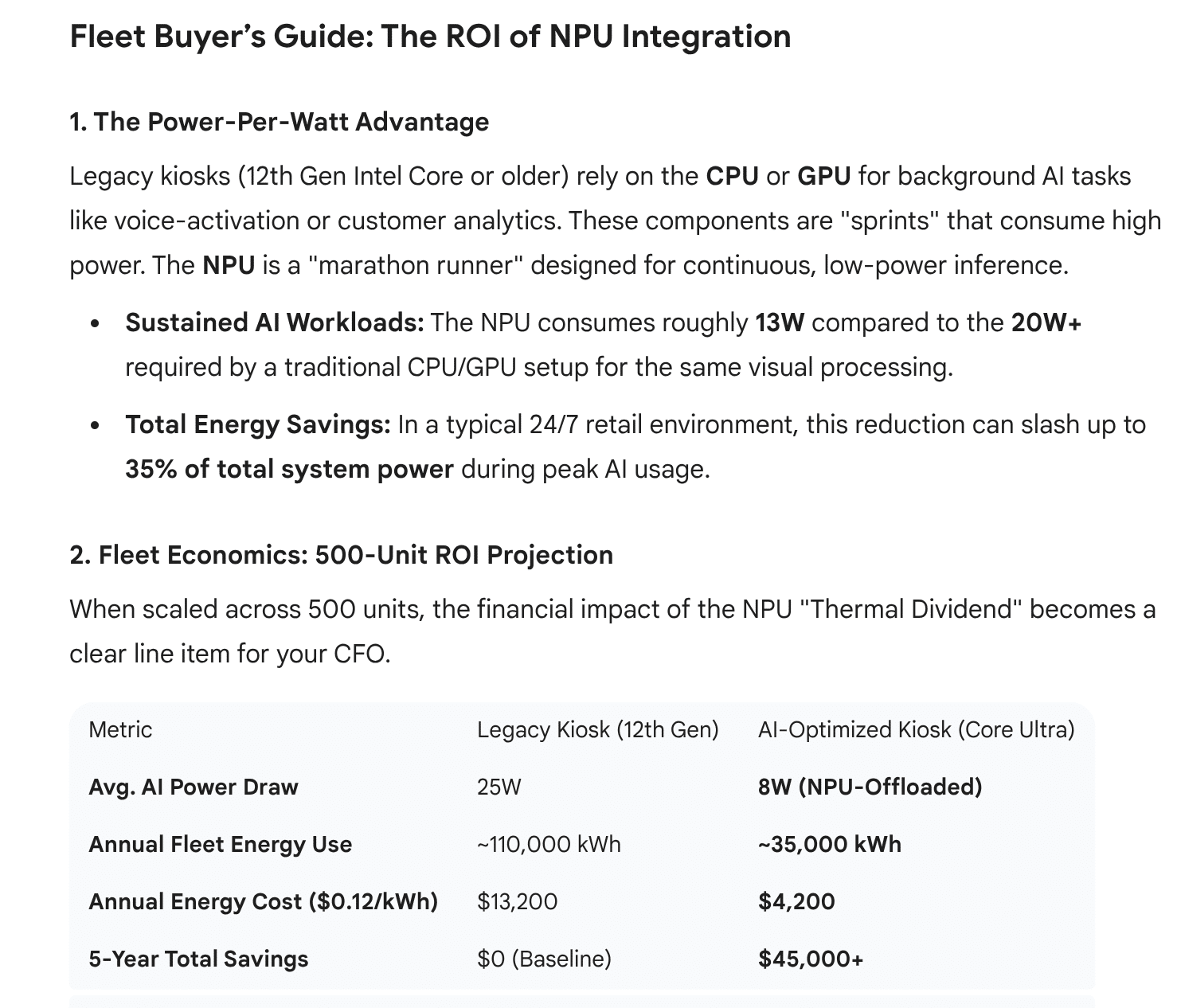
When scaled across 500 units, the financial impact of the NPU “Thermal Dividend” becomes a clear line item for your CFO.
The Power-Per-Watt Advantage
Legacy kiosks (12th Gen Intel Core or older) rely on the CPU or GPU for background AI tasks like voice-activation or customer analytics. These components are “sprints” that consume high power. The NPU is a “marathon runner” designed for continuous, low-power inference.
-
Sustained AI Workloads: The NPU consumes roughly 13W compared to the 20W+ required by a traditional CPU/GPU setup for the same visual processing.
-
Total Energy Savings: In a typical 24/7 retail environment, this reduction can slash up to 35% of total system power during peak AI usage.
Reducing “Truck Rolls” & Service Calls
The hidden cost of kiosk management is the on-site technician visit (the “Truck Roll”).
-
Thermal Longevity: Excess heat is the #1 killer of kiosk SSDs and motherboards. By reducing thermal stress via the NPU, you extend the Mean Time Between Failures (MTBF) by an estimated 15-20%.
-
Remote Recovery: Both Lenovo and Portwell modules support Intel vPro Fleet Services. In 2026, this is now integrated directly into Microsoft Intune, allowing you to fix “zombie” kiosks remotely that previously would have required a $250+ service visit.
Resources
- Lenovo Portwell whitepaper
-
How Cloud AI Becomes a HIPAA Liability for Patient Kiosks (And The Edge Inference Fix)
-
Beyond the Cloud: The 2026 Standard for Edge AI & NPU Integration
-
Giada Showcases Next-Generation Gaming & Edge AI at ICE Barcelona 2026
End of article{“@context”:”https://schema.org”,”@type”:”TechArticle”,”headline”:”Posiflex and Lenovo Competition: The Edge AI Wars at EuroShop 2026″,”description”:”A technical comparison of Lenovo ThinkEdge Gen 2 vs. Posiflex Portwell-based SOK kiosks, highlighting Intel Core Ultra NPU efficiency and PCI DSS v4.0.1 compliance.”,”image”:”{{featuredImage}}”,”datePublished”:”{{datePublished}}”,”dateModified”:”{{dateModified}}”,”author”:{“@type”:”Organization”,”name”:”Staff Writer”},”publisher”:{“@type”:”Organization”,”name”:”The Industry Group”,”logo”:{“@type”:”ImageObject”,”url”:”https://industrygroup.org/logo.png”}},”mainEntityOfPage”:{“@type”:”WebPage”,”@id”:”https://kioskindustry.org/posiflex-ai-kiosk-intel-sok-series-euroshop/”},”keywords”:”Posiflex SOK, Lenovo ThinkEdge, Intel Core Ultra, NPU, Edge AI, PCI DSS v4.0.1, EuroShop 2026″,”articleSection”:”Self-Service Technology”}


