Last Updated on March 20, 2026 by Craig Allen Keefner
Touch Screens — How They Work
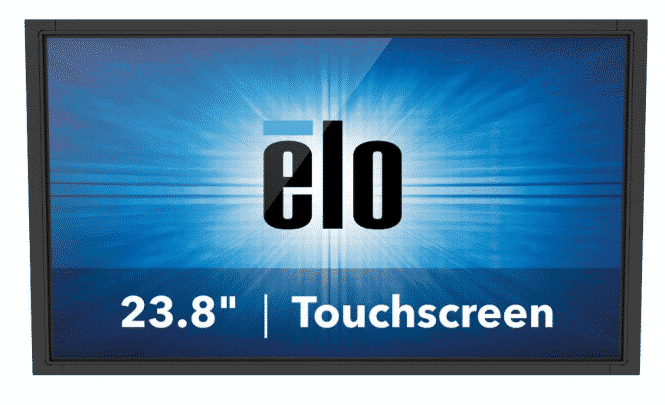
[Editors note — marquee image by Elo who is arguably the dominant provider of touchscreens for any and all markets. Recently sold, again, this time to Zebra. Elo no longer focuses on just touchscreens though. The new kids on the block are the Microtouch bunch which has been resurrected as a brand by a group of ex-Elo people. High quality and low cost is their pitch.]
The interactive screen or touchscreen monitor display is the primary interface for self-service kiosks. At one time it was considered fully optional, now it is pretty much a given (though some keyboard apps still exist).
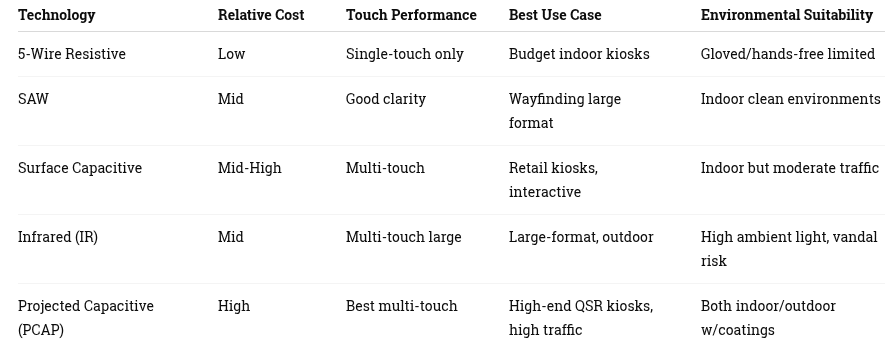
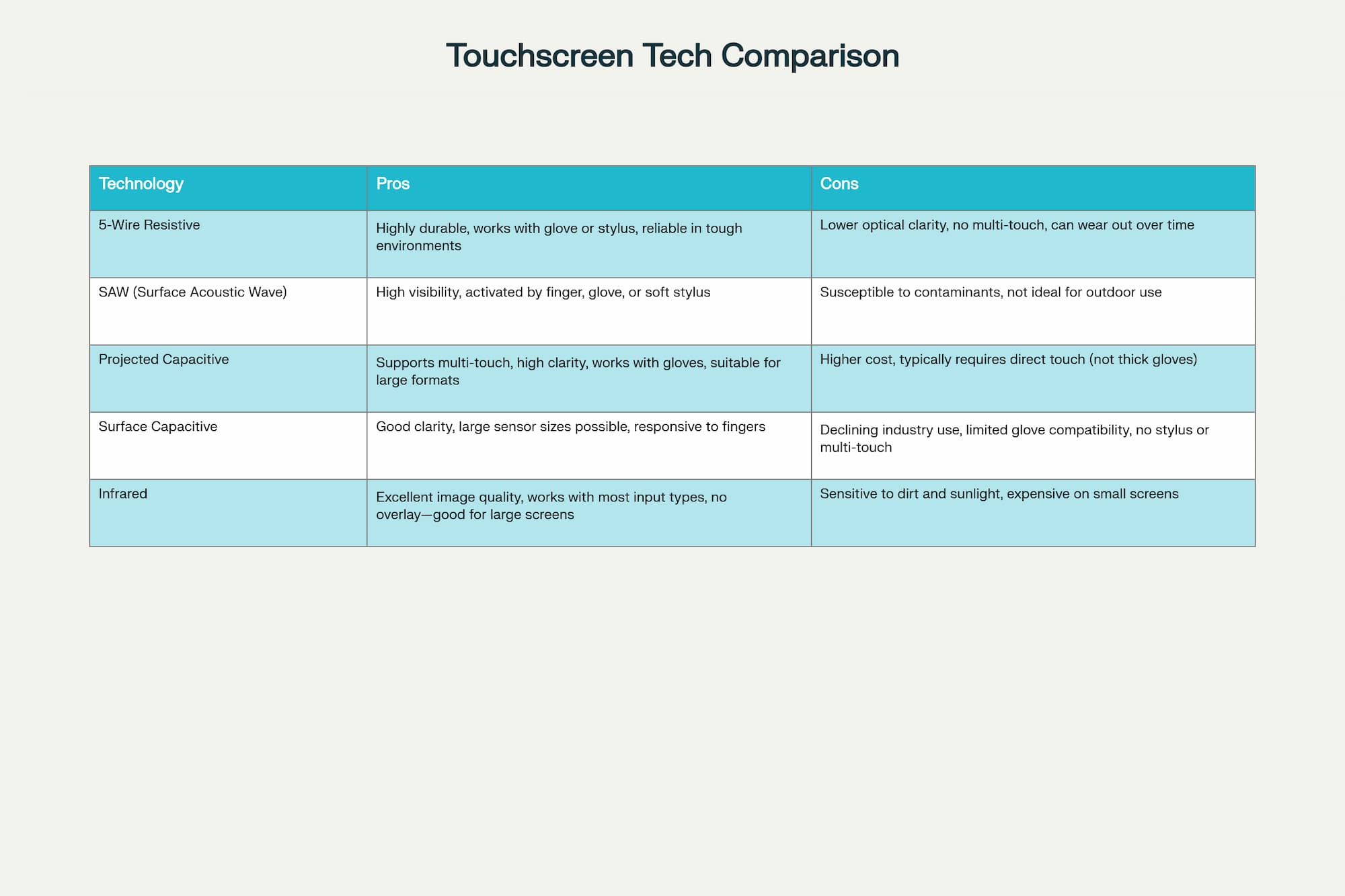
quick comparison – click for full size
Many providers will tell you that they are the biggest providers. The largest are “glass providers” are BOE in China as also LG and Samsung (though they buy glass from BOE). You can see touchscreens extremely low priced from China. 98% use the glass above. In 2025 FutureSource notes 50% of all display value comes from China.
The top touch technologies are projected capacitance, analog resistive, surface capacitive, infrared (IR), and surface acoustic wave (SAW). However, SAW, projected capacitive and analog resistive make up 90% of the total market. In 2019 we added contactless touchscreens. There are also several options for purchasing the touch overlay separately and applying to a display. This is a common solution for larger touchscreens using IR for example. TSI Displays is one of those suppliers.
Variations on touchscreen monitors
- Open frame — these are integrated into a kiosk
- Desktop — these have the bezel and usually attach via mount in rear of panel
- Outdoor terminals —
-
1. Shaded Outdoor / Semi-Outdoor (Under awnings, vestibules, drive-thru canopies) — 700 – 1,000 nits
-
Suitable for QSR drive-thru kiosks not in direct afternoon sun
-
Often used with IR or PCAP touch
-
Needs adequate ventilation or active cooling
2. Full Outdoor – Indirect Sunlight — 1,000 – 1,500 nits
-
Minimum level for consistent readability in bright environments
-
Good for bus stops, airport curbside, amusement parks
-
Should be paired with:
-
Optical bonding
-
Anti-reflective coatings
-
3. Direct Sunlight Outdoor (Peak Conditions) — Standard Tier — 1,500 – 2,500 nits
This is the common commercial range for:
-
Outdoor self-service kiosks
-
Outdoor ticketing/pay stations
-
Outdoor wayfinding
-
EV charging kiosks
-
Outdoor PCAP touch monitors
Most kiosk OEMs spec 1,800–2,200 nits as the working sweet spot.

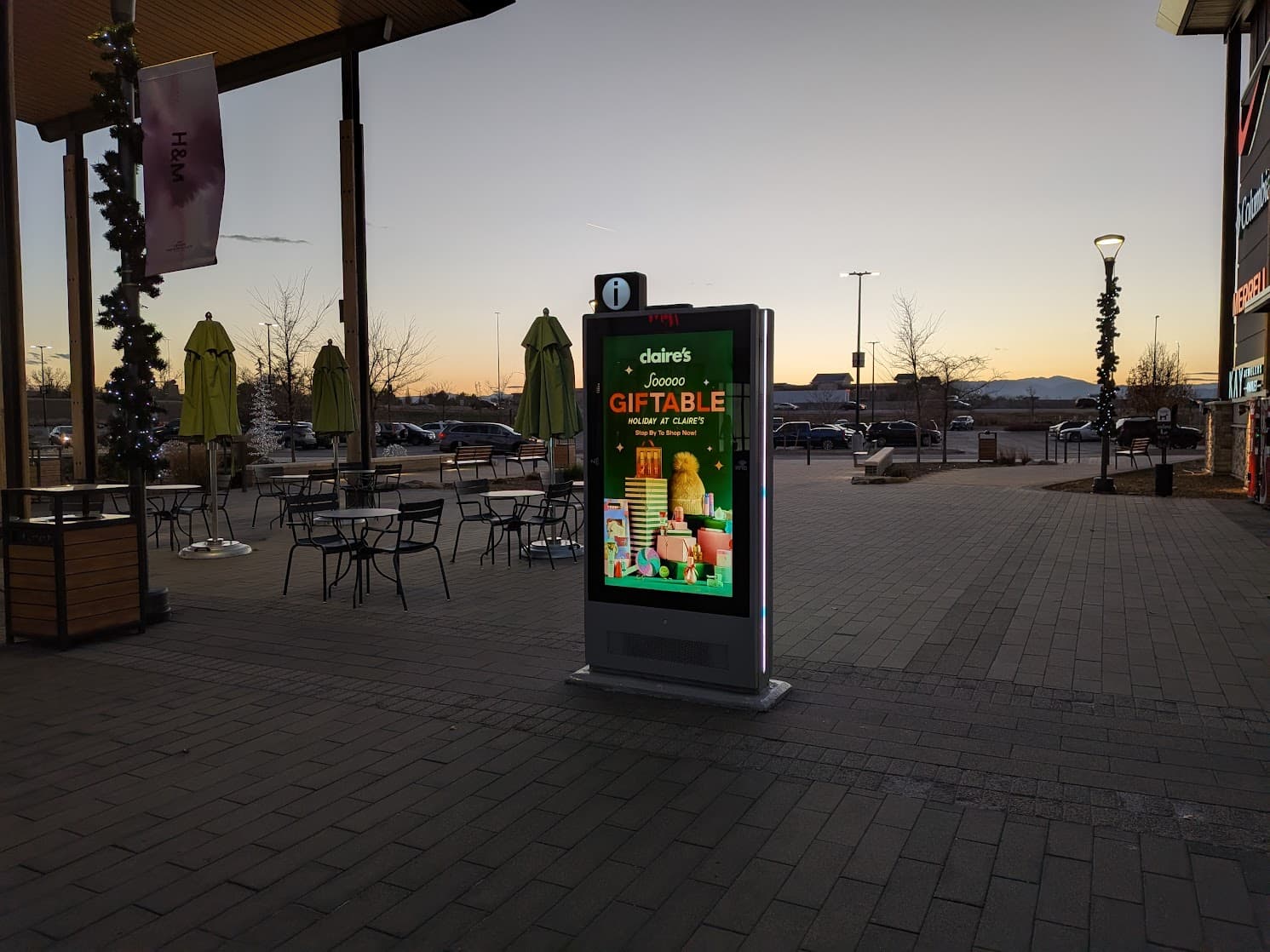
The other side faces the west and mid afternoon almost impossible to read. Figure 1500 nit Keetouchy. Simon went cheap. simon malls outdoor touchscreen in Colorado
4. Direct Sunlight – Premium / Harsh Conditions — 2,500 – 3,500+ nits
Required for:
-
South-facing deployments in summer
-
Environments with high reflectivity (snow, water, glass buildings)
-
High-size displays (32″–55″) where perceived brightness drops
-
Mission-critical outdoor kiosks (transit/parking/municipal)
**5. Extreme High-Brightness Panels (Special Use)
— Rare but available**
4,000 – 5,000+ nitsUsed for:
-
Outdoor LED-backlit signage in airports or theme parks
-
Harsh desert climates
-
Highly reflective environments (ski resorts)
-
Situations where sunlight directly hits display for long periods
Not common for everyday kiosks due to:
-
Cost
-
Heat load (requires active cooling)
-
Power consumption
-
-
- Both of those come in “AIO” configuration which means embedded computer either Android or Windows (can be Linux).
- Size classes
- the 19 inch 4:3 used to be the standard (aka most economical)
- Now it’s the 22 or 24
- For larger wayfinding they will be between 32 and 55
- In classrooms and exotics they are 75 to 85
- Decide if portrait or landscape.
- New technologies such as curved touch hasn’t really taken off
- In 2024 Pyramid introduced the first transparent OLED touchscreen for fast casual ordering
- Touchless and Gesture — NOT touching the screen works well for Outdoor and Vandal Resistant. Here is latest HoverTap –Touchless Screen Technology for Terminals — What is HoverTap™ / NZTech’s Touchless Screen Interface What is HoverTap™? Next-Generation .
- Worth noting that somewhat like keyboards which began to diminish once touchscreens became affordable, the same thing is happening to touchscreens being diminished by Voice Actuation. Live video of AI Connect Bar taking orders in high noise environment. Demo using Soundhound at RetailNOW by Urway Holdings and Ed Crowley. Any AI software is fine.
https://kioskindustry.org/conversational-ai-gets-a-leg-up/ - Theory — Gesture and voice might be the new paradign?
Touchscreen Monitor Providers
- LG-MRI — large outdoor format
- Peerless-AV — large outdoor format
- Insight Touch – touchscreens products from 10″ to 98″ customized and supported in US.
- TDS TOUCH– touchscreens of all technologies and design
- More touchscreen monitor providers
- TSI Displays do a ton of overlays for large format screens. Same for Zytronic.
- Lots of other providers such as AUO, Touch International, and more
- Anti-glare providers
- Super vandal resistant for corrections
- You will see different Anti-Microbial pitches and treatments but ultimately soap and water is the solution to finger oil.
- Be sure and clean your mobile phone by the way
- Outdoor and Indoor come with different ratings (IP67 e.g.)
- Keyser —- large outdoor format
- Elo — product portfolio includes a most popular selection of interactive touchscreen displays from 7-65 inches, all-in-one touchscreen computers, OEM touchscreens and touchscreen controllers and touchscreen monitors.
Best Interactive Touch Screen Software
- KioWare
- Nanonation
- Acquire Digital
- Sitekiosk
- DynaTouch
- Self-Service Networks
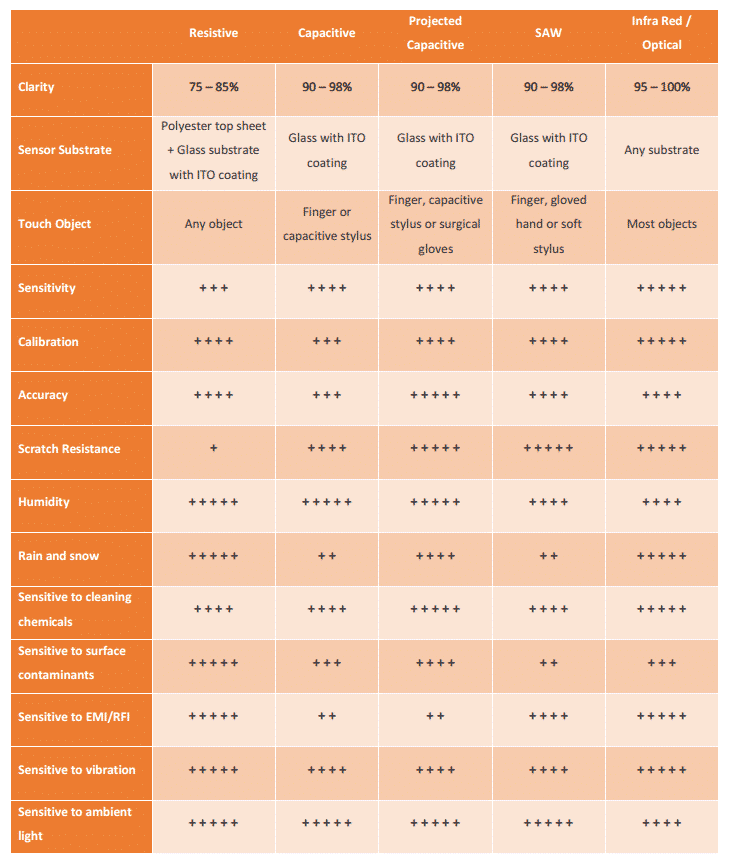
Quick Touchscreen Capability Comparison

touchscreen comparison 2025 — Click for Full Size
Quick Touchscreen Cost Comparison
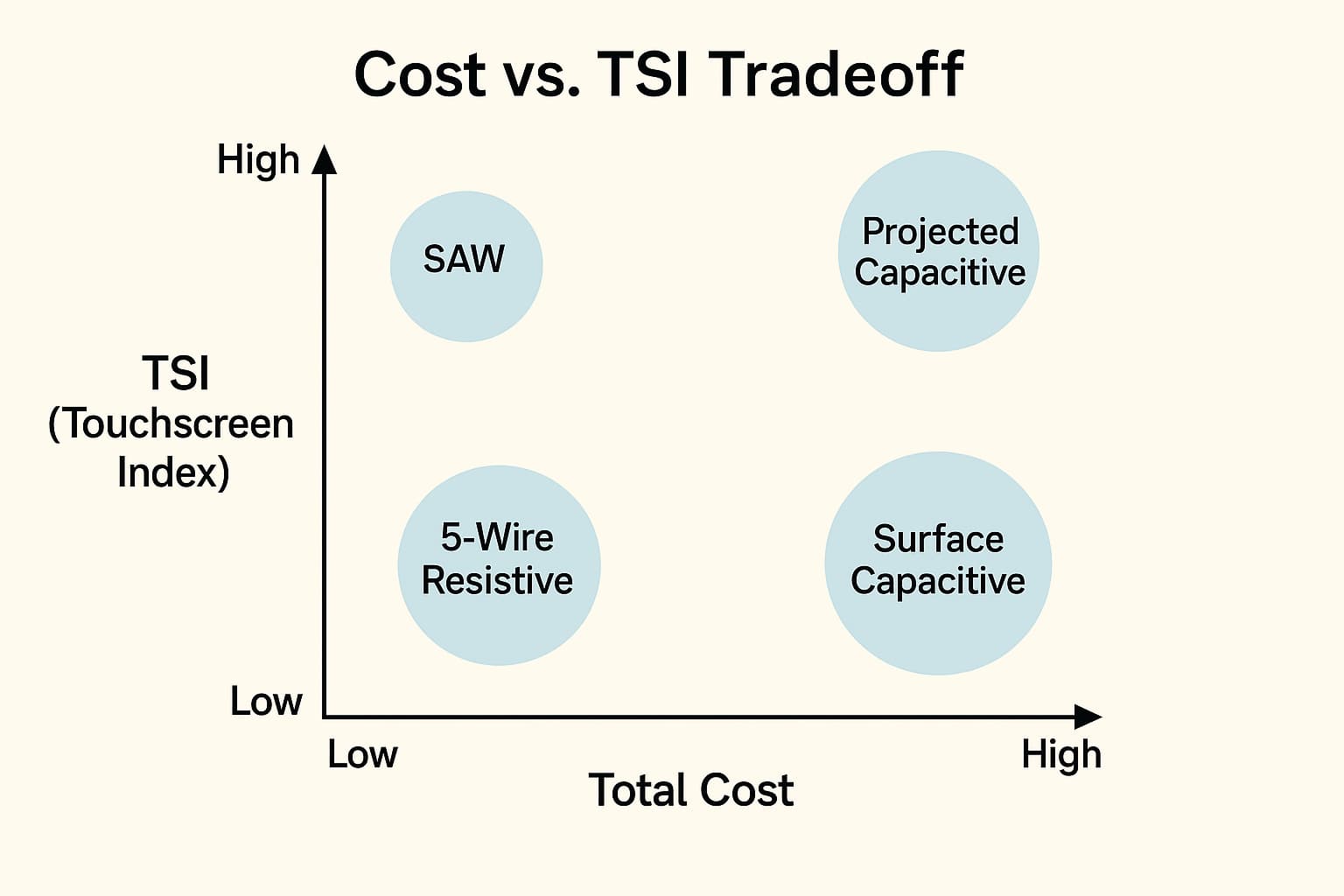
Touchscreen Costs – Click for full size
-
Interactive Touch Screen Kiosk Technology
5-Wire Resistive Touchscreen
has been the most widely used touch technology. Indestructible and works under maximum conditions. A resistive touch screen monitor is composed of a glass panel and a film screen, each covered with a thin metallic layer, separated by a narrow gap. When a user touches the screen, the two metallic layers make contact, resulting in electrical flow. The point of contact is detected by this change in voltage.
SAW (Surface Acoustic Wave) touchscreen
19 inch touchscreens — touch screen monitors utilize a series of piezoelectric transducers and receivers along the sides of the monitor’s glass plate to create an invisible grid of ultrasonic waves on the surface. When the panel is touched, a portion of the wave is absorbed. This allows the receiving transducer to locate the touch point and send this data to the computer. SAW monitors can be activated by a finger, gloved hand, or soft-tip stylus. SAW monitors offer easy use and high visibility. !
Projected Capacitive Touchscreen – large touchscreens
is similar to Surface Capacitive, but it offers two primary advantages: in addition to a bare finger, it can also be activated with surgical gloves or thin cotton gloves; and it enables multi-touch activation (simultaneous input from two fingers). A projected capacitive is composed of a sheet of glass with embedded transparent electrode films and an IC chip, which creates a three dimensional electrostatic field. When a finger comes into contact with the screen, the ratios of the electrical currents change and the computer is able to detect the touch points.
Surface capacitive touchscreen technology
Surface capacitive (s-cap or surface cap) is a declining technology and is now mostly used in legacy gaming and amusement machines. One positive aspect of surface capacitive is that its optics are as good as projected capacitive and the sensor dimensions can be larger.
Infrared touchscreen
monitors do not overlay the display with an additional screen or screen sandwich. Instead, infrared monitors use IR emitters and receivers to create an invisible grid of light beams across the screen. This ensures the best possible image quality. When an object interrupts the invisible infrared light beam, the sensors are able to locate the touch point.

touch screen monitor comparison Click to expand
Comparison of Elotouch technologies — comparison2007
Contactless Touchscreen
There are contactless options. See our brief on Touchless Touchscreens
More info Touchscreen Displays
-
- Gary Barnett writeup on touch screens
- Touch Screen Tech Comparison Elo
- Planar comparison
- Planar touch technology PDF – How they work
- Touch Systems comparison – link
- Elo comparison 2007
- comparison2007
- TRu comparison of touchscreens
- Handbook of visual display technology Robert Phares [link]
- Bill Buxton principal researcher at Microsoft Multi-touch technology history [link] [PDF Buxton]
- Wikipedia Multitouch [link]
Surface mount, rear projection, specialty, tabletops and more for Touchscreen
-
- Perch Interactive
- SpyeGlass (rear projection)
- Brookview Technologies
- VisualPlanet.biz based in UK
- Ideum – featured 3M in table top 46 at DSE 2014 –
Related Touchscreen Monitor Information
- Touchscreen FAQ – Are All Kiosk Touchscreens Created Equal?(Opens in a new browser tab)
- Are All Touchscreens Created Equal? – Best Practice Touchscreen Monitor(Opens in a new browser tab)
- Digital Signage Solutions(Opens in a new browser tab)
- Success Story – Museum Kiosk using Table Kiosk(Opens in a new browser tab)
- Touch Screen Monitor – InsightTouch(Opens in a new browser tab)
- TDS Touch – TouchScreen Solutions(Opens in a new browser tab)
-
AI/Touch & Vision Hybrids — think about — how “touch + camera + gesture + voice” is the next frontier; how PCAP/IR are evolving with embedded vision.
-
Hygiene & Outdoor Deployments — think about — focus on sanitizable coatings, UV/IR optics, anti-microbial glass, glove/hands-free interactions (especially post-COVID).
-
Cost, Lifecycle & Procurement — think about — deep dive into TCO, vendor comparison, global sourcing (China vs US), warranty, lifespan.
Related Links
- Touchscreen Monitor Kiosk
- Are All Touchscreens Created Equal? – Best Practice Kiosk Touchscreen
- Touch Screen Monitor – Goldfinger Touchscreens
- Touch Screen Monitor Released – Industrial Touchscreen with Resistiv
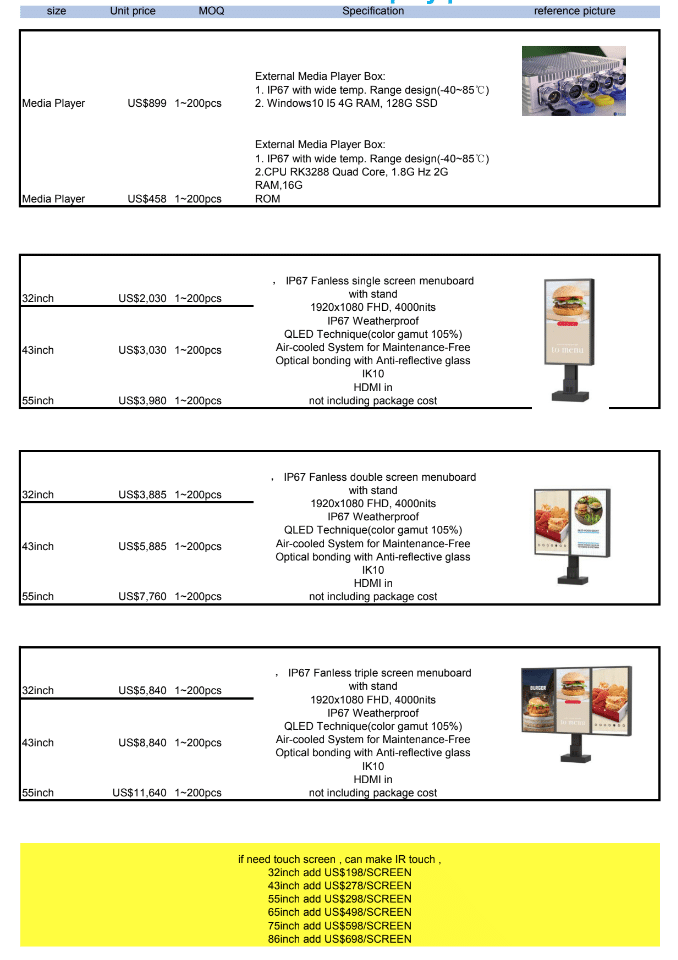
So What is the Pricing from China Anyway for Outdoor Touchscreen?

China touchscreen pricing
-