Chromebook Kiosk Mode by Google
Configure Chrome devices to power your customer or employee kiosks
Source: www.google.com
Google for Work resource page on developing kiosks. Chromebox, ChromeBase, Chromebit, and more.
Configure Chrome devices to power your customer or employee kiosks
Source: www.google.com
Google for Work resource page on developing kiosks. Chromebox, ChromeBase, Chromebit, and more.
Kiosk Mode Kiosk Mode protects your systems from public hacks. Recently there was a large RFP for kiosk enclosures (at a federal cemetery). The procuring office indicated that no computers would be required as they had existing stock of some older Dell laptops. The laptops run Windows 7 (consumer edition). Deploying self-service computers with an unsupported (and often… Read More »
Kiosk Mode Lockdown Windows Editors Note: As much as we appreciate Microsoft supporting some sort of kiosk mode we can’t help but wish they could recommend “assistive” products like KioWare and Sitekiosk which eliminate the “learned my lesson” or didn’t. Companies who have spent years analyzing and dealing with the situation have a much more robust, time-saving and… Read More »
Kiosk Software Basics – Part 2 Kiosk Security Welcome to the second article in my series on kiosk software development. My goal for this series of articles is to give an overview on the basics of developing kiosk software that’s both a joy for your customers to use and adheres to the guidelines of PCI-Compliance. This is more of a… Read More »
Malware locks Google Chrome in kiosk mode until you enter your password New situation where hackers use kiosk mode to gain credentials. Bleeping Computer first reported. Excerpt — A malware campaign uses the unusual method of locking users in their browser’s kiosk mode to annoy them into entering their Google credentials, which are then stolen by information-stealing malware. Specifically,… Read More »
Kiosk Software Secure Browser Kiosk Mode September 17 th , 2024 FOR IMMEDIATE RELEASE—KioWare, the leading secure browser and lockdown, is pleased to announce the official launch of its redesigned website, marking an important milestone in its ongoing commitment to delivering exceptional service to the self-service kiosk industry. The redesigned website represents the first step in a series… Read More »
Chrome Kiosk — Just two weeks after initial product release, KioWare has an update that adds support for fully customizable HTML virtual keyboards. It also allows users to restrict interaction on a second monitor (so the second monitor in a set up can be used as only digital signage, with no ability to interact). There is another feature… Read More »
KioWare for Android Version 4.3 is Now Available! A new version update of KioWare for Android has been released. Version 4.3 for Android is now available with many improvements that work toward the company’s goal of constantly improving user experience. The updates to version 4.3 include streamlined app management, improved permission requests, a customizable notification shade, an improved… Read More »
Linux and the Kiosk Industry Linux has emerged as the next incremental step in self-service kiosks (see new hardware options from Elo). Cost has always been a major concern and Windows has run its course at typically $80 license for decent CPU. Android native is free but for purposes of self-service must be customized. Linux offers zero cost… Read More »
KioWare OS for Linux® – Kiosk Mode for Linux! YORK, Pa. – KioWare is excited to announce the release of a KioWare OS for Linux product. Originally only available for Android, KioWare OS for Linux is our most secure product to date. Both options were created to provide customers with an industry-leading, customizable kiosk solution that saves time… Read More »
Setting up Assigned Access Assigned Access or Kiosk Mode is lively subject. We would remind you of our cautions below: It’s tempting for IT to “learn” how to set up kiosk mode. That entails making mistakes. Some that will be very costly. Better to use a mature tool and understand it first before thinking a few browser settings… Read More »

Newest KioWare for Windows Released Highlights are: New KioWare Classic Importer Tool. KioWare has added an importer tool that allows users of KioWare Classic for Windows to import their configuration settings easily for use with the new KioWare for Windows (nice feature for existing user base). Super easy/simple attract screen set up. KioWare has added a new option… Read More »
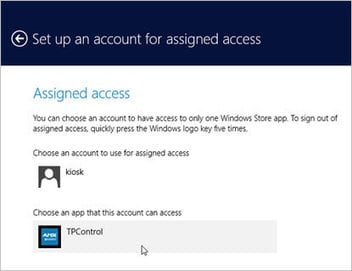
Do you want to restrict your users to only a single app in Windows? Here is how you can set up kiosk mode in Windows 8. Source: www.maketecheasier.com Locking the user down to one single app (assuming it is a “modern” app). kiosk mode. Posts 2026: 3,537
Kiosk Mode & Assigned Access Mode Kiosk Mode Article reprinted from Kioware and author Jim Kruper date Feb 2014 Generally, kiosk mode is usually meant to refer to a particular “mode” that most browsers offer. “Kiosk Mode” is offered by browser applications (Internet Explorer, Chrome, Firefox etc) to run the application full screen without any browser user interface… Read More »
Secure Browser – Kiosk Mode for Windows 2024 Update: Kiosk Mode Malware — Hackers Steal Credentials Secure Browser For Windows Linux – Redesigned Website Kiosk Software News – DynaTouch acquires KioWare KioWare for Windows Version 8.24 with KioTouch – Kiosk Industry Lockdown Secure Browser Windows – Kiosk Remote Management Update Windows 10 Kiosk Mode – KioWare 8.33 The transition from IE to… Read More »
New KioWare kiosk software for Windows KioWare released version 8.5 of KioWare kiosk software for Windows with a ton of new features and enhancements. See press release online at KioWare site. James Kruper, President of KioWare notes, “system security should be reliable and easy to configure with a strong feature set for kiosk customization. This update of KioWare… Read More »
KioWare publishes a series of whitepapers and all of them are excellent whitepapers. For December we wanted to do a roundup of their 2016 Whitepapers which follow below. White Papers Below you will find white papers covering the issues and solutions involving kiosk software and security. What is Mobile Device Management? What is mobile device management,… Read More »
PROVISIO SITEKIOSK KIOSK MODE SOFTWARE PROVISIO Sitekiosk Software is a market-leading kiosk software development company providing turnkey secure kiosk, digital signage and remote management software solutions. PROVISIO products are sold in more than 50 countries through offices in the U.S. and Europe. Fortune 500 companies, including Verizon Wireless, Hilton Hotels, BMW, T-Mobile and Citibank, have chosen the company’s… Read More »
Lenovo Android Computers with Esper Today, Esper is announcing an extension of our partnership with Lenovo, which welcomes four new x86 devices to the Esper family — including the first to ship with Esper Foundation for Android directly from the factory. The Lenovo ThinkCentre M70a 3rd Gen desktop is the first of our planned x86 devices to ship… Read More »
Everything you wanted to know of how to setup your Chromebox Device Management Console and Kiosk mode. Do you want to learn more?
Source: www.youtube.com
Lockdown Browser for Android KioWare has released a new version of KioWare for Android out (3.12) and it has a few great new features worth sharing. A new “Guided Setup” tool which allows new or existing users to configure KioWare by answering a few quick questions. Support for automatic actions. Kioware can now enable automatic log ins, redirects,… Read More »
Good article on the difference between kiosk mode in Windows 8 assigned access mode
Source: blog.kiosksimple.com
Kiosk simple describes the difference between kiosk mode in Windows 8 assigned access mode
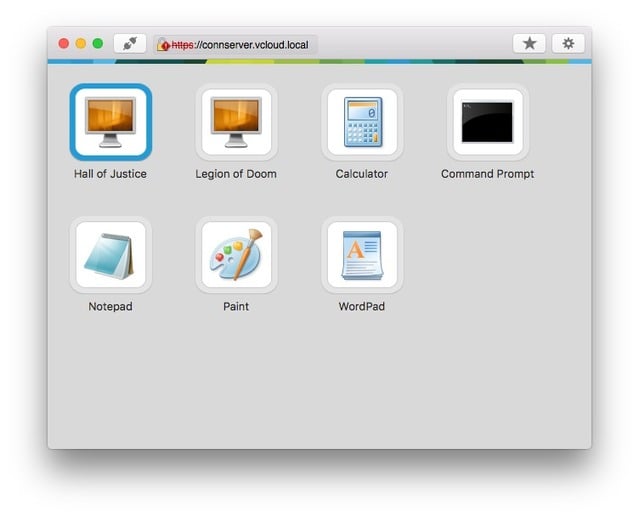
Kiosk Mode VMWare Self-service kiosks can be used in many different situations, such as healthcare, hospitality, and education. For example, a majority of patients claim that the most challenging part of a hospital or doctor visit isn’t the visit itself—it’s the check-in process. A kiosk station can help simplify the patient experience by allowing them to update their personal… Read More »
Mobility means everything these days. Phones and tablets are dominating our world and it’s becoming more and more challenging to avoid them.
Source: blogs.vmware.com
Nice step by step configuration.
Question and answer from VMware community on configuring kiosk mode and thin client. View Kiosk Mode with Zero Client – Auto login myvdi (1 posts since Jul 7, 2014) Jul 7, 2014 2:20 PM We are looking to use a zero client to provide guest internet access and are currently testing various configurations. We currently have a zero… Read More »
FlowVella, the mobile-first presentation platform, is launching “Kiosk Mode” today on the FlowVella iPhone and iPad apps, giving users the ability to secure presentations for public use like trad
Source: www.exhibitoronline.com
Kiosk Lockdown Mode With Google tools, you can create, publish, and deploy apps that make Chrome OS devices do even less. That’s a good thing. Andy Wolber explains. Source: www.techrepublic.com The process takes three steps: create the app, upload it to the Chrome Web Store, then deploy the app to managed Chrome devices. (Even if you don’t have… Read More »
Version 3.4 of KioWare for Android is now available. Also available is Version 7.3.0 of KioWare for Windows. With External Device Support for a plethora of new devices, this latest release of KioWare Kiosk Software Products allows for integration with new payment, printing, and security devices. Source: www.sitekiosk.com Disable status bar, Spanish language, and EMV compliance & devices… Read More »
We have configured Kiosk mode on Physical Desktop. When user connects to view via “Kiosk mode” he is not able to access physical desktop anymore. I was
Source: communities.vmware.com