

Last Updated on November 4, 2026 by Craig Allen Keefner
Modern self-service architecture has evolved far beyond the traditional touchscreen interface. As computer vision, edge AI, and spatial sensors integrate into deployable hardware, the interaction landscape requires a more sophisticated paradigm: The Perceptual and Contextual Layer.
Two Sides To Everything
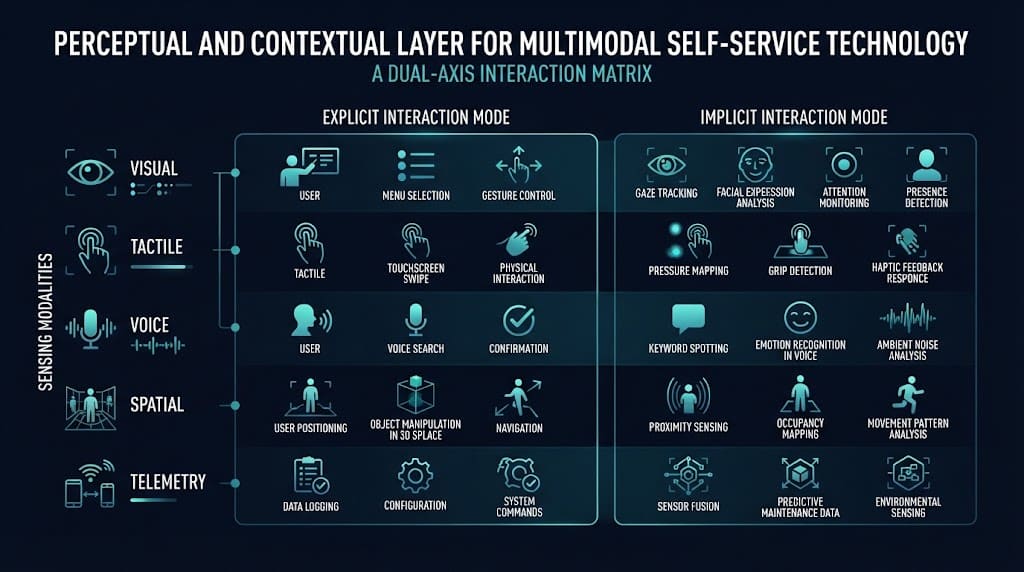
Rather than treating every sensor as merely another button, modern self-service systems separate how information is captured (the sensory modality) from how intent is derived (the mode of interaction). To design truly adaptive, accessible, and context-aware systems, interaction must be evaluated along two distinct axes:
- Explicit Interaction: The user intentionally instructs the system through deliberate action—such as tapping a PCAP display, speaking a voice command, scanning a barcode, or executing a target gesture.
- Implicit Interaction: The system continuously senses ambient state, presence, gaze, or environmental telemetry to infer context, adapt the UI, or trigger automated workflows without requiring a direct command.
The same physical sensing channel frequently operates across both dimensions. An optical camera can process an explicit driver’s license scan or hand gesture, while simultaneously capturing implicit dwell time, approach intent, or age estimation to adjust the interface on the fly.
The Perceptual & Contextual Interaction Matrix
Mapping primary interaction modalities across explicit control and implicit observation establishes a complete framework for multimodal kiosk and self-service design:
| Sensing Modality | Explicit Interaction Mode (Deliberate Command) | Implicit Interaction Mode (Passive Context) |
|---|---|---|
| Visual & Optical (Vision) |
|
|
| Tactile & Haptic (Touch) |
|
|
| Acoustic & Voice (Auditory) |
|
|
| Spatial & Motion (Kinesthetic) |
|
|
| M2M & Proximity (Telemetry) |
|
|
INTEL INSIGHT — SELF-SERVICE UX
The interface should adapt without taking control away from the user.
The emerging value of multimodal self-service is not simply replacing touchscreens with voice, cameras or gesture recognition. It is combining intentional user commands with contextual signals to make transactions more efficient.
A kiosk might detect an approaching customer and wake its display, but that does not mean it should infer the customer’s identity, language or purchasing intent without appropriate safeguards.
The distinction matters for accessibility. Implicit sensing can improve convenience, but explicit controls must remain predictable, discoverable and usable by people with different physical, sensory and cognitive abilities.
The design objective is not maximum automation. It is appropriate automation with reliable user control.
Context-Aware Orchestration
The core objective of the Perceptual and Contextual Layer is seamlessly bridging these two modes. Implicit observation primes the system—waking the display, adjusting text contrast, pre-loading language preferences, or alerting staff to a queue—so that when the user initiates explicit interaction, the experience is immediate, intuitive, and frictionless.
Support accessibility objectives and applicable regulatory requirements when paired with accessible interface design and verified conformance testing.
Accessibility and Privacy Recommendations — Craig Keefner’s Take
Multimodal interaction offers significant opportunities for improving self-service accessibility, but more technology does not automatically mean better accessibility.
My recommendations for manufacturers and operators:
- Preserve user choice. Touch, voice, tactile controls and assistive technologies should provide alternative ways to complete essential transactions. No customer should be forced to use facial recognition, gestures or voice commands.
- Design for accessibility first. Evaluate interfaces against applicable ADA, Section 504 and EN 301 549 requirements. Implicit sensing is a convenience feature, not a substitute for accessible controls.
- Make privacy intentional. Cameras, microphones, biometric sensors and behavioral analytics should operate transparently, with appropriate consent, data minimization and clear retention policies.
- Always provide a fallback. When voice recognition, computer vision or contextual AI fails, users must still be able to complete transactions independently.
- Keep the user in control. Context-aware systems should anticipate needs without making irreversible decisions or assumptions about a person’s abilities, identity or intentions.
Intel Insight: The objective is not to eliminate explicit interaction. It is to make interaction easier while preserving accessibility, privacy and individual control. The best self-service technology adapts to the customer—not the other way around.
— Craig Allen Keefner, Kiosk Industry Group / The Industry Group
Real Life Examples
- Giada Brings Digital Signage and Edge AI Hardware to Latin America. A look at Giada’s InfoComm América Latina showcase—and the specifications integrators should request before choosing hardware. https://kioskindustry.org/giada-digital-signage-latin-america/
- Star Wars Drive Thru — Bojangles live with Hi-Auto. But the biggest breakthrough may actually be eliminating the need for conversational voice at the drive-thru, rather than making the voice assistant sound more human. A customer could authorize their personal AI to manage the transaction. Voice would remain available for changes, questions, and exceptions.
https://kioskindustry.org/bojangles-ai-drive-thru-bo-linda-hi-auto/ - VoiceTopping uses Cerence conversational AI to add spoken interaction to existing self-service kiosks, connecting voice technology with the kiosk’s on-screen experience. https://kioskindustry.org/code-factory-voice-enabled-kiosks/
- Machine Vision Asia: The Future of Self Checkout SCO — Why use machine vision instead of a $20 barcode scanner?
https://kioskasia.org/computer-vision-self-checkout-in-asia/
Images
interaction modality — click for full size
Interaction Technologies That Struggled to Gain Adoption