
Last Updated on September 19, 2026 by Craig Allen Keefner
ADA Kiosk Compliance Update (April 2026)
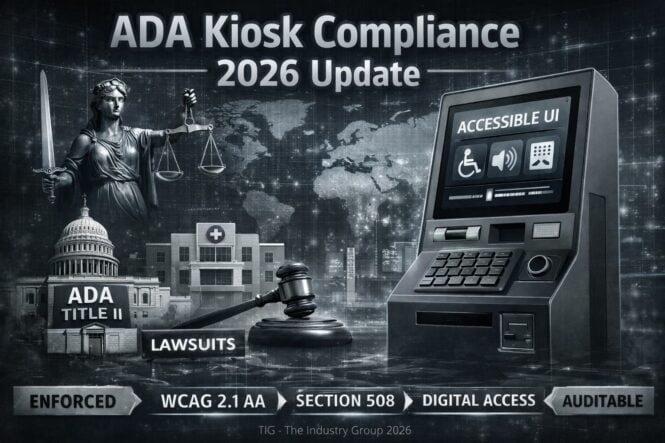
ADA compliance for kiosks has entered an enforcement phase in 2026, shifting from general guidance to measurable, auditable digital requirements. Kiosks are no longer treated as standalone hardware—they are now considered part of the “digital front door,” requiring full transaction accessibility under WCAG-aligned standards. Organizations that fail to address this system-level responsibility face increasing legal exposure, while those that act now can future-proof deployments and improve real-world usability.
Executive Overview
The regulatory environment for ADA and kiosk accessibility has entered a new phase in 2026.
For the first time, kiosks are being treated not just as physical devices, but as digital service delivery platforms subject to enforceable accessibility rules.
Three forces are now converging:
- DOJ enforcement of digital accessibility under ADA Title II
- Federal expansion of accessibility requirements to full “digital front door” systems
- Continued reliance on hybrid standards (ADA + WCAG + Section 508)
Bottom line:
Accessibility is no longer a design consideration—it is now auditable infrastructure with legal exposure.
What Changed in 2026
1. ADA Title II Digital Rule – Now in Effect
The Department of Justice finalized updates requiring state and local government digital services to meet accessibility standards.
- Compliance deadline: April 26, 2026 (large public entities)
- Required baseline: WCAG 2.1 AA
While the rule explicitly references web and mobile, the implication is clear:
👉 Any kiosk acting as a public service interface falls under the same accessibility expectations.
Implication:
Government kiosks (DMV, courts, transit, libraries) must now meet digital accessibility—not just physical ADA requirements.
2. Kiosks Now Part of the “Digital Front Door”
Federal guidance and enforcement trends now treat kiosks as:
- Patient intake systems
- Government service endpoints
- Payment and transaction interfaces
This aligns kiosks with:
- Websites
- Mobile apps
- Digital service workflows
👉 Accessibility must apply to the entire transaction, not just the screen.
3. No Single “ADA Kiosk Standard” Still Exists
Despite increased enforcement:
- ADA does not define a comprehensive kiosk technical specification
- Requirements are derived from:
- ADA 2010 (physical design)
- Section 508 (ICT accessibility)
- WCAG (software/UI guidance)
Kiosks—especially “closed systems”—sit in a gray area where WCAG is adapted rather than directly applied
The 2026 Compliance Stack (Reality)
ADA kiosk compliance is now a multi-layer model:
| Layer | Standard | What It Covers |
|---|---|---|
| Physical | ADA 2010 | Reach ranges, height, floor space |
| Digital UI | WCAG 2.1 AA | Screen readers, contrast, navigation |
| Functional | Section 508 | Non-visual operation, cognitive access |
| Enforcement | ADA Title II / III | Legal liability |
Core ADA Requirements for Kiosks (Still Valid)
Physical Accessibility
- Reach range: 15”–48” interaction height
- Clear floor space: 30” x 48” minimum
- Accessible approach (front or side)
These remain foundational—but are no longer sufficient alone.
Sensory Accessibility (Critical Gap Area)
Accessible kiosks must support:
- Audio output (speaker or headphone jack)
- Screen reader / speech output
- Tactile input (keypads, discernible controls)
These are already required in ATM-style deployments and increasingly expected across all kiosks
Functional Accessibility
Kiosks must allow:
- Non-visual operation
- Limited vision use (contrast, scaling)
- One-handed operation
- Completion of full transactions independently
Failure to complete a transaction = failure of accessibility
What is Failing in Real Deployments (2026)
Based on field audits and enforcement patterns:
1. “Touchscreen-only” designs
No alternative input = non-compliant
2. No private audio path
No headphone jack = privacy violation risk
3. Incomplete accessibility flows
Ordering accessible → payment not accessible
4. Vendor fragmentation
Hardware compliant, software not (or vice versa)
5. Retrofit strategy
Accessibility added late = high failure rate
Enforcement Reality
Kiosks are now being treated similarly to:
- ATMs
- Fare machines
- POS devices
All of which are explicitly required to be accessible under ADA frameworks
Additionally:
- Lawsuits increasingly cite denial of equal access
- Accessibility failures expose:
- Privacy risks
- Transactional barriers
- Discrimination claims
Strategic Shift (Most Important)
Old Model
“Kiosk is ADA compliant”
New Model
“The service delivered via kiosk must be accessible”
That includes:
- UI/UX
- Payment systems
- Backend workflows
- Privacy and independence
👉 Accessibility is now a system-level responsibility
2026 Best Practice Framework
1. Design for multi-modal interaction
- Touch + audio + tactile + mobile fallback
2. Treat accessibility like security
- Built-in, not bolted on
3. Standardize accessibility stack
- Screen reader layer
- Audio interface
- Accessible UI framework
4. Plan for lifecycle (5–7 years)
- Avoid retrofit risk
- Ensure software update path
Global Alignment (Strategic Context)
United States
- Enforcement-driven (ADA + DOJ)
- Litigation increasing
Europe
- More prescriptive (EN 301 549, EAA)
Asia
- Emerging but fragmented
👉 Direction of travel:
Global convergence toward functional, multi-modal accessibility
Bottom Line
April 2026 marks a turning point:
- Kiosks are now part of the regulated digital ecosystem
- Compliance is shifting from:
- Interpretation → Enforcement
- Physical → Digital + Physical
Organizations that fail to adapt will face:
- Legal exposure
- Operational disruption
- Brand risk
Organizations that lead will deliver:
- Inclusive service
- Higher completion rates
- Future-proof deployments
FAQ
- Question: When to design in accessibility?
- Answer: from the start
- Question: what is most often forgotten?
- Answer – ABA requirements and multimodal
- Question: Is ADA enforced?
- Answer – That has always been weak here in U.S. and even more so given current administration. Europe on other hand has strict penalities.
- Question – how can I reduce the cost of providing accessibility?
- Answer – A speaker jack and tactile navigation is easiest. Screen Reader is easy. AudioPad is best hardware addition. Look at voice and gesture control.
Useful reference links:
- https://kioskindustry.org/standards/eaa-checklist-2026/
- https://kioskindustry.org/faq/security-compliance/
- SELF-SERVICE Dec 2023 https://www.reginfo.gov/public/do/eAgendaViewRule?pubId=202304&RIN=3014-AA44
- EV NPRM 9/00/23 https://www.reginfo.gov/public/do/eAgendaViewRule?pubId=202304&RIN=3014-AA48
- Note there are two different listings for the EV item. The links provided for the NPRM on electric vehicle charging stations are from two different unified agendas – the Fall 2022 and the Spring 2023 agenda. Please refer to the September 2023 date in the Spring 2023 agenda, as this represents the most recent projected date for publication.
- ANSI regs now issued — Roadmap of Standards and Codes for Electric Vehicles at Scale
- Here is our running Legal chronology log for self-service
- We like the drawings that Advanced Kiosks has
Interesting that the FCC is looking at Conferencing platforms and accessibility. Video conferencing platforms like Zoom, Microsoft Teams, and Webex could be subject to accessibility requirements under a proposal from FCC Chairwoman Jessica Rosenworcel. Link on AVIXA
Accessibility Guidelines for Self-Service Transaction Machines
This rulemaking would amend the Architectural and Transportation Compliance Board’s existing accessibility guidelines for buildings and facilities under the Americans with Disabilities Act (ADA) and the Architectural Barriers Act (ABA), located at 36 CFR part 1191, to include guidelines for the accessibility of fixed self-service transaction machines, self-service kiosks, information transaction machines, and point-of-sale devices. The U.S. Department of Transportation and U.S. Department of Justice are expected, via separate rulemakings, to adopt these amended guidelines as enforceable standards for devices and equipment covered by the ADA. RIN: 3014-AA44
Tools We Use Everyday
- Google PageSpeed Insights — tests speed and accessibility
- MS Edge Accessibility Insights — quick fast pass for accessibility (WCAG 2.1)
- Experte — free web tools based in Germany, also WCAG 2.1 — will test entire website for you
Send an email to craig@kma.global or call at 720-324-1837 for more details. The KMA provides this information in complete form to any and all companies looking to deploy a self-service kiosk project as well as governmental entities. A small administration fee of $250 is the only cost. Contact craig@kma.global or call at 720-324-1837
ADA Reference Resources
- Revised 508 the Final Rule – 2018
- ICT Standards – 2017
- ADA 2010
- More background information
- ANSI Process
- ANSI-Essential-Requirements-2018
- FINAL DRAFT Whitepaper. The Use of Voice Recognition and Speech Command Technology as an Assistive Interface for ICT in Public Spaces
- Associations
Accessibility Companies
- Tenon.io – Tenon.io can identify 508 and WCAG 2.0 issues in any environment.
- Aira.io – augmented reality assistance for the Blind
- Right Hear — micro-positioning wayfinding mobile apps for the blind
- SmyleMouse – computer navigation by head gesture and blinking eyes
- WP Accessibility plugin — we utilize this for improving our web accessibility
- Google Tools — many tools for websites and handhelds and mobiles. Test suites.
- Kessler McGuiness ADA
- Webaim – web accessibility
- Overview of ADA by CUInsight
- TENON for testing accessibility on your website
- I-Communicator Resources – link
- Spacepole
ADA Kiosk Links
- ADA.Gov lists all the resources in one place in the Accessible Technology section of the website.
- ADA Parking Guidelines (shows ratio)
- Revised 508 Standards – went into effect January 18, 2018
- ict-rule-2018 effective 2018
- EN 301 549 V1.1.2 European Standards — Accessibility requirements suitable for public procurement of ICT products and services in Europe
- Software — iCommunicator software is NLP that converts speech to text and also speech to sign language.
- 10/01/2018 – New ADA.Gov Technical Assistance
- 10/01/2018 – ADA FAQ on KMA
Pin Pad Regulatory Guidelines
- EN 1332 Machine readable cards, related device interfaces and operations. Part 3 Keypads.
- V EN 29241 Part 4 Keyboard requirements.
- ETSI DTR/HF 02009 (1996) Characteristics of telephone keypads.
- ETSI TCR–TR 023 (1994) Assignment of alphabetic letters to digits on push button dialling keypads.
- ETSI ES 201 381 (December 1998) Telecommunication keypads and keyboards: Tactile identifiers.
- IEC 73 Colours of pushbuttons and their meanings.
- ISO/IEC 9995 Information technology: Keyboard layouts for text and office systems.
- ITU E161 Arrangements of figures, letters and symbols on telephones.
- Storm – informative historical paper on Pin Pad Accessibility. Note this is from 2003 and changes since then. Accessibility – Implications on Keypad Design by Steve Greenaway
- Full specs for EPPs — Regulations EPP Pin Pads- 2020
Measuring the Disabled – 2022
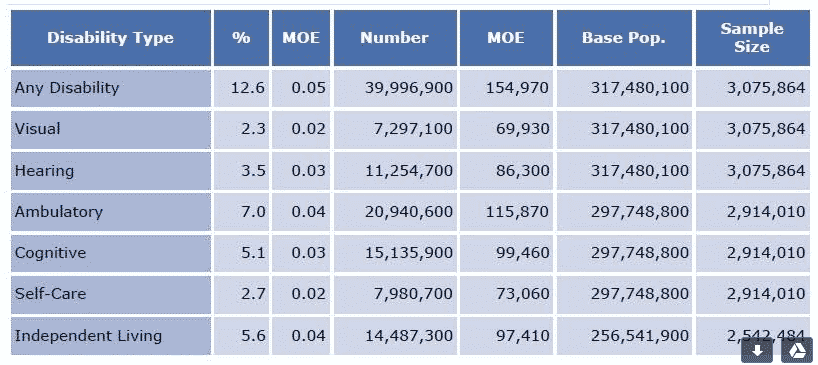
Click for full size disability statistics
2015-StatusReport_US
End of Content{“@context”:”https://schema.org”,”@graph”:[{“@type”:”Organization”,”@id”:”https://kioskindustry.org/#organization”,”name”:”Kiosk Industry”,”url”:”https://kioskindustry.org/”,”logo”:{“@type”:”ImageObject”,”@id”:”https://kioskindustry.org/#logo”,”url”:”https://kioskindustry.org/wp-content/uploads/2024/12/kiosk-industry-logo.png”,”contentUrl”:”https://kioskindustry.org/wp-content/uploads/2024/12/kiosk-industry-logo.png”,”caption”:”Kiosk Industry”},”sameAs”:[“https://industrygroup.org/”,”https://kma.global/”]},{“@type”:”WebSite”,”@id”:”https://kioskindustry.org/#website”,”url”:”https://kioskindustry.org/”,”name”:”Kiosk Industry”,”publisher”:{“@id”:”https://kioskindustry.org/#organization”},”inLanguage”:”en-US”},{“@type”:”Person”,”@id”:”https://kioskindustry.org/#/person/craig-allen-keefner”,”name”:”Craig Allen Keefner”,”url”:”https://kioskindustry.org/author/craig/”},{“@type”:”ImageObject”,”@id”:”https://kioskindustry.org/standards/ada-kiosk/#primaryimage”,”url”:”https://kioskindustry.org/wp-content/uploads/2026/04/ADA-Compliance-2026.jpg”,”contentUrl”:”https://kioskindustry.org/wp-content/uploads/2026/04/ADA-Compliance-2026.jpg”,”caption”:”ADA Kiosk Compliance 2026 Update”,”representativeOfPage”:true},{“@type”:”BreadcrumbList”,”@id”:”https://kioskindustry.org/standards/ada-kiosk/#breadcrumb”,”itemListElement”:[{“@type”:”ListItem”,”position”:1,”name”:”Home”,”item”:”https://kioskindustry.org/”},{“@type”:”ListItem”,”position”:2,”name”:”Kiosk Accessibility & Compliance Standards”,”item”:”https://kioskindustry.org/standards/”},{“@type”:”ListItem”,”position”:3,”name”:”ADA Kiosk”,”item”:”https://kioskindustry.org/standards/ada-kiosk/”}]},{“@type”:”DefinedTerm”,”@id”:”https://kioskindustry.org/standards/ada-kiosk/#term”,”name”:”ADA Kiosk Compliance”,”description”:”Accessibility requirements and enforcement framework for self-service kiosks combining ADA physical standards, WCAG 2.1 AA digital guidance, and Section 508 functional accessibility.”,”inDefinedTermSet”:{“@type”:”DefinedTermSet”,”name”:”Kiosk Accessibility & Compliance Standards”,”url”:”https://kioskindustry.org/standards/”}},{“@type”:”WebPage”,”@id”:”https://kioskindustry.org/standards/ada-kiosk/#webpage”,”url”:”https://kioskindustry.org/standards/ada-kiosk/”,”name”:”ADA Kiosk Standards for Digital Accessibility Compliance”,”headline”:”ADA Kiosk”,”description”:”Comprehensive ADA kiosk standards and digital accessibility compliance guide covering ADA 2010, WCAG 2.1 AA, Section 508, enforcement trends, best practices, and FAQ guidance for self-service deployments.”,”isPartOf”:{“@id”:”https://kioskindustry.org/#website”},”about”:[{“@id”:”https://kioskindustry.org/standards/ada-kiosk/#term”},{“@type”:”Thing”,”name”:”ADA Title II digital accessibility”},{“@type”:”Thing”,”name”:”WCAG 2.1 AA kiosks”},{“@type”:”Thing”,”name”:”Section 508 kiosks”},{“@type”:”Thing”,”name”:”Self-service kiosk standards”}],”mainEntity”:{“@id”:”https://kioskindustry.org/standards/ada-kiosk/#faq”},”primaryImageOfPage”:{“@id”:”https://kioskindustry.org/standards/ada-kiosk/#primaryimage”},”image”:{“@id”:”https://kioskindustry.org/standards/ada-kiosk/#primaryimage”},”breadcrumb”:{“@id”:”https://kioskindustry.org/standards/ada-kiosk/#breadcrumb”},”dateModified”:”2026-04-13T00:00:00-06:00″,”author”:{“@id”:”https://kioskindustry.org/#/person/craig-allen-keefner”},”publisher”:{“@id”:”https://kioskindustry.org/#organization”},”inLanguage”:”en-US”},{“@type”:”FAQPage”,”@id”:”https://kioskindustry.org/standards/ada-kiosk/#faq”,”url”:”https://kioskindustry.org/standards/ada-kiosk/”,”mainEntity”:[{“@type”:”Question”,”name”:”When should accessibility be designed into a kiosk project?”,”acceptedAnswer”:{“@type”:”Answer”,”text”:”Accessibility should be designed in from the start, not added later as a retrofit.”}},{“@type”:”Question”,”name”:”What is most often forgotten in kiosk accessibility?”,”acceptedAnswer”:{“@type”:”Answer”,”text”:”ABA requirements and multimodal accessibility are often overlooked.”}},{“@type”:”Question”,”name”:”Is ADA enforced for kiosks?”,”acceptedAnswer”:{“@type”:”Answer”,”text”:”Enforcement in the United States has historically been uneven, while Europe has stricter penalties and more prescriptive enforcement.”}},{“@type”:”Question”,”name”:”How can I reduce the cost of providing kiosk accessibility?”,”acceptedAnswer”:{“@type”:”Answer”,”text”:”The simplest starting points are a headphone or speaker jack and tactile navigation. Screen reader support is also relatively straightforward to add. AudioPad is a strong hardware option, and voice or gesture control may also help reduce long-term accessibility costs.”}}]}]}