

Last Updated on September 10, 2024 by Craig Allen Keefner
As posted on the Kiosk Association website Feb2021
Kiosk ADA Checklist 14 point – Code of Practice
General Areas of Discovery and Due Diligence for Kiosk ADA Checklist Review
Kiosk ADA Checklist Initial Design
- Begin your initial design phase with full accessibility accommodated. You can always do a cost/benefit analysis and compare later to a stripped-down unit with its inherent liability
Kiosk ADA Checklist Hardware
-
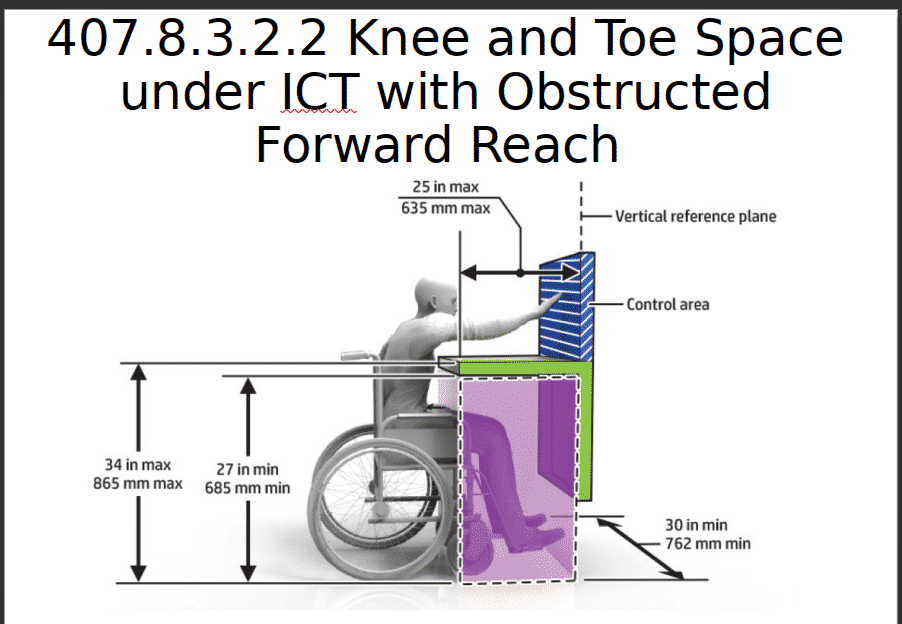
ada kiosk knee and Toe reach illustration – click for full size
Spacing — Depth, Clearance, Maneuvering, Protruding Objects
- Reach Ranges
- Interface considerations or Operable Parts
- Assistive considerations – user controls such as Braille and Tactile guidance
- Hardware assistive device inventory (audio jack e.g.)
Software
- Does your application extend to assistive technologies ( Example: ICT with a display screen shall be speech-output enabled for full and independent use by individuals with vision impairments.)
- The Big Seven – captions, contrast, audio, focus, target size, errors and labels
Devices
- Assisted interface – review available tactile interface devices (NavPad e.g.)
- Review biometric and proxy interfaces – is there facial or is a mobile device required?
Testing
- People with Disabilities – Blind, sight-impaired, deaf, quadriplegic e.g.
- Mobility – People in Wheelchair or Quadraplegic user group testing
Installation
- Space, protruding, and maneuvering space?
- Light and any other environmental factors (ambient noise e.g.)
Notes
- The above points are meant to provide a brief generalized direction that should be reviewed for any project.
- Historically self-service or user-operated projects have been approached with little priority on ADA and accessibility.
- More times than not true ADA is only offered as option which has costs in time and money, and generally minimized as much as possible to achieve price and delivery endpoints.
- The Kiosk Association recommends beginning with true ADA as overall project scope to start with. Calculate your costs, timeframes and liabilities upfront. If you want to subsequently reduce the accessibility components for cost calculations, then you can always reduce your overall scope from your start point. You could develop a plan/method to accommodate and develop future accessibility for that matter.
Kiosk ADA Checklist Resources
- ADA Checklist-COP 2021 -4121
- U.S. Access Board Section 508 and Final Rule
- ADA 2010 Standards for Accessible Design (308 for Reach and 309 for Operable Parts)
- Europe – EN 301 549 — here is V2.1.2
- DHS Testing Resources for 508 Compliance (Web, Software and Mobile)
- DOT Regulations kiosks and websites
- There are many more and includes UL and HIPAA — KMA has a concordance of links
- Assistive hardware technology and ADA consulting firms are listed on kioskindustry.org
Revision Level:
20210214


