Picking a Kiosk Manufacturer – Tips

Pick Kiosk Manufacturer

How to Pick a Kiosk Manufacturer

The question often asked is “What type of hardware do I need? Freestanding, wall-mounted, countertop, outdoor vs indoor, touchscreen size, printer/scanner, payment terminal — these all matter.”.  Here are some answers for you

From RedyRef — Excellent breakout of what to consider when you are picking a partner for your kiosks. Ordering a POS terminal is much easier and straightforward. Engaging with a kiosk company means due diligence and experience. Having someone practice on you because they are cheap isn’t going to work.

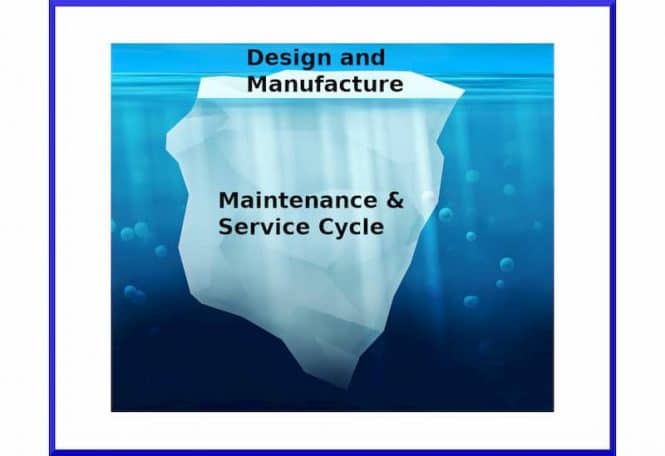
Long term projects mean multiple iterations.  The initial iteration of the AT&T Bill Payment kiosk was one thing. It has since had many interactions and changes. Service and support goes from one year to two to five to 10 all of the sudden. Hardware and software.  Software is always underestimated generally because software engineers like to be optimistic. Hardware engineers tend to be very precise. In my experience.

Summary

Nice article that provides guidance on picking a kiosk manufacturer. Here are the key points:

  1. Determine Your Needs: Identify the type of kiosk, features, and budget.
  2. Research Manufacturers: Look for companies with experience and a good reputation in your industry.
  3. Customization Capabilities: Choose a manufacturer that can tailor the kiosk to your specific requirements.
  4. Technical Expertise: Ensure the manufacturer has skilled engineers and designers.
  5. Quality Control: Select a manufacturer with rigorous testing and quality assurance processes.
  6. Integration and Compatibility: Ensure the kiosk can integrate with your existing systems.
  7. Ongoing Support and Maintenance: Opt for a manufacturer that offers comprehensive technical support and maintenance services.

Article

1. Determine Your Digital Kiosk Needs

Before you start looking for a self-service kiosk manufacturer, you need to determine your specific needs. What type of digital kiosk do you need? What features are important to you? What is your budget? These are all important questions to ask yourself before you start starting the research process.

2. Research Kiosk Manufacturers, Considering Their Experience and Reputation

When searching for a kiosk manufacturer, it’s crucial to find a company that fits your needs. Look for those that have experience in your industry and offer the type of digital kiosk you need. To evaluate a manufacturer’s reputation, read online reviews and ask for references.

REDYREF is an industry leader in kiosk manufacturing, with a 100-year history of delivering high-quality self-service kiosks and exceptional customer service. With experience working in various sectors, including hospitality, retail, healthcare, and government, they have a proven track record of providing customized solutions that meet the specific needs of each industry and business.

3. Evaluate the Manufacturer’s Customization Capabilities

Look for a company that can collaborate with you to design and build a digital kiosk that fulfills your specific requirements, whether that involves integrating with existing systems, incorporating your branding, or adding particular hardware or software. To ensure your kiosk is an ideal match for your business, consider a manufacturer that also offers a full range of customization options, whether it’s the size, color, software, integrations, or type of display used.

REDYREF stands out among interactive kiosk manufacturers by providing customizable kiosk solutions that are tailored to meet the specific needs of your business. They offer flexibility in hardware and software options and a range of kiosk styles and designs to choose from. Additionally, they work closely with clients to ensure that the kiosk solutions they provide are customized to the specific requirements of their business. REDYREF also offers various customization options, including branding, software integration, and hardware features, to deliver kiosks that are unique to each client.
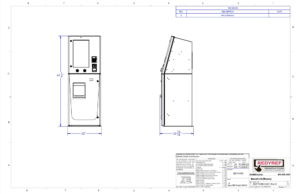
 

engineering drawing 

4. Consider the Manufacturer’s Technical Expertise

Self-service kiosks can be complex systems that require a high level of technical expertise to design and build. Look for a manufacturer that has a team of experienced engineers and industrial designers who can handle the technical aspects of creating a kiosk, including hardware design, software development, and integration with other systems.

5. Assess the Manufacturer’s Quality Control Processes

Ensuring the quality and reliability of your interactive kiosk is vital to meet your expectations and minimize downtime and maintenance costs. To achieve this, choose a manufacturer that has a comprehensive quality control system in place to test and inspect every kiosk before shipping.

Investing in a self-service kiosk is a significant decision, so choose a manufacturer that produces high-quality and durable kiosks. Look for a manufacturer that uses top-quality materials in their construction process and has thorough testing and quality control measures. Also, confirm that the manufacturer offers warranties and ongoing support to maximize the lifespan of your investment.

REDYREF uses top-quality materials in its construction process and conducts rigorous testing and quality control measures to guarantee the longevity of your investment. Moreover, they provide warranties and ongoing support to ensure your kiosks operate smoothly. Their quality control system ensures that each kiosk is built to the highest standards and meets the specific needs of clients in various industries.

6. Ensure Integration and Compatibility With Current Systems

When selecting a self-service kiosk, it’s important to ensure that it can integrate seamlessly with your existing technology and software systems. A reliable manufacturer should be able to provide integration solutions and guarantee compatibility with your hardware and software. It’s also essential to choose a manufacturer that offers ongoing maintenance and support for your kiosks. REDYREF offers integration solutions to ensure compatibility with your existing technology and software systems.
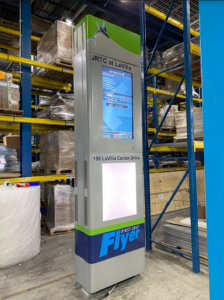
 

Industry Group Kiosks Digital Signage 

7. Look for a Manufacturer that Offers Ongoing Support and Maintenance

It’s essential to have ongoing support and maintenance options available for your digital kiosk, even when it’s well-designed and built. Choose a manufacturer that offers comprehensive technical support, including remote monitoring, kiosk software updates, and on-site repairs, to ensure your kiosk remains functional and reliable. Look for a company that has a rigorous quality control process and uses top-quality materials and testing procedures to deliver reliable and durable kiosks. REDYREF offers comprehensive technical support and maintenance services, providing timely and responsive support, as well as proactive maintenance services to minimize downtime and maximize uptime.

Why REDYREF for Digital Kiosk Manufacturing?

Selecting the right self-service kiosk manufacturer is crucial for your business’s success. It’s important to consider factors like experience, customization abilities, quality control, technical support, and cost to choose a manufacturer that can meet your specific requirements. REDYREF is an excellent choice for businesses of all types due to its custom solutions, thorough quality control, complete technical support, competitive pricing, and extensive industry experience, and you can trust that your self-service kiosk project will be a success. Contact us today to learn more about how their team can help bring your vision to life.


Related picking a kiosk manufacturer Links

Meanwhile — Nice list from Sixteen Nine on Picking a Digital Signage CMS

Digital Signage Software Selection: A Practical Guide

Digital signage software selection is a critical decision for any organization implementing display solutions. This guide outlines key considerations across ten essential areas that influence successful deployment and operation.

Key Decision Points

1. Operating System: Choose between SoC (System on Chip) displays and separate media players. SoC offers cost efficiency but less flexibility, while media players provide more power and adaptability.

2. Licenses & Pricing: Modern solutions typically use subscription models starting around €20/month per endpoint. Additional costs apply for enhanced features like remote management and specialized content.

3. Sourcing Strategy: Options include working with integrators, purchasing directly from providers, or going through distributors. Beginners benefit from integrator partnerships, while larger operations may prefer direct relationships.

4. Architecture: Modern systems utilize cloud-based CMS with API integration capabilities. Key features include playlist management and real-time data processing.

5. Cybersecurity: Essential considerations include protection against unauthorized access, compliance with regulations like the EU Cyber Resilience Act, and regular security updates.

6. Usability: Systems should accommodate various user types without requiring technical expertise, offering intuitive content creation tools and role-based access control.

7. AI Integration: Emerging capabilities include automated translation, content adaptation, error detection, and playlist optimization.

8. Industry-Specific Solutions: Different sectors require specialized features – from restaurant menu displays to transit information systems. Solutions range from modular add-ons to dedicated industry platforms.

9. Sustainability: Efficient operation through remote management, automated power controls, and intelligent brightness adjustment reduces energy consumption and extends hardware life.

10. Revenue Generation: Opportunities exist for monetization through third-party advertising, with systems supporting automated ad slot sales and performance reporting.

Organizations should evaluate these factors against their specific requirements, considering both immediate needs and future scalability.

I can’t really argue with any of these, but here’s what I would add and what I would downplay.

Add: Business health of the software vendor, as in financials and client base. A LOT of companies are just getting by and would happily entertain a “liquidity event” and some of them have one whale client that represents a disproportionate amount of revenue. That client moves on and the company is pretty much sunk. So that question needs to get ask. As in “Make us comfortable and confident your company has the financials and backing to carry out the 3-5 year term of any agreement we reach.”

Downplay: There are all kinds of public and private information display networks that will never, and never should, have advertising on them, so revenue generation should be key when ads are a possibility. It’s OK to have a network of digital signs that just inform and guide people.

More Kiosk Hardware Needed Tips


Security Stadium Biometrics – Fan Experience, Safer, Data Insights

Security for Stadiums Biometric

Stadium Security Systems and Olea Kiosks

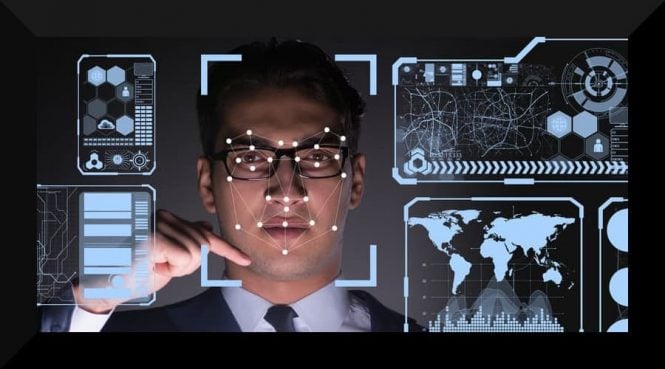
The Olea Kiosks article “The Future is Now: Biometric Stadium Security” explores integrating biometric technologies, such as facial recognition and fingerprint scanning, into stadium security systems.

Olea Kiosks Logo New These technologies are designed to streamline entry processes, enhance security, and personalize fan experiences. Facial recognition enables ticketless entry and real-time identification of potential security threats, while fingerprint scanning facilitates secure payments and loyalty programs.

The article emphasizes the advantages of biometric applications, which include

  • improved fan experience,
  • enhanced security,
  • increased operational efficiency, and
  • data-driven insights for personalization.

The adoption of these technologies is expected to grow, reshaping the future of security in stadiums and event venues.

Excerpt Security Stadium Biometrics

1. Facial Recognition: The New Face of Stadium Entry

Ticketless Entry: We’ve already said goodbye to paper tickets and may move on from digital tickets. Facial recognition software can scan your face and grant you access, making entry a breeze.

Security Measures: This technology can identify known troublemakers or even spot suspicious behavior in real-time, keeping events safer for everyone.

Personalized Experiences: Imagine receiving a discount on your favorite team’s merchandise as you walk by a store in the stadium, all thanks to facial recognition! This technology can personalize your experience with targeted offers and promotions.

Intuit Dome, home to the Los Angeles Clippers, opened recently. The venue’s biometric stadium technology includes facial authentication for entry and concession payments.

2. Fingerprint Scanning: A Touch of Security and Convenience

Secure Payments: No need to carry cash or cards. Fingerprint scanning allows quick and secure food, drinks, and merchandise payments.

Loyalty Programs: Earn rewards and perks with every scan! Fingerprint scanning can be linked to loyalty programs, making tracking your purchases and redeeming rewards easier.

Read the entire article


Related Posts

Hospitality Breach News – P2P Encryption for Payment Processing

hospitality breach payment kiosk

In Hospitality Breach News Encryption for Payment Processing

hacker attack

hacker attack

New press release from Datacap. The hospitality industry is often targeted by cyberattacks due to the vast amount of sensitive data it handles, including personal identification, credit card information, and health data. Here are some key points or the “whys” regarding data breaches in this sector:

  • **High Vulnerability:** Up to 31% of hospitality organizations have reported experiencing a data breach, with 89% encountering multiple breaches within a single year.
  • **Common Attack Methods:** Cybercriminals frequently use social engineering, phishing, and ransomware attacks to penetrate hospitality systems.
  • **Notable Breaches:** Major hotel chains, such as Marriott International and MGM Resorts International, have faced significant data breaches that affected millions of guests.
  • **Impact:** Data breaches can lead to severe consequences, including financial losses, reputational damage, legal costs, and regulatory fines.
  • **Security Measures:** To address these threats, hospitality businesses are implementing robust cybersecurity measures, including PCI-DSS compliance, multi-factor authentication, and endpoint detection and response.

This release summarizes a partnership between Bluefin and Datacap Systems, aimed at providing PCI-Validated Point-to-Point Encryption (P2PE) processing for hospitality businesses in the U.S. and Canada. The collaboration seeks to enhance payment security, streamline compliance, and ensure seamless payment experiences for an industry that is particularly susceptible to data breaches. By integrating Bluefin’s P2PE technology with Datacap’s payment solutions, this partnership significantly reduces the compliance burdens and scope of PCI DSS controls in the point-of-sale environment.


Bluefin and Datacap Partner to Deliver PCI-Validated Point-to-Point
Encryption (P2PE) Processing to Hospitality Businesses

October 31, 2024 – Atlanta, GA – Bluefin, a leader in PCI-validated encryption and tokenization technologies that protect payments and sensitive data, and Datacap Systems, Inc., a leading hardware and processor-agnostic omnichannel payments provider, announced they are partnering to deliver PCI-Validated Point-to-Point Encryption (P2PE) Processing to hospitality businesses across the United States and Canada.

Datacap is Bluefin preferred omnichannel payments provider to the hospitality industry for PCI-validated point-to-point encryption (P2PE) , reducing a customer’s PCI DSS  compliance burden by more than 70% and PCI control scope reduction at the point-of-sale environment by more than 90%.  The partnership will help secure and protect payments for the hospitality industry which is highly vulnerable to data breaches: According to industry estimates, up to 31% of hospitality organizations have reported a data breach, and 89% have been affected more than once in a year.

“The Datacap team understands the critical importance of protecting payments and data from compromise across all channels,” said Drew Monroe, Chief Revenue Officer. "By integrating Bluefin’s PCI-validated point-to-point encryption with Datacap’s industry-leading payments solutions we are empowering hospitality providers to benefit from enhanced security, streamlined compliance, and seamless payment experiences.”

“Partnering with Bluefin allows Datacap to offer hospitality ISVs the highest level of security for their merchant’s transactions without compromising the user experience,” said Justin Zeigler, Director of Product at Datacap. “With Bluefin’s PCI-validated P2PE, our partners can confidently focus on delivering exceptional guest experiences while reducing PCI DSS scope and compliance costs.”

Merchants interested in PCI-Validated P2PE should contact their POS reseller to learn how Datacap and Bluefin can help reduce their PCI DSS compliance burden and PCI control scope.

About Bluefin 

Bluefin is the recognized integrated payments leader in encryption and tokenization technologies that protect payments and sensitive data. Our product suite includes solutions for contactless, face-to-face, call center, mobile, Ecommerce and unattended payments and data in the healthcare, higher education, government and nonprofit industries. The company’s 300 global partners serve 35,000 connected enterprise and software clients operating in 60 countries. Bluefin is a Participating Organization (PO) of the PCI Security Standards Council (SSC) and is headquartered in Atlanta.

About Datacap Systems

Datacap builds industry-standard payment solutions for Point of Sale providers to meet the needs of merchants in any market. Security-centric solutions for virtually all processing platforms route through dozens of pre-certified devices from leading OEMs – all via a universal payments integration, empowering merchants to create a unified payments experience across brick and mortar, online, mobile and unattended applications. As the only channel-centric and processor-agnostic payments provider in the industry, Datacap is the ideal partner for any POS provider that’s serious about building a solution that will scale to address the needs of virtually any merchant, regardless of market or payment
processing platform. If your Point of Sale application isn’t yet integrated to Datacap, contact us to get started today! https://datacapsystems.com/contact-us/

Related Articles

Airport & Airline Accessibility ADA Kiosks

Airline AIrport Kiosks FTE

Airport & Airline Accessibility — See us at FTE Oct28-30 Long Beach

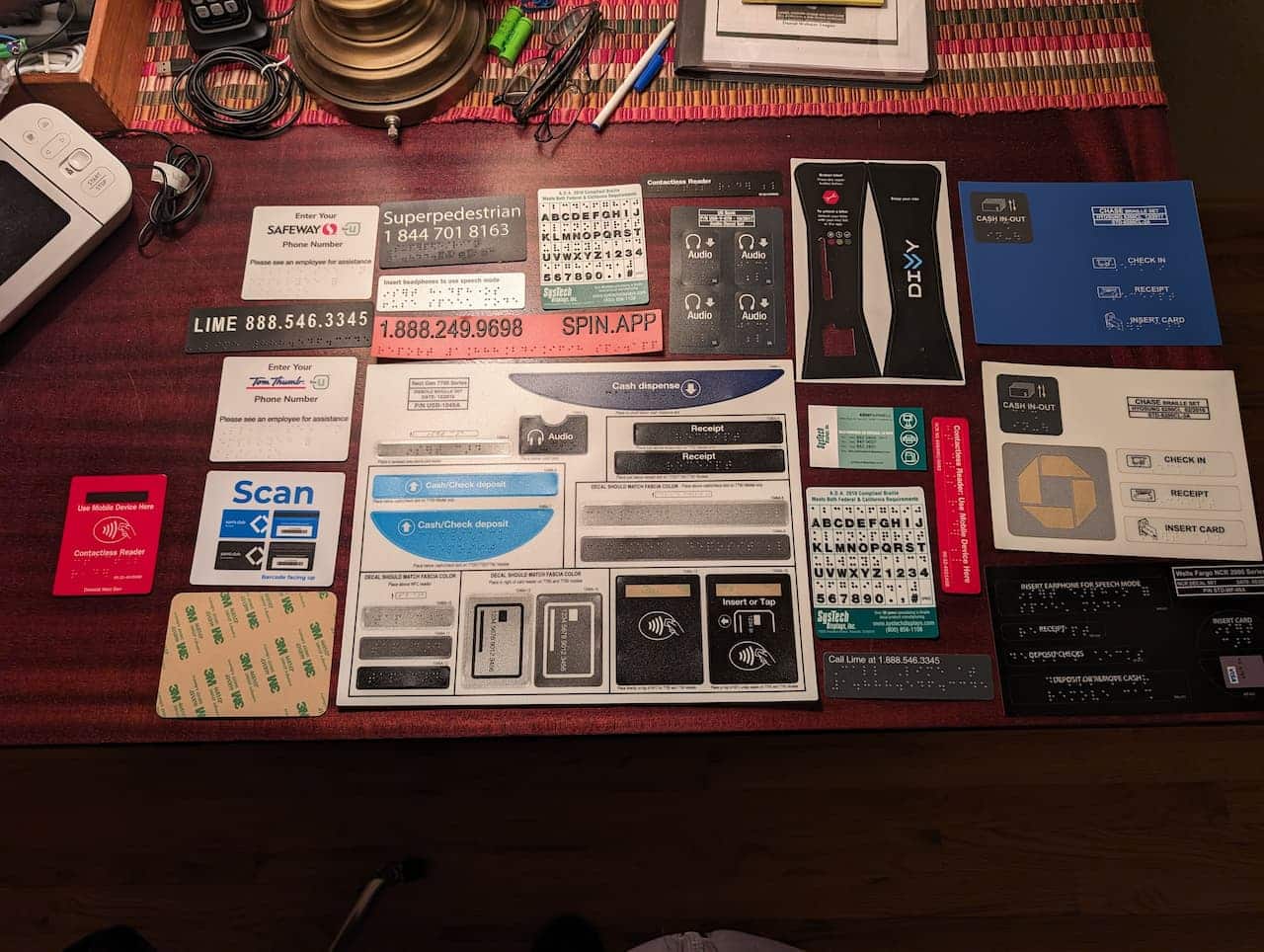
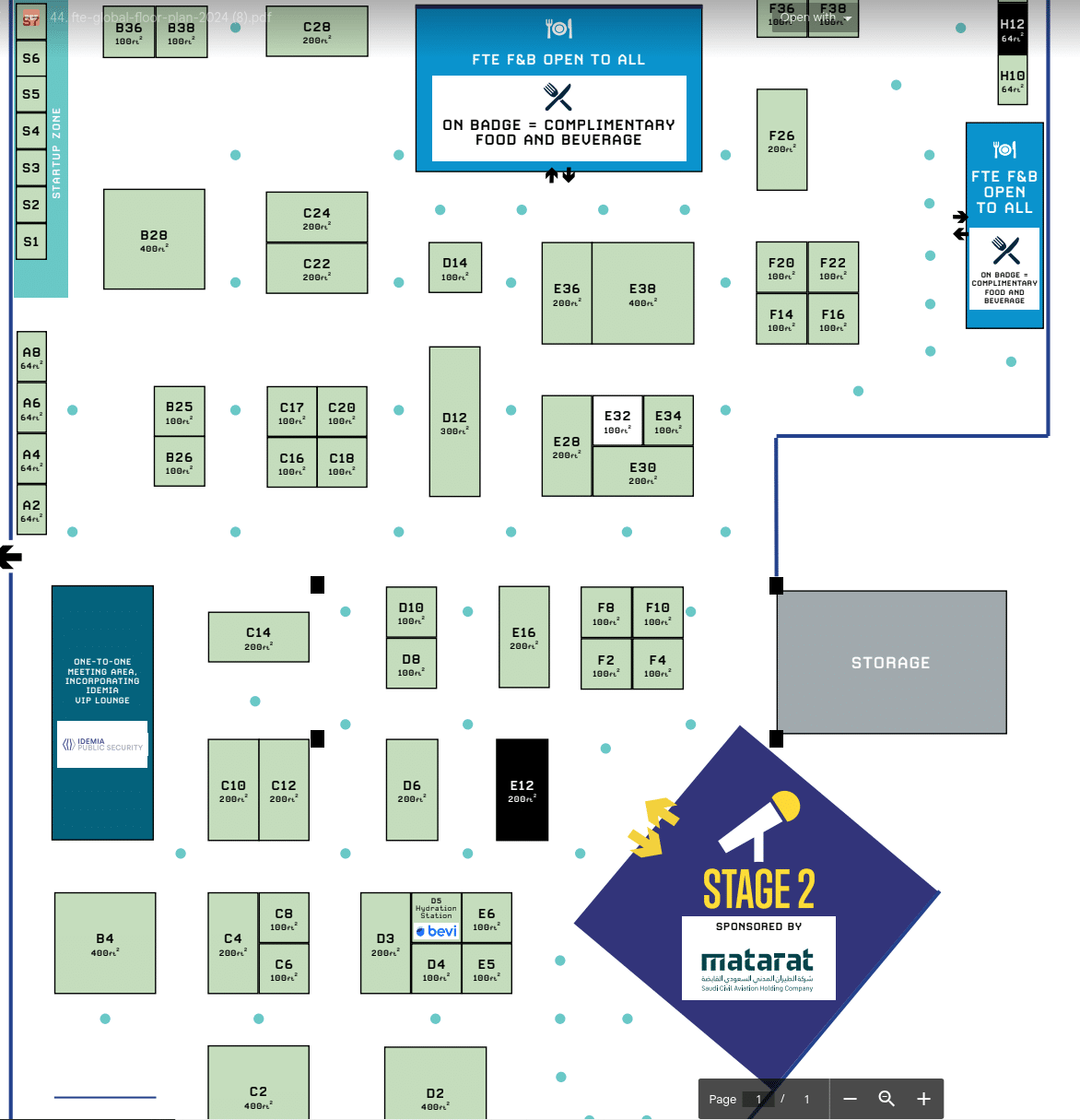
Join us at FTE in Long Beach. We will be displaying Braille labels for use in airports and airlines with SysTech and Ken Parnell in E12.  Given the show is in California makes it even more relevant for Braille.  Amazon Hubs just upgraded all of their Hubs in California to meet specific California spec. Have you?

Long Beach has its problems as does San Diego (50+ SITA kiosks)

Contact [email protected] for meeting or free sample pack.

Along with audio, one of the mandated requirements for ADA Accessibility are braille labels, especially ones that last…

Quote — “As I had mentioned I am trying to figure out who handles the Airline Industry ticketing Kiosks, every time I travel, I see what is being installed on ticketing Kiosks or the lack of and I know that we can provide a much superior product that will last and hold up to the heavy public exposure keeping the Kiosk 100% ADA compliant and legible.  I was stuck in Long Beach due to flight / weather cancellations for the last two days and had plenty of time to stare at their ticketing kiosks”, said Ken Parnell.

At SysTech Displays, we offer a wide range of standard Braille decal sets, voice guidance signage, audio signage, and network decals for most makes and models of ATMs. We also have an in-house design team that can help with custom ATM signage.

braille label decal kiosk

Click for full size – braille label decal kiosk

All our products are manufactured in the USA at our state-of-the-art facility in Northern California with our proprietary “Solid Dot” technology that stays 100% ADA compliant for the life of the decal.

While at the show be sure and visit imageHOLDERS in C10 and Pyramid Acceptors

ImageHOLDERS are a worldclass, award-winning digital kiosk manufacturer specializing in self-service Airline kiosks. With existing customers such as United, Lufthansa and Swissport, imageHOLDERS can offer end-to-end airline solutions which digitally transform any airline or airport. Digital airline kiosks boast a range of benefits, from enhancing passenger experience to saving on costs by reducing queue times and increasing check-in efficiency. They also provide opportunities for upselling once passengers are in dutyfree whilst enabling the redeployment of staff to other roles within the airport setting.

Booth location


C-Store Retailers Employee Training and Self Service

Retail Employee Self Service Kiosk

C-Store Retail Best Practices

Very nice article explaining the value and benefits of employee training as well as implementing self-service technology. Improving staff training, using technology for better execution at the store level, adding self-checkout and ordering kiosks, and outsourcing expense management are all approaches being chosen by retailers today to achieve the goal of operational excellence. Reference: csnews.com

Excerpt

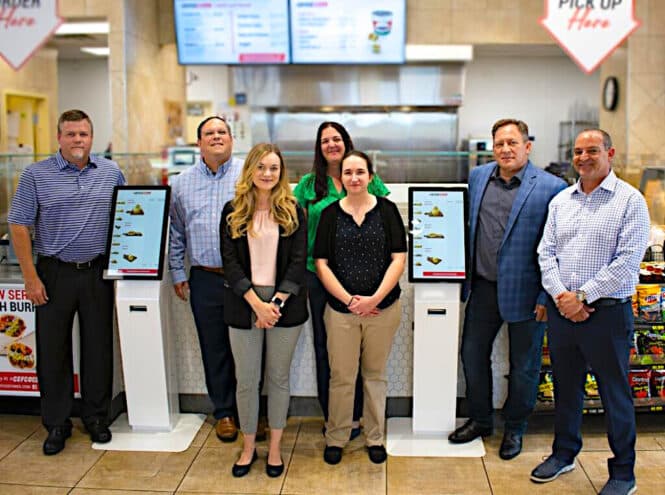
Temple, Texas-based CEFCO Convenience Stores, operator of more than 190 locations, added in-store kiosks for food service ordering in partnership with software company Reji LLC and Olea Kiosks, eliminating the need for an employee to take orders.

“One of the big challenges in a c-store is labor, and they are often short on store-level employees, so the kiosk allows for self-ordering and while the customer waits for the food, they can shop the store,” said Reji CEO Frank Yoder.

At its CEFCO Kitchen locations, the retailer prints out a receipt with a barcode for the customer to take to the checkout and pay. C-stores that do this offer their customers the opportunity to walk around the store and pick up other items while they wait, which they may not do if they already paid at the kiosk, noted Yoder.

“Kiosks have been proven in the QSR [quick-service restaurant] environment and we have seen for c-stores, the ticket lift is higher when they order through a kiosk — in some cases, by 20%-30%,” he added, explaining that it is more guilt-free for customers when they order through a kiosk and add extras. The kiosk also prompts the customer to add on items.


Key points:

  • Training and Development: Effective training is crucial for operational excellence in convenience stores. This includes initial onboarding and ongoing training to help employees grow within the company and aid retention. Custom videos and computer-based modules are used to ensure consistency across locations.
  • Self-Service Technology: Adopting self-service devices like kiosks can save labor, increase efficiency, and boost customer satisfaction. These devices allow customers to place orders and pay without employee assistance, leading to higher sales and improved customer experience.
  • Mystery Shops and Incentives: Utilizing loss prevention video systems for virtual mystery shops helps maintain high customer service standards. Employees are rewarded with cash incentives for excellent service, encouraging consistent performance.
  • Expense Management: Effective expense management can significantly impact the bottom line. This includes scrutinizing contracts for hidden fees and renegotiating terms to reduce costs. Specialized software and consulting services can help identify and eliminate unnecessary expenses.

These strategies collectively contribute to achieving operational excellence in convenience stores.

Reference: csnews.com

Related Posts

Restaurant Kitchen Employee Hygiene

touchless screen

Employee Hygiene and Touchless

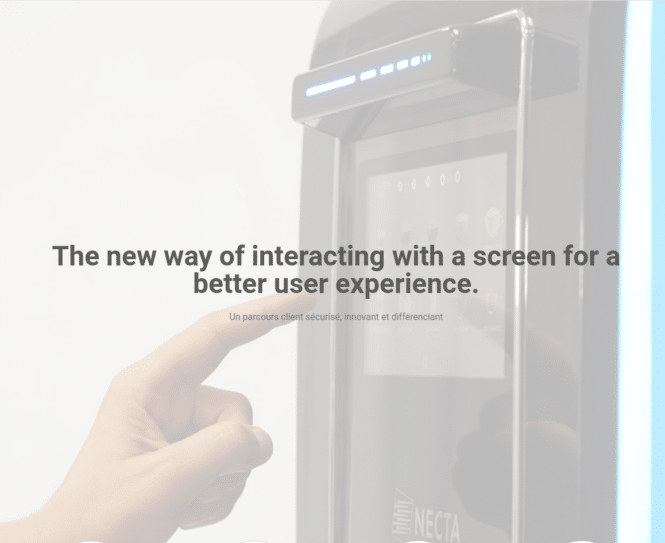
Kitchen technology for employees has improved over the years but touchless screens might just be the next generation of “touch technology”, This is a guest article by Laurence Cuni of MZ Technologie. For more information visit their website

PART I – THE BENEFITS

In the fast-paced environment of a quick-service restaurant (QSR), efficiency and cleanliness are crucial for success. A growing trend in this space is adopting touchless screen technologies to operate touchscreens. Traditional touchscreen interfaces can be challenging to use and maintain in the kitchen, where workers often handle food with dirty or greasy hands or wear gloves. New technology can result in productivity challenges, hygiene concerns, and increased device wear and tear. Touchless technology solves these challenges, providing significant benefits for cleanliness, health, productivity, and long-term cost savings.

1. Enhanced Cleanliness and Hygiene

Dirt, grease, and moisture are significant factors for touchscreens in QSR kitchens. Workers handling food with bare hands or gloves must interact with these devices for various tasks, such as adjusting timers, changing orders, or monitoring food preparation.

For example, a kitchen could use gesture controls to adjust timers, voice-activated systems for changing orders, and proximity sensors to monitor food preparation. This minimizes the buildup of grease, food particles, and other contaminants on the surface and helps reduce the spread of germs.

This shift towards touchless operation not only helps kitchens maintain higher hygiene standards but also significantly relieves hygiene concerns, providing a sense of reassurance. In environments where cross-contamination is a significant concern, touchless technology ensures food safety, further enhancing this feeling of reassurance.

2. Limiting Germ Propagation

Traditional touchscreens serve as high-contact surfaces in kitchens, often touched by multiple employees throughout a shift. Frequent contact increases the risk of germ transmission between staff, especially when handwashing practices are not enforced. The COVID-19 pandemic highlighted the importance of minimizing contact with shared surfaces to reduce the spread of viruses and bacteria.

By integrating touchless technologies in the kitchen, QSR operators can limit the spread of germs, thereby providing a protective shield for both employees and customers. This sense of protection is further enhanced by the fact that workers can perform their tasks without ever needing to make physical contact with the touchscreen. This greatly reduces the risk of contamination and germ propagation, promoting a healthier work environment and protecting both employees and customers.

3. Extended Lifespan of Touchscreens

Another significant benefit of touchless technology in QSR kitchens is the potential for extending the lifespan of touchscreens. Frequent direct interaction with touchscreens, especially with greasy or wet hands, can lead to the deterioration of screen quality over time. Screens can become scratched, coated with layers of grime, or damaged from excessive pressure or improper cleaning.

Touchless interfaces eliminate these problems by removing the need for direct physical contact. As a result, touchscreens experience less wear and tear, preserving their functionality and appearance for longer. This factor translates to fewer repairs and replacements, reducing downtime caused by malfunctioning screens.

In addition to protecting the screen, touchless technology reduces the need for harsh cleaning methods. Traditional touchscreens require frequent cleaning with chemical solutions to maintain cleanliness, which can degrade screen coatings and contribute to long-term damage. With touchless systems, the frequency and intensity of cleaning can be minimized, further extending the lifespan of the devices.

However, it’s important to note that touchless technology is highly adaptable and can be used for a variety of tasks in a kitchen. There may be a learning curve for employees to adapt to these new systems, but the benefits far outweigh the initial adjustment period. Another possible application is for outdoor touchscreens, in harsh weather conditions, such as on a cruise ship, in maritime environments where waterproof solutions are necessary and available, or in ski resorts, where operating with gloves is a must-have!

4. Enhanced Productivity and Workflow

In a QSR kitchen, speed and accuracy are vital to maintaining productivity. Employees are often under pressure to meet tight deadlines while ensuring that food is prepared and delivered quickly. Touchscreens are critical for managing orders, tracking inventory, and coordinating kitchen operations. However, traditional touchscreens can slow down productivity, particularly when workers must pause to remove gloves or clean their hands before interacting with the devices.

Touchless technology streamlines kitchen workflows by allowing employees to operate screens without needing to stop and clean their hands or remove gloves. Gesture controls, for instance, enable workers to perform simple tasks with a wave of their hands. At the same time, voice-activated systems can allow them to adjust settings or retrieve information without physically touching the screen.Here is the rewritten text based on the input:

Reducing screen malfunctions due to touchless operation also helps maintain smooth kitchen workflows. Broken or malfunctioning touchscreens can cause significant disruptions, slowing order processing and leading to longer customer wait times. Touchless technology ensures that these systems remain operational and practical by preventing damage to touchscreens, contributing to a more productive kitchen environment.

5. Cost Savings Through Reduced Downtime and Maintenance

Touchless technology benefits productivity and delivers significant cost savings for QSR operators. Traditional touchscreens are prone to damage and wear, which leads to frequent repairs and replacements. Downtime caused by malfunctioning touchscreens can result in delays and lost revenue as kitchens struggle to keep up with customer orders. By reducing physical contact with the screens, touchless systems help prevent these issues, leading to fewer breakdowns and a longer lifespan for the devices. This factor reduces the need for costly repairs and replacements, helping QSR operators save money in the long run and feel financially secure.

In addition, fewer maintenance interruptions mean that employees can continue to work efficiently without dealing with screen failures or waiting for technical support. Reducing downtime contributes to higher overall productivity, allowing kitchens to meet customer demand without delays.

PART I – Conclusion

Touchless technology represents a game-changing innovation in QSR kitchens, offering numerous benefits that improve cleanliness, reduce germ propagation, extend the lifespan of touchscreens, enhance productivity, and deliver cost savings. As the demand for
operational efficiency and food safety grows, adopting touchless systems will help QSR operators stay competitive while maintaining a healthy, productive work environment. This shift protects employees and customers and ensures that kitchens can operate smoothly and profitably, even in the most fast-paced conditions.
In the upcoming PART II, we will delve into the specific types of touchless technology available for QSR kitchens, their features, and how they can be integrated into existing operations.

Illustration, courtesy of MZ Technologie, https://mz-technologie.com/en/, a leader in touchless technologies. Contact: [email protected] (European Sales, based in Paris), [email protected] (Rest of the world, based in New York – (848)-234-1845)

touchless screen

touchless screen

Related Content

Wristband Printing Wristband Tickets

RFID wristbands

Wristband Printing and Encoding at a Kiosk

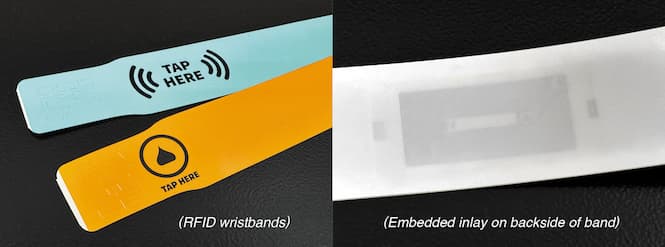
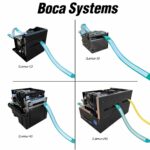
Boca Systems, Inc. has been a leading manufacturer of high-speed thermal printers for the past 44 years. BOCA’s printers can be configured for use with various media, such as thermal tickets, labels, receipts, or wristbands. The last item has experienced increased demand in the past couple years, especially with optional RFID encoding capabilities.

Editors Note:  Boca will be at the upcoming IAAPA show and is available for meetings.

“We have seen increased sales of our kiosk printers for use with both RFID and standard thermal wristbands, with RFID wristbands playing a bigger role at theme parks, festivals, fairs, and for hospitality”, says Louis Rosner, Boca Systems’ Vice President.

“With an RFID wristband, clients report improved access control and increased sales of products throughout the venue, including food, swag, etc,” Louis shared.

The BOCA kiosk printer will print any required data on the wristband (such as a barcode, text or graphics) and encode on an RFID chip embedded within the wristband. Popular BOCA models include the Lemur-K, Lemur-C and Lemur-X, as well as the dual path kiosk printer, the Lemur-2K. BOCA supports the most popular RFID chips, including Mifare, UHF and Icode.

In addition to producing high speed thermal printers, BOCA prides itself in providing the highest quality wristbands for use with its printers.  “Our wristbands are designed by the same folks that engineer our printers, so we are confident that our wristbands are the best choice for optimal kiosk and printers operations”, Rosner shared.

For further information on BOCA’s wristband printers and media, please contact [email protected]


Are Wristbands Popular?

Yes, wristband tickets are very popular at amusement parks! They offer several benefits that enhance the guest experience:

  1. Convenience: Wristbands, especially those with RFID technology, allow for quick and easy access to rides, attractions, and other park amenities. They can also be used for cashless payments, making it easier for guests to purchase food, souvenirs, and other items without carrying cash or cards.
  2. Security: These wristbands are often tamper-proof and non-transferable, reducing the risk of lost or stolen tickets.
  3. Efficiency: Wristbands help reduce queue times at entry points and rides, as they can be scanned quickly. This improves the overall flow of guests throughout the park.
  4. Customization: Many parks offer customizable wristbands that can be branded with the park’s logo or special designs, adding a fun and personalized touch to the guest experience.

For example, Disney’s MagicBands are a well-known implementation of this technology, allowing guests to enter parks, unlock hotel rooms, and make purchases with just a tap.

Have you used wristband tickets at an amusement park before? How was your experience?


More Wristband Printing Related Posts


Summary of IAAPA article with Wristband RFID technology

  • RFID Wristbands: These wearable devices allow guests to access facilities, pay for goods, and enjoy interactive experiences at theme parks and zoos.
  • Mobile Apps: Platforms like Attractions.io help parks manage visitor experiences, from ticketing to navigation and food ordering.
  • Crowd Management: Solutions like Veovo provide insights on guest movement and wait times, improving flow and reducing congestion.
  • Enhanced Experiences: Technologies create personalized and engaging experiences, such as interactive missions and surprise elements.
Reference: iaapa.org

Kiosk Industry Press Release October 20

iaapa kiosk

Self Service Kiosk October 2024 News from Kiosk Manufacturer Association
Our kiosk industry booth at IAAPA features a strong lineup of partners

WESTMINSTER, Colo., Oct. 15, 2024 (PR Newswire) — Kiosk Manufacturer Association updates for October 2024, announced. As we gear up for IAAPA in Orlando this November, we’re excited to showcase our expertise in the kiosk market. Our demos will include self-order, digital wayfinding, cash-to-card, and accessibility. These solutions are particularly well-suited for amusement parks and cruise ships, where self-service, self-order, and digital signage (such as wayfinding) are in high demand. Did you know that Disney in Orlando has over 200 restaurants and covers 43 square miles?

Did we mention free passes? We have those too.

“Our booth at IAAPA features a strong lineup of partners, including Pyramid kiosks (two units), RedyRef (two units), AcquireDigital, & TPGi. TPGi will be showcasing a demo from imageHOLDERS,” says KMA executive director Craig Keefner. “In the digital signage pavilion, you can also find 22Miles and Elotouch, demonstrating our commitment to collaboration and innovation. Our next tradeshow after IAAPA is NRF in January.”

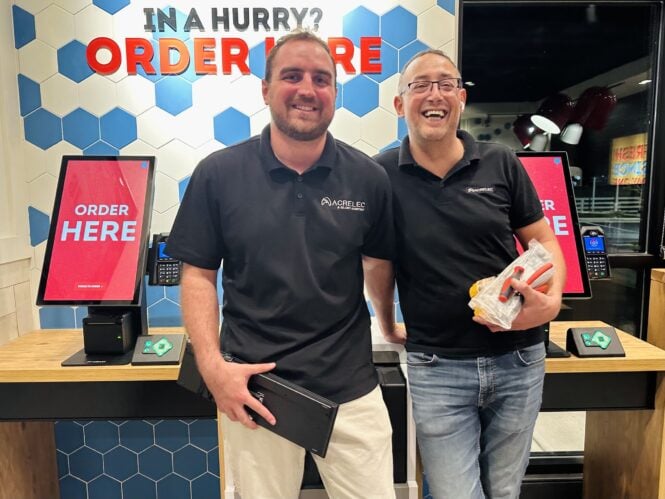
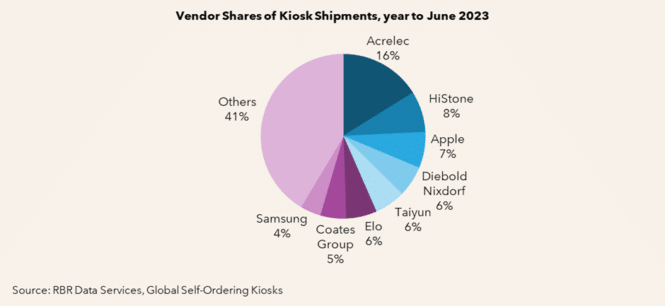
DataByte — The latest India datamart report says “kiosk market 64B. That is for 2032 and more than half of their numbers are ATMs. This data is significant for us as it underlines the trending growth in the kiosk market. There is double-counting (KFC deploys 5000 kiosks & so does ACRELEC America who makes them for KFC. McDonalds deploys 10,000 kiosks? Diebold Nixdorf does too. \And for triple counting Pyramid Computer makes the McD units for DN.

Latest

• Stats Smorgasboard
• EV Chargers by LG Available
Patient Kiosk – Top 5 Reasons
• WCAG for Non-Web Guidelines
• Self-Order Management – Case Study 1100 Units
Interactive Display Software
• Europe – Advantech Buys AURES
• Europe – Restaurant Self-Order – Ordu & Lazenby
• Wendy’s Deploys ACRELEC
• SUZOHAPP New President Geoff McDowell
Retail Automation
• Chipotle Robots Peeling Avocados
• Sweetgreen Robots – Not So Fast !
Self-Checkout Systems – Advantages Disadvantages
• Payment Processors – Shift4 is really Shaft4?
• McDonald’s Market Research
• Touchscreen or Person – Which is Better?
• Concerns for Toast’s TAM

Contact [email protected] with questions or contacts. We accept no financial commission or paid advertising.

About Kiosk Industry

Your best source for opinions, insights, news, and market trends for self-service kiosks, digital signage, POS, and more. Learn from the experts. We are a “co-op” of over 700 companies.

About the Kiosk Association
Our mission is to inform and educate. Accessibility, ADA, PCI, UL are some of our focus points. Join us for informative Q&A webinars and weekly or monthly update emails (no ads). Learn more: https://kma.global/
Thanks to the companies who make this possible.

MEDIA ONLY CONTACT:
Craig Keefner
Kiosk Association of Manufacturers
EMAIL: [email protected] | PHONE: 720-324-1837
KMA LOGO: https://www.Send2Press.com/300dpi/23-0918-s2p-kmalogoblk-300dpi.jpg
###


Related Kiosk Industry Posts

Stats Smorgasboard – What We See

Stats

Stats – Restaurant, POS, Kiosks, Digital Signage

We all like stats and numbers, too. Generally, though, any stats for any market are 95% of the time from India + they are automatically raised 10% from last year’s report + they want $5000 for them.  Generally all the wrong companies are listed, there are very pretty charts and graphs, half of the copy is reiterated in different ways and there is zero insight to be gained.  You may as well listen to certain cable channels for “news”. There are some decent data firms, but even they often suffer from their “sponsor influence” (RBR in Europe, e.g.).  “I paid for this microphone” principle applies.

There is some value in these reports.  Generally they are triggered by more activity in markets (thus more potential sales) so a certain trend can be identified.

Kiosk Stats

kiosks Infinitive Research Report released 11/27 – Terrible & False

2024

Restaurants

Industry Group Kiosks Digital Signage

2024

Airport Kiosks

USD 2.19 billion in 2023 to USD 2.35 billion in 2024. It is expected to continue growing at a CAGR of 7.67%, reaching USD 3.68 billion by 2030.

2024

Restaurant POS Terminals

Expands from $29.57 billion in 2023 to $31.64 billion in 2024, achieving a compound annual growth rate (CAGR) of 7.0%.  BRC

2024


Restaurants Stats

Restaurants

Industry Group Kiosks Digital Signage

2024

Restaurants

Industry Group Kiosks Digital Signage

2024

Restaurant POS

USD 2.19 billion in 2023 to USD 2.35 billion in 2024. It is expected to continue growing at a CAGR of 7.67%, reaching USD 3.68 billion by 2030.

2024

Restaurant POS Terminals

A new study published by Report Ocean Market Research projects that the global Restaurant POS Terminals market is expected to achieve a valuation of USD 30,966 million by 2026. In 2017, fixed POS terminals held the dominant position in terms of revenue, and North America is predicted to be the leading contributor to the market revenue during the forecast period.

2024

Restaurant POS Terminals

According to the report published by Allied Market Research, the global restaurant point of sale (POS) terminal market accrued earnings worth $16.5 billion in 2021, and is expected to hit $44.6 billion by 2031, registering a CAGR of 10.8% from 2022 to 2031.

2024


Digital Signage Stats


Digital Signage

Digital Signage Market size was valued at USD 20.04 billion in 2023 and the total Digital Signage revenue is expected to grow at a CAGR of 7.15% from 2024 to 2030, reaching nearly USD 32.55 Billion by 2030.

2024

Digital Signage Touch Apps

Samsung Electronics, LG Electronics, NEC, Sony, Panasonic, Cisco Systems, Sharp Corporation, Elo Touch, Planar. CAGR of 11.2% during the forecast period (2024-2030)

Digital Signage India

US$ 604.8 million in 2021 and is expected to exhibit a CAGR of 15.2% over the forecast period (2021-2028).


Healthcare Stats

Patient Kiosk SW The patient check-in kiosk software market size is expected to see rapid growth in the next few years. It will grow to $12.84 billion in 2028 at a compound annual growth rate (CAGR) of 10.3%. Business Research Company (India).  Pretty terrible.

2024

Telehealth

The global telehealth kiosk market is projected to reach a valuation of over USD 4,129.80 million by 2034, marking substantial growth from its current estimate of approximately USD 2,060.50 million in 2024. With a Compound Annual Growth Rate (CAGR) of 7.20% over the forecast period, the market’s expansion is underscored by rising demand for accessible healthcare services, particularly in underserved and rural areas.

2024

2024


Related Data

EV Chargers by LG Now Available

LG EV Charger Station

LG EV Chargers Now Available

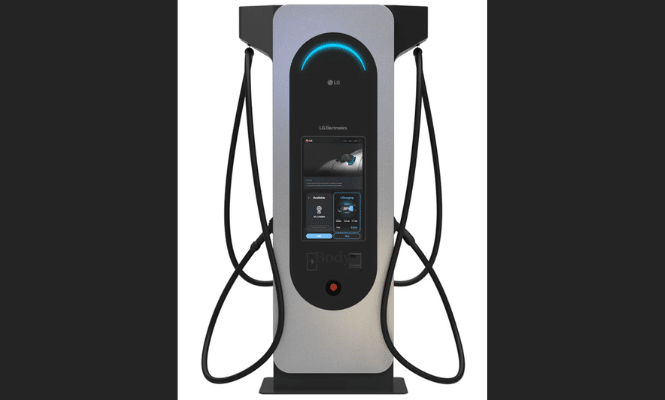
LG Business Solutions has announced they will begin taking orders for their first Level 3 DC Charger in the United States.

The new fast charger, model LG EVC175SK-PN, has been certified to UL 2594, the UL Standard for Electric Vehicle Supply Chain Equipment. The Level 3 DC Charger has a number of dynamic features including load management of multiple chargers, a high resolution 24” LCD touchscreen display, and a liquid cooled CCS/NACs charging cable.

Underscoring LG’s commitment to the electrification of America with independently owned and operated charging stations and expanding business opportunities by creating new revenue streams, additional marketing and income opportunities, and differentiation with competing businesses.

LG Business Solutions EV Charging


FOR IMMEDIATE RELEASE

LG TAKING ORDERS FOR LEVEL 3 DC FAST CHARGER,  EXPANDING LINEUP FOR GROWING EV INFRASTRUCTURE

New Level 3 DC Charger to Join LG’s Level 2 AC Charger
Offering Commercial Customers Flexibility in Meeting Needs of EV Customers

LINCOLNSHIRE, Ill., Oct. 3, 2024 — Further strengthening its commitment to meet the growing market need for fast, reliable EV vehicle charging solutions, LG Business Solutions USA has begun taking orders for LG’s first Level 3 DC Charger in the United States. The new fast charger, model LG EVD175SK-PN, has been certified to UL 2594, the UL Standard for Electric Vehicle Supply Equipment.

To be assembled starting this fall at the company’s Fort Worth, Texas EV charging production center, LG’s new stylishly designed Level 3 DC Charger features dynamic load management of multiple chargers, a high resolution 24-inch LCD touch-screen display, and liquid cooled CCS/NACS charging cable. The charger is a stand-type model with a connected Power Bank that provides fast charging up to 175kW. The outdoor LCD touch-screen display can serve multiple functions for various owners and use cases.

“LG continues to invest in the global electrification movement, and the announcement of our first Level 3 DC charger demonstrates our ongoing commitment to provide our U.S. commercial customers with solutions that enable them to build out their EV vehicle charging infrastructure,” said LG Business Solutions Senior Vice President Michael Kosla.

For LG commercial customers, the availability of the Level 3 DC chargers opens the door to new business opportunities, according to Kosla. “Together, our Level 2 and Level 3 chargers are creating new opportunities for businesses, municipalities and other public places to support the electrification of America with independently owned and operated charging stations that create new revenue streams, additional marketing and income opportunities, and differentiation with competing businesses.”

LG’s EV chargers are part of LG Electronics’ broad electrification strategy that empowers customers to convert buildings to more sustainable energy usage, saving money and protecting the environment in the process. LG’s suite of whole home electrification products includes heat-pump-enabled HVAC systems, water heaters and dryers, energy storage systems, and ENERGY STAR® certified smart appliances, including induction ranges and cooktops. To further aid in energy and cost savings, LG’s ThinQ Energy platform allows customers to take control of their home’s energy usage at their fingertips.

LG employs a nationwide network of sales, customer support and technical maintenance professionals that provides LG with a significant advantage over smaller EV charging firms and provides buyers with peace of mind when investing in their privately-owned charging
infrastructure. LG’s Level 2 AC and Level 3 DC chargers also feature trusted LG software to enable integration with other LG infrastructure elements including digital display networks.

For more information on LG’s EV Charger solutions, click here. For images, click here.

About LG Business Solutions USA

The LG Electronics USA Business Solutions division serves commercial customers in the U.S. lodging and hospitality, digital signage, systems integration, healthcare, education, government and industrial markets – with cutting-edge commercial displays, robots and electric vehicle charging stations. Based in Lincolnshire, Ill., with its dedicated engineering and customer support team, LG Business Solutions USA delivers business-to-business technology solutions tailored to the particular needs of business environments. Eleven-time ENERGY STAR® Partner of the Year LG Electronics USA Inc., based in Englewood Cliffs, N.J., is the North American subsidiary of LG Electronics Inc., a $60-billion-plus global force in consumer electronics, home appliances, air solutions and vehicle components. For more information, please visit www.LGSolutions.com.

Media Contacts:

LG Electronics USA

Kim Regillio
+1 815 355 0509
[email protected]

Caleigh McDaniel
[email protected]


Related Posts

Patient Kiosk in Healthcare – Top 5 Reasons to Use

patient kiosk

Top 5 Reasons Healthcare Embrace Self-Service Kiosks

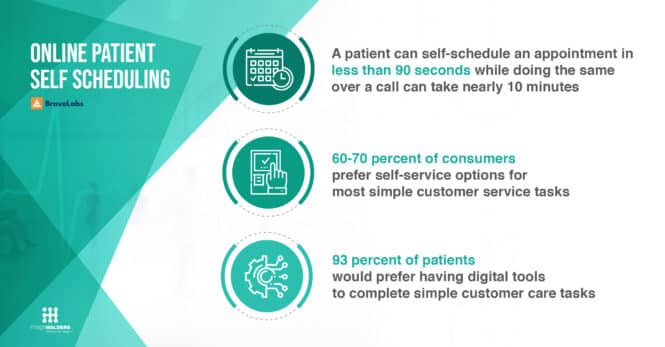
This guide, published by ImageHOLDERS, explores the key benefits of integrating self-service kiosks into healthcare settings and how they contribute to a more efficient, patient-centric approach.

Patient check-in kiosk technology is a key driver in modern healthcare

In today’s fast-paced world, efficiency is critical, especially in healthcare, where time saved can directly impact patient outcomes.

As healthcare providers strive to deliver better services while reducing operational burdens, self-service kiosks are becoming an increasingly valuable tool. These kiosks offer more than just convenience; they streamline administrative tasks, improve patient engagement, and enhance data accuracy.

Whether you’re managing a small clinic or a large hospital, self-service kiosks can transform the patient experience, enabling healthcare providers to focus on what matters most, delivering quality care.

This guide explores the key benefits of integrating self-service kiosks into healthcare settings and how they contribute to a more efficient, patient-centric approach.

What is a Self-Service Patient Kiosk in Healthcare?

Technology plays a pivotal role in enhancing patient experiences, one such innovation is the self-service patient kiosk, a digital solution designed to automate routine tasks in medical facilities.

These kiosks are interactive touch-screen stations that allow patients to manage various administrative tasks independently, such as checking in for appointments, updating personal information, or making payments.

Self–service kiosks empower patients to take control of their healthcare journey, while freeing up staff to focus on more critical aspects of care delivery.

5 Benefits of Self-Service Kiosks in Healthcare

Self-service patient check-in kiosks offer a range of benefits that directly enhance patient satisfaction in healthcare settings.

Here’s a breakdown of key advantages:

     1. Convenience and Speed

Kiosks streamline the check-in process, allowing patients to bypass long queues and tedious paperwork. This faster experience shows patients that their time is valued, which leads to higher satisfaction and a more efficient flow in healthcare facilities.

     2. Improved Accuracy

By allowing patients to enter and verify their data, kiosks help reduce administrative errors. This ensures that information such as contact details and medical history is up-to-date and accurate, contributing to smoother care delivery.

     3. Enhanced Privacy and Security

Modern kiosks are equipped with privacy safeguards, such as screens that shield personal information from onlookers. This reassures patients about the confidentiality of their data, fostering trust and comfort in healthcare providers.

     4. Cost Efficiency and Resource Management

By automating routine administrative tasks, healthcare facilities can reduce operational costs and the need for additional front desk staff. This optimization also frees up existing staff to focus on patient care.

     5. 24/7 Access and Multilingual Support

Self-service kiosks can provide round-the-clock availability, allowing patients to check in or manage appointments outside of normal office hours. Many kiosks also offer multilingual support, enhancing accessibility for non-English-speaking patients.

As healthcare providers adopt these technologies, many report significant improvements in patient satisfaction, thanks to the convenience, accuracy, privacy, and overall modern experience that kiosks provide.

Deployment Areas for Patient Check-In Kiosks

Patient check-in kiosks are versatile solutions that can be deployed across a range of healthcare environments, from large hospitals to local clinics and GP surgeries.

Healthcare Blog Image

In hospitals, kiosks streamline the check-in process for outpatient visits, reducing congestion in busy reception areas.

Clinics and GP surgeries benefit from kiosks by allowing patients to quickly check-in for appointments, verify their information, and update records without relying on administrative staff.

Pharmacies are also adopting these kiosks to facilitate faster prescription pickups and consultations, improving service efficiency. By being integrated into various healthcare settings, patient check-in kiosks enhance operational flow while offering patients a convenient, modern experience.

Hospital Kiosk Design and Implementation

Designing and implementing hospital kiosks requires a user-centric approach, ensuring that the interface is intuitive and accessible to all patients, regardless of their technical skill level.

The kiosk interface should offer clear navigation, large buttons, multilingual support, and assistive technologies to accommodate diverse patient needs. Seamless integration with existing hospital systems, such as electronic health records (EHR) and scheduling software, is crucial for real-time data updates and efficient patient management.

Moreover, compliance with data privacy and security regulations, such as HIPAA, is paramount.

Kiosks must include:

  • Robust encryption
  • Secure authentication methods
  • Privacy features to protect sensitive patient information, ensuring that healthcare providers maintain the highest standards of confidentiality and trust

Patient Self-Check-In Systems and Applications

Patient self-check-in systems are digital solutions that allow patients to manage their registration and administrative tasks independently upon arrival at a healthcare facility. These systems often come equipped with key features such as appointment scheduling, which enables patients to book, confirm, or cancel appointments with minimal assistance.

This reduces the administrative burden on staff and ensures more accurate scheduling, helping to prevent overbooking or missed appointments.

Another valuable feature is insurance verification, where patients can directly enter or update their insurance details, allowing the system to verify coverage in real time.

This streamlines billing processes and minimizes delays in care caused by insurance discrepancies.

Healthcare Blog Image

By automating these tasks, patient self-check-in systems optimize patient flow, reducing wait times and congestion at reception areas. This efficient management of the check-in process also leads to higher patient satisfaction, as it creates a more seamless and less stressful experience.

Additionally, these systems improve data accuracy and minimize human error, ensuring that healthcare providers have the correct patient information from the outset.

The Impact of Implementing Patient Check-In Kiosks: Enhancing the Healthcare Experience

Overall Patient Experience

By offering convenience, accuracy, and privacy, patient check-in kiosks contribute to a more modern, patient-centric healthcare experience. Patients appreciate healthcare facilities that invest in technology to make their visit easier and more efficient.

The reduced stress of navigating complex administrative tasks and the assurance of data security positively influence how patients perceive the quality of their care. In summary, implementing patient check-in kiosks not only streamlines healthcare operations but also greatly enhances patient satisfaction.

From faster check-ins to secure data handling, kiosks offer a transformative solution that improves the entire healthcare journey.

Ryan Cuthbert, Vice President of Medent said:
“Our end users and their customers have received the kiosks well. We have a vast portfolio of solutions and the new kiosk provides an all-in-one solution that functions in various ways, saving time for the receptionist and providing patients a quick way to check-in and feel in control of their journey.”

Our Commitment to Inclusive Self-Service Kiosks

At ImageHOLDERS, we are committed to designing inclusive self-service kiosks that ensure everyone has equal access to technology, regardless of ability.

Our kiosks are built with accessibility at the forefront, aligning with the standards set by the Americans with Disabilities Act (ADA). This means they are designed to accommodate users with a range of physical and cognitive challenges, incorporating features such as adjustable heights, tactile buttons, and screen readers.

The ADA mandates that public accommodations, including healthcare facilities, provide accessible services for individuals with disabilities, and non-compliance can lead to legal repercussions.

By prioritizing accessibility, we not only meet these requirements but also uphold our core belief that technology should be intuitive and effortless for all users. Ensuring inclusivity in our kiosk designs enhances the overall user experience while fostering a more equitable and welcoming environment.

Non-compliance in making kiosks accessible could lead to legal repercussions and fines.

Choosing the Right Kiosk Vendor

Choosing the right kiosk vendor is a crucial step for any organization looking to enhance its services with self-service technology. At ImageHOLDERS, we understand that several factors should guide your vendor selection process.

  1. First, consider cost, it’s important to find a vendor that offers a balance of quality and affordability without compromising on features.
  2. Next, evaluate software compatibility to ensure that the kiosks can seamlessly integrate with your existing systems, such as electronic health records or appointment scheduling platforms.
  3. Finally, assess the level of technical support provided by the vendor; a responsive and knowledgeable support team is essential for troubleshooting and maintenance, ensuring your kiosks operate smoothly over time.

By focusing on these key aspects, organizations can make informed decisions that align with their operational goals and enhance overall efficiency.

FAQs About Patient Self-Service Kiosks

What is a self-service kiosk?

A self-service kiosk is an interactive, digital terminal that allows patients to perform various tasks independently, such as checking in for appointments, updating personal information, scheduling future visits, and making payments. These kiosks enhance the patient experience by reducing wait times and streamlining administrative processes in healthcare settings.

How much do they cost?

The cost of self-service kiosks can vary widely based on factors such as the kiosk’s features, design, and the vendor you choose. On average, the initial investment for a self-service kiosk can range from a few thousand to tens of thousands of dollars, depending on the level of customization and technology integration required.

It’s important to consider not just the upfront costs, but also ongoing maintenance and support expenses when budgeting for your kiosks.

What design considerations are important?

When designing self-service kiosks for healthcare settings, several considerations are crucial. First, ensure the kiosk is user-friendly, with an intuitive interface that accommodates patients of all ages and tech-savviness.

Accessibility is also vital; kiosks should comply with the Americans with Disabilities Act (ADA) by including features like adjustable heights, tactile buttons, and screen readers.

Additionally, consider the kiosk’s integration with existing healthcare systems to ensure seamless data flow and accurate patient information. Finally, the overall aesthetic should be welcoming and aligned with your facility’s branding to create a positive impression for patients.

Tips and warnings

As healthcare providers navigate the demands of modern patient care, self-service kiosks emerge as a transformative tool that enhances efficiency and patient satisfaction.

Here are the key takeaways from this guide:

  1. Convenience and Speed: Kiosks streamline the check-in process, reducing wait times and allowing patients to manage their appointments with ease. This demonstrates respect for patients’ time, contributing to higher satisfaction.
  2. Improved Accuracy: By allowing patients to enter their data directly, kiosks minimize administrative errors and ensure that information is accurate and up-to-date, leading to smoother care delivery.
    Enhanced Privacy and Security: Equipped with privacy safeguards, kiosks protect sensitive patient information, fostering trust and confidence in the healthcare provider.
  3. Cost Efficiency and Resource Management: Automating routine tasks helps reduce operational costs and allows staff to focus on delivering quality care rather than administrative duties.
  4. 24/7 Access and Multilingual Support: Kiosks provide patients with around-the-clock access to check-in and manage appointments, while also supporting multiple languages to accommodate diverse populations.

Tips and Warnings

While the benefits of implementing self-service kiosks are significant, healthcare providers should consider potential challenges, such as the initial investment costs, the need for proper training for staff and patients, and ongoing maintenance and support requirements. It’s essential to select a vendor that aligns with your organization’s needs and ensures compliance with accessibility standards like the ADA.

By integrating self-service kiosks, healthcare organizations can greatly improve patient experiences, streamline operations, and ultimately focus on what matters most—providing high-quality care.

Transform Your Patient Check-In Experience Today!

Unlock a more efficient and seamless patient check-in process by integrating our custom kiosk solutions, tailored to meet your facility’s unique needs. Discover how our advanced kiosks can revolutionize your healthcare environment—enhancing patient satisfaction, streamlining workflows, and elevating the overall quality of care.

Don’t wait to enhance your patient experience!

Contact us today to learn more and take the first step toward implementing your custom kiosk solution.

Let’s work together to create a healthcare experience that your patients will love!

patient kiosk imageholders

patient kiosk imageholders


Related Links


WCAG for Non-Web Guidelines

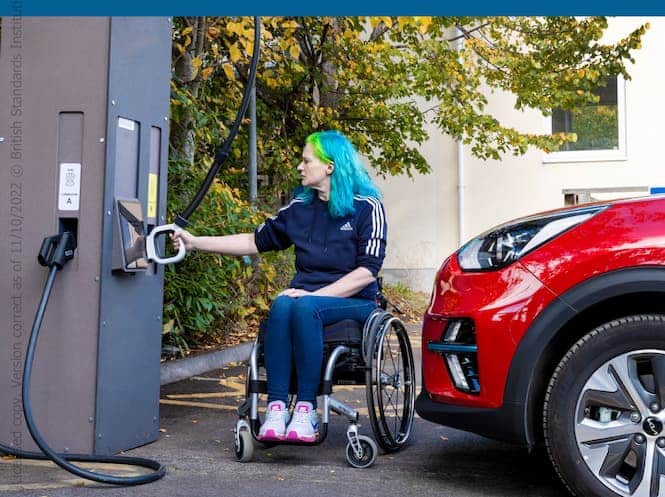
EV Accessibility UK and ETSI

WCAG Guidelines for Non-Web

Posted on KMA.global

Latest guidance from W3C on basically closed systems which do not fall under the Open systems that WCAG normally applies to,

Think someone using their desktop at home versus using an ATM.

The accessibility guidelines for closed systems do in fact have references to WCAG (three total) and the US Access Board certainly considers W3C guidelines as one of their foundations for accessibility. The European standards (349) also follow.

These new “guidelines” are not legalistic in nature. They are suggestions and recommendations on what WCAG parameters should be considered when doing “closed systems”.

Oddly enough large format screens such as interactive digital for wayfinding, smart cities, or classroom schools are not detailed.

The working committee deciding all this had no representation from the kiosk or digital signage sector though Phil Day is very accomplished albeit basically NCR ATMs and checkouts (based in Scotland).  NCR checkout technology such as that at Walmart or Whole Foods (based in Atlanta) only marginally pass ADA rules. The question then becomes is whether all that is client-driven and for the most part we believe it is. Walmart decides its liability. See ADA – Whole Foods SCO Review – Amazon Accessibility

We are not sure why they spent two years on this just to create a subset of the main WCAG. We also wish regulatory guidelines took the daring step of providing actual real like examples but that is problematic for them. And then you have to wonder about California. ADA is different in California (Braille Label – Braille Decals for ADA Accessibility)

Including mobile is definite plus for sure.

For baseline testing of desktop and mobile accessibility the best option is to have Google do it for you (https://pagespeed.web.dev/). It uses WCAG 2.1 as base.

Definition of closed systems by W3C

  • self-service transaction machines or kiosks — examples include machines used for retail self-checkout, point of sales (POS) terminals, ticketing and self-check-in, and Automated Teller Machines (ATMs).
  • telephony devices such as internet phones, feature phones, smartphones, and phone-enabled tablets
  • educational devices such as interactive whiteboards and smart boards
  • entertainment technologies including gaming platforms or consoles, smart TVs, set-top boxes, smart displays, smart speakers, smart watches, and tablets
  • an ebook reader or standalone ebook software that allows assistive technologies to access all of the user interface controls of the ebook program (open functionality) but does not allow the assistive technologies to access the actual content of book (closed functionality).
  • medical devices such as digital blood pressure monitors, glucose meters, or other wearable devices
  • an operating system that makes the user provide login credentials before it allows any assistive technologies to be loaded. The login portion would be closed functionality.
  • other technology devices, such as printers, displays, and Internet of Things (IoT) devices

On October 8th, 2024, the W3C Accessibility Guidelines Working Group (AGWG) published Guidance on Applying WCAG 2 to Non-Web Information and Communications Technologies (WCAG2ICT) as a completed W3C Group Note. WCAG2ICT describes how Web Content Accessibility Guidelines (WCAG) principles, guidelines, and success criteria can be applied to non-web information and communications technologies (ICT), specifically to non-web documents and software. The Note includes guidance for WCAG 2.0, 2.1, and 2.2 success criteria and glossary terms. For an introduction, see: WCAG2ICT Overview.


More WCAG Guidelines

Kiosk Update and Management – Coffee Restaurant Case Study 2024

touch screen kiosk maintenance

Kiosk Update and Management Case Study

Every successful kiosk project requires maintenance, updates and upgrades. Here is a good example of wanting to migrate the Windows version to the latest windows version for maximum support, reliability and security.


Milestone achieved! We just successfully migrated 1,176 kiosks from Windows 8 to Windows 10 for remotely! A huge technical achievement for our team.

These ACRELEC kiosks are 5 years old, and honestly, they’re ready to go for another 5 years.

When people ask why our kiosks might be more expensive than others, it’s simple:
– Minimal downtime
– Exceptional performance even after years of use
– Seamless integration of peripherals, drivers, and system stability
– Remote OS support & migrations (like this one) without the cost of on-site visits
– Even sometimes PC upgrade kits, even for kiosks that are 10 years old!

Investing in quality means long-term reliability and lower costs over time.

I would like to highlight the commitment on this project of Norbert ELEUTERIO, Kolin Jozwiakowski, Samuel MALKA , Lucian Sevastru for his amazing support and Acrelec Software (Romania) dev team and infrastructure team for their support in general in this project


More Posts on Kiosk Maintenance

Resources

Kiosk Management:

– Conduct regular physical inspections of the kiosks to detect any hardware issues such as screen damage, peripheral malfunctions, or connectivity problems.

– Schedule routine maintenance to clean and service the kiosks, ensuring they remain in good working condition.

  1. Regular Updates:
    • Ensure that the operating system and any kiosk software are up to date. This includes security patches, feature updates, and bug fixes1.
    • Update the content displayed on the kiosks to keep it relevant and engaging for users.
  2. Monitoring and Reporting:
    • Use kiosk management software to monitor the health and status of your kiosks. This can include checking for hardware issues, software crashes, and network connectivity.
    • Generate regular reports to track usage patterns, performance metrics, and any issues that need addressing.
  3. Security Management:
    • Implement security measures such as antivirus software, firewalls, and secure user authentication to protect against unauthorized access and malware.
    • Regularly review and update security policies to address new threats and vulnerabilities.
  4. Content Management:
    • Periodically review and update the content displayed on your kiosks to ensure it remains current and relevant. This can include promotional materials, informational content, and interactive features.
    • Use content management systems to schedule and automate content updates.
  5. User Feedback:
    • Collect feedback from users to understand their experience and identify areas for improvement. This can help in making necessary adjustments to enhance the user experience.
  6. Hardware Maintenance:
    • Perform regular physical inspections of the kiosks to check for any hardware issues such as screen damage, peripheral malfunctions, or connectivity problems.
    • Schedule routine maintenance to clean and service the kiosks, ensuring they remain in good working condition.

Interactive Digital Signage Software

Android lockdown kiosk mode https://kioskindustry.org//digital-signage-software-sitekiosk-online-kiosk-software-new-release/

Digital Signage Software –  Improved Device Integration and Content Management for Interactive Displays

SiteKiosk Online has unveiled its latest update, Version 1.5, introducing new features and improvements to enhance and simplify managing and deploying interactive displays for better user experience and functionality. This Cloud-based Kiosk and Digital Signage software is used for various interactive displays, such as HR Kiosks for employee self-service and product information displays in retail and corporate spaces. SiteKiosk Online is a Cloud subscription and licensed server software for on-premises deployments. Free trial accounts at https://us.sitekiosk.online

Digital Signage Software Enhancements:

Improved Hardware Support: The update streamlines incorporating predefined hardware, such as Nexmosphere devices, into kiosk projects. Version 1.5 extends support for various sensor and hardware devices, including:

● Nexmosphere (light, motion, distance sensors)
● MaxBotix (ultrasonic distance sensors)
● Generic emulated keyboard devices
● Serial port devices

New Calendar Element: Users can now display customized daily schedules on displays using iCal links from popular online calendar services like Google or Outlook.

Revamped File Manager: A new file manager for Windows clients enables administrators to manage files across multiple folders.

New File Explorer: A new file explorer for Windows and Android clients allows for flexible positioning within projects to display files like PDFs and videos.

Additional Features:

● Custom buttons can be added to the taskbar and browser toolbar for personalized functions.
● New predefined virtual keyboard layouts are available.
● The browser toolbar can now be positioned at the top or bottom of the screen.
● Users can override system colors for text, icons, and highlights.

“We are thrilled to announce the release of SiteKiosk Online Version 1.5, which represents a significant step forward in our mission to provide cutting-edge solutions for interactive displays," said Heinz Horstmann, CEO of PROVISIO, LLC in Miami, Florida. "This update reflects our commitment to innovation and responsiveness to customer needs. The improved device integration and enhanced content management features will empower our clients to create more engaging and efficient interactive experiences.”

For more information at https://www.sitekiosk.com/ Contact the sales team at (305) 974-1952 or [email protected] to schedule a product demo.

digital signage software Sitekiosk

digital signage software Sitekiosk


More Interactive Display Software Articles

Europe Kiosk News – Advantech Acquires AURES

AURES kiosk Advantech

ADVANTECH Finalizes AURES Acquisition

Introducing the “ADVANTECH-AURES” Brand to the Global Market

TAIPEI, Taiwan – Oct 4th, 2024 – ADVANTECH (TWSE: 2395), a global leader in AIoT and artificial intelligence, announced today that it has finalized its acquisition on block shares of AURES
Technologies SA, a French Company renowned for its POS and KIOSK Brands. On October 1st, 2024, ADVANTECH has closed block trade of 1,430,381 shares from the major AURES shareholder and
subscribed the first tranche of convertible bonds of EUR 2,500,000 of principal amount.

ADVANTECH and AURES will officially join forces under the new Brand “ADVANTECH-AURES” after this acquisition. The new Brand will honor the spirit and value proposition of AURES while being empowered by ADVANTECH and will debut on the market with a clear mission to provide value-driven products and services. The goal of ADVANTECH-AURES is to initiate growth from the retail and hospitality sectors and expand its products and solutions into the broader “Intelligent City Services” market, with the vision of becoming a leading player in this field.

MC Chiang, the newly appointed CEO of AURES and Vice President of ADVANTECH Service-IoT Group, stated that this partnership enables both companies to leverage their combined expertise to enhance product offerings and expand into rapidly changing markets. AURES has a strong heritage of product innovation and leadership, with well-established Brand and channel networks across Europe, Australia, and the US, complemented by Service Support through RTG in the US. Through this collaboration, ADVANTECH-AURES aims to deliver a broader range of product portfolios, focusing on quality, design, and integrated AIoT solutions.

Reflecting the journey that began in October 2023 when AURES and ADVANTECH first forged their partnership, Patrick Cathala, Founder and Chairman of AURES, said:” For 35 years, we are proud of
what our teams have accomplished; AURES has been dedicated to creating high-quality products and serving our customers with passion. This alliance is built on a foundation of meticulous planning and a
shared vision for future growth. With the ADVANTECH-AURES Partnership, we are entering an exciting new phase alongside ADVANTECH. Together, we are stronger.”

The completion of block trade on October 1st would result in the mandatory filing by ADVANTECH of a tender offer with the French AMF (Autorité des Marchés Financiers) on all the outstanding shares of AURES not held by ADVANTECH, except for treasury shares, on the same financial terms as the Share Acquisition, i.e. at a price of EUR 6.31 per share.

# # #

About ADVANTECH

ADVANTECH has the corporate vision to “Enable an Intelligent Planet”. The company is a global leader in the fields of IoT intelligent systems and embedded platforms. To embrace the trends of AIoT and artificial intelligence, ADVANTECH has fully deployed its sector-driven strategy, focusing particularly on seven major sectors. This deployment aims to nurture market sectors and enhance core competitiveness. In the meantime, ADVANTECH integrates its existing product group – the AIoT + Edge computing hardware platform – with the mature WISE-IoT software platform. Together with our industrial AI solutions and business expertise, this integration will form an “orchestrator” model for seamless industrial chain connections, benefiting both our partners and clients. ADVANTECH is also working with business partners to co-create business ecosystems that accelerate the goal of industrial intelligence. (https://www.ADVANTECH.com)

About AURES Technologies

Founded in 1989 and listed on Euronext Growth, AURES Technologies is a developer and manufacturer of IT hardware solutions (POS & KIOSK) and applications for all Point of Sale and Service sectors. Its comprehensive ranges of POS terminals and systems – and interactive KIOSK Solutions – are designed for the worlds of Retail and Commerce, the Hospitality sector (hotels, restaurants and food services), Leisure and Transport, Public Services and Industry.

AURES has a global presence, with headquarters (HQ) in France, subsidiaries in the UK, Germany, Australia and the USA, and a network of partners, distributors and resellers in over 60 other countries. (https://www.aures.com).

ADVANTECH-AURES Contact:
Yannick-Florence WAELLY
Communications & PR Manager
+33 (0)1 69 11 16 60 (65 LD)
[email protected]


More Posts

Restaurant Self-Order Europe – Ordu and Lazenby

ordu lazenby kiosk europe

New Europe Kiosk Partnership

Overview – Irish-headquartered Ordú, a provider of advanced online ordering systems for the food service industry, today announces a new €1.5 million investment with global kiosk manufacturer Lazenby Group. Over the next three years, this collaboration is forecasted to generate €9 million in additional revenues for Ordú. It will facilitate the expansion of Ordú’s service offerings across various sectors including fast food, hospitality, pubs and restaurants, retail, and pharmacies. Please see full details in the press release below.

Editors Notes:

  • The Lazenby “Safe Touch” kiosk hardware is pitched as self-sanitizing. Not much information on exactly what it does or how though it appears to UV light.  That comes with caveats. And oily fingers? That is still soap and water once a day we think.   The UK suffered thru terrible news articles a few years back for sure.
  • Lazenby is a significant player in the UK market for sure.
  • It looks like, in the UK, a few people have fallen out with xxxxxxxx (who have done a number of the QSR kiosks in the past), so this may have allowed Lazenby Group to grab this deal.
  • Europe has been generating quite a bit of news.  The Popeyes deal in Prague most notable — Popeyes Chicken Kiosk Locations in Prague Thanks To ACRELEC


PRESS RELEASE

Ordú to create 10 new jobs as it secures €1.5M partnership with Lazenby Group

  • Ordú is an online ordering system for various sectors including fast food, hospitality, pub and restaurants, retail and pharmacies
  • Lazenby Group create kiosk solutions for diverse industries with clients such as the NHS, Holiday Inn, Disney, Nestle, and Greggs
  • With the new investment, additional headcount and new technology, Ordú expects to generate €9 million in revenue over the next three years

Dublin/Galway, 3rd October 2024: Ordú, a leading Galway-based provider of advanced online ordering systems for the food service industry, today announces a new €1.5 million investment in its partnership with Lazenby Group.

Over the next three years, this collaboration is forecasted to generate €9 million in additional revenues for Ordú. This investment will cover the recruitment and support of staff, including the creation of 10 new jobs in product development within the next 12 months, and the rollout of new technologies.

Established in 1963, Lazenby Group is a leading global kiosk manufacturer, serving various sectors with clients such as the NHS, Holiday Inn, Disney, Nestle, and Greggs. Known for its premium, high-quality and innovative solutions, including the industry-disruptive self-sanitising Safe-Touch kiosk technology, the company has set new benchmarks for hygiene and efficiency in retail, hospitality, healthcare, aviation, and more.

Lazenby Group sought a software partner to streamline its operations to enable growth plans across Ireland, the UK and Europe. Ordú was selected for its cutting-edge software and established market presence in Ireland and the UK. Additionally, targeting the pharmacy sector, where Ordú is also expanding into, was a key focus.

Moreover, Ordú’s software incorporates a smart upselling engine, driving a notable 20% increase in order value. By integrating Ordú’s software, Lazenby Group can expand its market reach significantly, with the capacity to manufacture and sell 3,500 kiosks annually, a significant increase from their previous annual sales of 2,000 kiosks.

Furthermore, this partnership facilitates the expansion of Ordú’s service offerings across various sectors including fast food, hospitality, pubs and restaurants, retail, and pharmacies. With an impressive client roster including Pita Pit Ireland, PG Chips, Four Lanterns, and CBE in Ireland and the UK, Ordú is positioned to introduce its technology to a much wider audience. The incorporation of Safe-Touch kiosks with self-sanitising kiosk technology marks a pioneering initiative in Ireland.

Ordú recently won silver in the Best in Retail and Consumer Goods category at the 2024 Digital Media Awards for its work in boosting operational efficiency for large retail businesses.

Andrew Dewdney, CEO of Ordú said: “Joining forces with Lazenby Group, a leader in kiosk technology, marks a pivotal moment in Ordú’s growth trajectory. Our partnership will not only elevate Ordú’s service portfolio but also introduce innovative solutions like Safe-Touch to our clientele, enhancing in-store customer experiences and upholding impeccable hygiene standards in the post-pandemic landscape. As we expand our team and merge our areas of expertise, we’re committed to enhancing our product and service capabilities, ensuring a seamless and safer digital journey for our valued customers.”

Steven McWilliam, Commercial Manager of Lazenby Group, said: “Ordú’s impressive customer base and industry expertise make them an obvious partner for us in Ireland. This collaboration holds tremendous potential and strengthens Lazenby Group’s foothold in the QSR hospitality sector. We are delighted to partner with an ambitious company like Ordú to bring our products to market. By streamlining our operations, this partnership enables Lazenby Group to deliver superior solutions, enriching our customers experience and driving revenue growth.”

-ENDS-

Image captions

  1. Pictured at the announcement that Ordú is to create 10 new jobs as it secures a €1.5M partnership with Lazenby Group are L-R: Steven McWilliam, Commercial Manager of Lazenby Group and Andrew Dewdney, CEO of Ordú
  2. Pictured at the announcement that Ordú is to create 10 new jobs as it secures a €1.5M partnership with Lazenby Group are L-R: Andrew Dewdney, CEO of Ordú and Steven McWilliam, Commercial Manager of Lazenby Group
  3. Pictured at the announcement that Ordú is to create 10 new jobs as it secures a €1.5M partnership with Lazenby Group are L-R: Steven McWilliam, Commercial Manager of Lazenby Group and Andrew Dewdney, CEO of Ordú

About Ordú:

Founded in 2020, Ordú is an enterprise-level online ordering system tailored for large multi-chain food retailers and quick-service restaurants. With a focus on innovation and customer satisfaction, Ordú offers flexible and user-friendly solutions to enhance the ordering experience for businesses and consumers alike.

About Lazenby Group:

Established in 1963, Lazenby Group is a leading provider of kiosk solutions, offering design, manufacturing, and installation services to clients across various industries. With a reputation for excellence and innovation, Lazenby Group is committed to delivering cutting-edge solutions that meet the evolving needs of its customers.

Ruth Marnell

Comit Communications & Marketing Limited,

D4 Nutgrove Office Park, Rathfarnham,

Dublin 14, Ireland.

Tel: +353 1 2993000

Mob: +353 86 0749049

www.comit.ie


More Europe Kiosk Related Posts

Wendy’s Kiosks Deployed ACRELEC

wendys kiosk self order acrelec

ACRELEC Deploys new kiosks at Wendy’s

New deployment for Wendy’s by ACRELEC America

We had talked with Wendys at NRF 2022 and they told us then they were very dissatisfied with their current provider reliability and the complete lack of remote monitoring. Cheap price becomes not so cheap when the kiosks run out of receipt paper and the application requires it (unlike gas stations for reference).  Downtime and expensive field service over and over. Suddenly they are very expensive kiosks in reality.

Generally you will always get a better unit buying from someone who makes it for a living, and not someone who sells them for a living (aka reseller). People have make cheaper and the sellers have to add their margin. Dell used to add 30% margin.  Wendy’s was trying to aggregate purchases thru fewer vendors with them sourcing what Wendy’s wanted.

The new kiosks are compact and attractive. Nice to see the accessibility addition of AudioPad. Smart!

Comments on the LinkedIn Post

Today we are launching our first hashtagkiosk pilot with The Wendy’s Company in the U.S.!

It’s been an incredible journey with one of the most iconic brand ‍

Congratulation to a team 2000% commited to deliver Luke Peirsel , Samuel MALKA and Thomas Tavrides thank you very much it makes me proud to be part of this team! ✌️

Kevin Dubler that was very nice to see you at the install and looking forward to launch cash payment next week with the best handlers in the world GLORY

More ACRELEC US Posts

Video

SUZOHAPP New President Geoff McDowell

suzohapp kiosk

SUZOHAPP appoints Geoff McDowell as New President

SUZOHAPP is excited to announce the appointment of Geoff McDowell as its new President, effective October 1, 2024.

McDowell previously worked at SUZOHAPP from 2010 to 2017, successfully leading the gaming business in Australia and Asia. He rejoins the company from Coinflip, a global digital currency platform, where he was SVP/GM of US Kiosks. Prior to that, he held the position of CEO of Atlas Gaming Pty Ltd, an Australian developer of proprietary gaming content and products.

“We are thrilled to welcome Geoff back to our global leadership team to lead one of our core divisions,” said Drew Scielzo, ACON Partner. “His proven track record in growth and strategy execution will be invaluable as we continue to serve our customers and achieve strong results. We also extend our gratitude to Sim Bielak for his years of dedicated service and leadership at SUZOHAPP.”

Geoff McDowell is excited about his return and the opportunity to drive SUZOHAPP’s success. “SUZOHAPP is an exciting company with tremendous growth potential and a strong team,” he said. “I look forward to embracing this new challenge in an industry I am passionate about!”

More Posts

McDonald Kiosk – Cash and Coin – Video

mcdonalds cash kiosks

McDonald Kiosk With Cash and Coin Test In Progress

In February 2024 we did a photo tour of latest McDonald’s restaurant here in Colorado showing counterless “Kiosk-Only-Ordering”. We went back today and decided to try out the cash and coin payment option.  We checked with management and it seems like the ratio of cash to credit (or mobile) payment is around 20%.  That’s lower than the rates at AT&T bill payment and Verizon bill payment kiosks.

Editors Note 12/17/2024: We have seen the “counterless” McDonalds but their latest “test” is ultra-small stores that have no inside dining, or drive thru and seem to be geared for pickup and delivery by services. Pickup lockers outside are standard.  Story on QSR Magazine. Thanks to Sixteen-Nine for tip.

Investopedia did a short story on cash and McDonalds. We found the screens to offer a full menu where we tested. Cashiers and counter went away and for awhile they served as concierge and may still do that but generally in the kitchen.

Here is what they said:

  • New Kiosks: McDonald’s is introducing digital ordering stations that accept cash and give change, bypassing the register.
  • Limited Deployment: These kiosks will be in less than 2% of U.S. franchisees, with no plans for a full roll-out.
  • Staff Redeployment: Cashiers will be reassigned to roles like curbside pickup and table service.
  • Menu Display: Screens will show a limited menu, encouraging orders via kiosks or the mobile app to improve speed and accuracy.

Cash Kiosk Video

McDonald’s Cash Kiosk Pictures

McDonald’s Cash Kiosk Project Companies Involved

  • Essentially 5 order stations. Old counter would have three?
  • The kiosks are sold by Diebold Nixdorf. They use Pyramid Computer as their kiosk manufacturer
  • Almost zero digital signage customer facing.
  • Cash and Coin is CI-10 by Glory – they’ve “wrapped it” in enclosure to make it appear more modular (and secure it probably)
  • Glory also owns ACRELEC but they missed out on this deal. Too busy with KFC and Popeyes maybe….
  • Drive thru’s seem to be fine so far. Coates is the provider, but they have a history of malfunctioning screens despite using top-quality Samsungs. August 2024 last incident.
  • All to the best to our knowledge (and photos)
  • Software and kiosk application all handled in third party contractor we all know.

Related McDonald’s Cash Kiosk Posts

Kiosks Adoption Rate – Restaurant Self Order – Thaeler

restaurant kiosk market research

Restaurant Self Order & POS Adopted at Glacial Rate

We enjoy hearing all point of views. ReformingRetail consistently berates retail and restaurants for ignoring solutions as long as they can. Latest article by Jordan Thaeler on adoption rates. Interesting to hear the historical talk and we’ll add some too.

  • According to restaurant kiosk vendors, only 10% of QSR restaurants have kiosks. — we have no idea who those vendors are.
  • Grocery stores introduced self-checkout in the late 1990’s/early 2000’s (although technically Kroger offered the first self-checkout machine in Georgia in 1986), and reported great success. — Yes, NCR went live at Balls Hen House (nice name) supermarket in 1998.
  • Kiosk industry really started in 1986 for reference in earnest.  Minitel was 1981
  • In 1974 first UPC scanner in supermarket by NCR at Marsh’s supermarket
  • ATMs invented in 1967
  • Telejuke kiosk in 1955 technically

Here are the key points from Thaeler article:

  • Retail and Restaurant Self-Order: The article discusses the adoption rate of new technologies by retailers and restaurants and highlights that only 10% of quick-service restaurants (QSRs) use kiosks despite their documented upsell benefits.
  • Historical Context: It mentions the early adoption of self-checkout systems in grocery stores and kiosks in McDonald’s (erroneously 2003 instead of 2001), noting their success in increasing sales and reducing wait times.
  • Olo: The article details the progress of Olo, a company providing online ordering solutions for restaurants, and its struggle to penetrate the market despite the widespread use of smartphones.
  • Industry Comparison: It compares technology adoption in the restaurant industry to other sectors like healthcare, emphasizing the lag in its technological advancement. Telemedicine is a prime comparison example, and some nice graphs are included.

Excerpt

Using Kiosks, Olo As Barometer for Restaurant’s Glacial Adoption of Anything Sensical

Much has been written about the diffusion of innovation, and Clayton Christensen (RIP) brought its dynamics to the masses.

Below is an image popularized by Clayton (source here) that we’ll reference for this article.

Industry Group Kiosks Digital Signage

Adding quantitative values to this graphic, the Innovators are 2.5%, the Early Adopters are 5%, the Early Majority are 34%, the Late Majority are 34%, and the Laggards are 16%.

Without question, retailers are at the very, very far right of the Laggard pool.

Only treading water because there’s an offchance a visitor mistakes the locale for a nude beach and the retailer glimpses side boob.

Score.

To put teeth to this argument we’re going to quantify the torpidity of retail – and in particular, restaurants – using kiosk and online ordering.

Too many newbie founders look at retail and salivate over the size of the market.

If I can only get 1% of retailers to pay for my solution I’ll be rich!

What they fail to realize is that it will take acts of God to reach 1% penetration in any meaningful amount of time, and retailers won’t pay anything worthwhile for your solution.

In fact, when you multiply the paltry amount a retailer will pay for your solution by the number of retailers that will pay in a given year, you are staring at a charity engagement:

If your time is worth more than $0 you are going to be disappointed.

It might surprise you to learn that kiosks were first used at McDonald’s in 2003. Go grok this early CNN webpage to prove it.

Grocery stores introduced self-checkout in the late 1990’s/early 2000’s (although technically Kroger offered the first self-checkout machine in Georgia in 1986), and reported great success.

From the same CNN article:

The self-checkout has reduced length of lines by a third and the time spent in lines by a third. We estimate that 30 percent of all sales are made through self-checkout at stores equipped with them.

John Simley, spokesman for Home Depot.

~25 years later, studies show that nearly half of all grocery transactions occur at self-checkout, accounting for 55% of transactions and 48% of all registers.

In fact, according to the Food Industry Association, 96% of grocery stores offer self-checkout.

But guess whatttttttt?

According to restaurant kiosk vendors, only 10% of QSR restaurants have kiosks.

Cuz, you know, why do math when you can nibble your own turds?

McDonald’s and countless other retailers proved that consumers who use kiosk spent 10-30% more.  Link is incorrect — here is data https://www.pymnts.com/restaurant-technology/2018/mcdonalds-kiosk-strategy/However, perhaps the most important number for McDonald’s is this: One study showed that fast food customers spend an average of 30 percent more when they place their own orders at a self-service kiosk station. In the face of flagging foot traffic, McDonald’s could definitely use the sales and revenue boosts from larger tickets.

In a 2022 earnings call, Shake Shack CFO said that kiosks are the chain’s most profitable channel, and Panera experienced an 11.5% increase in sales after implementing kiosks.

And this is our point: if your solution requires a functioning brain from your restaurant customer, you’re hosed.

They just will not – and can not – muster pre-school level thinking.

It’s hard to explain just how crazy this is.

But let us try.

Read rest of the article at Reforming Retail


Related Restaurant Self Order Posts


McDonalds Touchscreen Kiosks – Not Taking Jobs CNN Story

McDonalds touchscreen kiosk Cash

McDonald’s touchscreen kiosks were feared as job killers. Instead, something surprising happened

McDonald’s touchscreen kiosks are explained as having surprising and unintended results such as “labor redistribution”.  This is probably the first article for this fellow on kiosks and we are surprised he didn’t touch on robotics. All in all, it is a nice article, though. For reference, McDonald’s first trialed kiosks in Denver in 2001 (see kiosk history).  Also thanks to Aaron Kurland (Consulting Specialist) for reminding me. It’s been a long time since the Kanji website for Northwest Airlines Japan….

Worth noting:  recent news has McDonald’s “to experiment with cash”.  We showed pictures of the new Mcdonald’s here in Colorado in February 2024 of the new cash iteration. See McDonalds Counterless with only Self Order Kiosks (with Cash too). Note that the kiosks/etc are provided and supported by Diebold Nixdorf, often highlighted as a major kiosk manufacturer. Fact is they buy and resell kiosks from Pyramid Computer and it says so right on the serial numbers on the backside.

Couple of points:

  • Nice of them to use photos of McDonald’s kiosks made by Pyramid Computer (to be fully accurate Diebold white labels and sells to McDonalds)
  • Mentions unintended consequences of NOT replacing workers?
    • Yes, more orders require a more efficient kitchen.
    • Typically, during remodel improvements are made to the drive-thru as well for increased thruput
    • Delivery is a new channel that has been added, and yes, that complicates things but not due to kiosks
    • Obviously, mobile channels and marketing have been expanded usually at the same time for a concerted campaign
    • In the McDonalds we have seen the counter personnel are no longer stuck behind the counter but instead take on concierge mode.
  • Panera was a leader in revamping their kitchens prior to expanding channels and fact is McDonald’s does the same.  In 2015 Panera introduced Panera 2.0. McDonalds copied their Delivery To The Table later. Increased capacity must be in place as more ordering options are deployed and as employees are redistributed. We noted in 2024 at California Fish and Grill that over 70% of instore sales are via the touchscreen kiosks. And generally the orders are 10% larger at minimum  (Kiosk Solutions – Future Proofing Kiosks with Frank Olea)
  • Yes, McDonalds is experimenting with cash. McDonald’s experiments with everything by the way (Voice order e.g.)…
  • McDonald’s is still struggling with its McFlurry.
  • Standing in line causes street.  Generally, it’s poor placement, yet typically, it just takes one person to exit the line and order from a kiosk to have those counter lines reform behind the kiosks. See Real Life – Some People Still Stand in Line rather than Order From A Kiosk
  • People like their habits — kiosks give them a chance to personally explore other options.  I always indicate NO SALT and how many pickles I want.

Our Take — Overall, self-service is designed for burst capacity and more and more as the primary order channel.  What it allows retailers like McDonalds to do is to granularize their labor/operational buckets into fewer segments. For example, getting rid of the typical order counter with its multimillion-dollar menu board system and software.

Workers at restaurants and supermarkets have a lot more to fear from automation and robotics in the drive thru, the kitchen and in the back warehouse of Krogers.  Last week Chipotle debuted new robotic avocado peeling automation. Nice writeup in LA Mag. 

And as cameras and lidar go in to monitor customers, guess what, they will monitor employees too.

Blaming kiosks for mobile orders is stretching it albeit many pay at the kiosk using their mobile.

Credit — Original article by , CNN  Published 9:27 AM EDT, Fri September 20, 2024

Here are the key points:

  • Impact on Jobs: Contrary to initial fears, kiosks have not replaced workers but shifted their roles to other tasks like maintaining the dining area and assisting customers.
  • Increased Sales: Kiosks help upsell items like milkshakes and fries, which employees might overlook during busy times.
  • Mixed Results: While kiosks can speed up orders and increase accuracy, they can also cause stress for customers and sometimes malfunction.
  • Labor Reallocation: The labor saved from kiosks is often reallocated to handle mobile orders and deliveries, adding complexity to restaurant operations.

McDonalds Kiosks From LinkedIn & Meyesohn

Self-service kiosks at McDonald’s and other fast-food chains have loomed as job killers since they were first rolled out 25 years ago. But nobody predicted what actually happened.

In one of the earliest mentions of kiosks in fast-food settings in 1999, now-defunct trade industry publication Business Information said that McDonald’s was working to “develop an electronic order-taking system that may eventually replace some of its human equivalents.”

Instead, touchscreen kiosks have added extra work for kitchen staff and pushed customers to order more food than they do at the cash register. The kiosks show the unintended consequences of technology in fast-food and retail settings, including self-checkout. Chains are now experimenting with artificial intelligence at drive-thru lanes, and the experience with kiosks holds lessons for them.

Today, instead of replacing workers, companies deploy kiosks to transfer labor to other tasks like handing off pickup orders, help increase sales, easily adjust prices and speed up service. (Many chains, including Subway, Chick-fil-A and Starbucks, don’t use them much or at all.)

“In theory, kiosks should help save on labor, but in reality, restaurants have added complexity due to mobile ordering and delivery, and the labor saved from kiosks is often reallocated for these efforts,” said RJ Hottovy, an analyst who covers the restaurant and retail industries at data analytics firm Placer.ai. Kiosks “have created a restaurant within a restaurant.”


More McDonald’s Kiosk Articles

Kiosk Solutions – Future Proofing Kiosks with Frank Olea

kiosk solutions Olea

Kiosk Solutions – Frank Olea Interview

Join host Kate Orara as she chats with Frank Olea, CEO of Olea Kiosks, about the future of self-service kiosk technology. Frank shares insights into implementing kiosk solutions that enhance customer engagement across industries like healthcare, hospitality, and entertainment, while offering strategies to future-proof systems against inevitable hardware and software changes.

Listeners will learn how to balance advanced kiosk features with user-friendly design, promote self-service technology, and stay ahead of industry trends. Frank also provides advice for resellers on demonstrating the ROI of kiosk solutions to clients.

Tune in for expert insights on driving innovation and preparing your kiosks for the future!


Kiosk Solutions Notes

More Solution related posts

More Posts

Restaurant POS Systems TOAST, Clover, Aloha, GRUBBRR

Restaurant POS ecosystem

Restaurant Point of Sale Presentations

We went to FSTEC this year in Dallas and some of the presentations are pretty interesting. Thanks to Olea Kiosks , Pyramid Computer and Nanonation Software for making this possible.

Restaurant spending

Restaurant spending

Presentations

Excerpts

$27 million reasons to care  — Businesses across the U.S. in cities with Fair Workweek laws paid more than $27 million in violations last year.* This includes the cost of fines and court-ordered restitution to employees. *This includes fines and restitutions paid by the
following businesses in 2022: Chipotle, Shake Shack, McDonald’s, Ruth’s Chris Steak House, and Del Frisco’s.

Generative AI in restaurant marketing
○Examples
○Recommendations
○What to watch out for
Where else to use AI
○Guest journey / funnel stages
○Sentiment Analysis
○Segmentation
○Pricing
Takeaways

NCR Voyix Consumer Marketing is an all-in-one loyalty and marketing solution that helps brands drive additional revenue by  removing the guesswork from customer data and creating personalized offers and communications that influence guest behavior.


Today’s Session Content
• Importance and growth of digital and third-party channels
• Delivery service partner performance metrics
o Speed
o Premiums & Fees
o Accuracy
o Satisfaction
• Restaurant vs Convenience Store comparisons
• Delivery service partner rankings

restaurant POS data

restaurant POS data

Related Restaurant POS Systems posts

Kiosk Mode Malware — Hackers Steal Credentials

kiosk mode hacker

Malware locks Google Chrome in kiosk mode until you enter your password

New situation where hackers use kiosk mode to gain credentials. Bleeping Computer first reported. Excerpt — A malware campaign uses the unusual method of locking users in their browser’s kiosk mode to annoy them into entering their Google credentials, which are then stolen by information-stealing malware.

Specifically, the malware “locks” the user’s browser on Google’s login page with no obvious way to close the window, as the malware also blocks the “ESC” and “F11” keyboard keys. The goal is to frustrate the user enough that they enter and save their Google credentials in the browser to “unlock” the computer.

Once credentials are saved, the StealC information-stealing malware steals them from the credential store and sends them back to the attacker.

Here are the key points:

  • Malware Campaign: A new malware campaign locks users in their browser’s kiosk mode to steal Google credentials.
  • Attack Method: The malware blocks “ESC” and “F11” keys, forcing users to enter their credentials to “unlock” the browser.
  • StealC Malware: Once credentials are saved, the StealC malware steals them from the browser’s credential store.
  • Prevention Tips: Users should avoid entering credentials and try hotkey combos like ‘Alt + F4’ or ‘Ctrl + Shift + Esc’ to escape kiosk mode. If all else fails, perform a hard reset and run a full antivirus scan.
  • Reference: bleepingcomputer.com

Here are the more key points:

  • Malware Campaign: A new malware campaign forces Google Chrome into kiosk mode to steal Google passwords and other credentials.
  • Amadey Malware: The attack uses the Amadey malware loader, which has been active since 2018, to spread through malicious attachments, ads, and pirated software.
  • Avoiding Infection: Use keyboard shortcuts like Alt + F4, Ctrl + Shift + Esc, or Ctrl + Alt + Delete to exit kiosk mode safely. If these don’t work, reboot in Safe Mode and run a malware scan.
  • Prevention Tips: Install updates promptly, avoid unknown attachments and links, and consider using antivirus software for added protection.
  • Reference: tomsguide.com

Exiting the k mode

Users who find themselves in the unfortunate situation of getting locked, with Esc and F11 not doing anything, should keep their frustration in check and avoid entering any sensitive information on forms.

Instead, try other hotkey combos like  ‘Alt + F4’, ‘Ctrl + Shift + Esc’, ‘Ctrl + Alt +Delete’, and ‘Alt +Tab.’

Those may help bring the desktop on the foreground, cycle through open apps, and launch the Task Manager to terminate the browser (End Task).

Pressing ‘Win Key + R’ should open the Windows command prompt. Type ‘cmd’ and then kill Chrome with ‘taskkill /IM chrome.exe /F.’

If all else fails, you can always perform a hard reset by holding the Power button until the computer shuts down. This may result in losing unsaved work, but this scenario should still be better than having account credentials stolen.

When rebooting, press F8, select Safe Mode, and once you’re back on the OS, run a full antivirus scan to locate and remove the malware. Spontaneous kiosk mode browser launches are not normal and shouldn’t be ignored.


More Kiosk Mode articles

Secure Browser For Windows Linux – Redesigned Website

secure browser lockdown

Kiosk Software Secure Browser Kiosk Mode

September 17 th , 2024

FOR IMMEDIATE RELEASE—KioWare, the leading secure browser and lockdown, is pleased to announce the official launch of its redesigned website, marking an important milestone in its ongoing commitment to delivering exceptional service to the self-service kiosk industry. The redesigned website represents the first step in a series of planned updates to improve how KioWare users interact with KioWare products and services.

The enhancements implemented in this phase are a direct response to customer feedback and the evolving needs of the industry.

Enhanced Design and Interface

The website’s product layout and user interface have been refreshed, presenting a modern, visually appealing look and feel. This update, importantly, also simplifies navigation, allowing users to find information and resources with fewer clicks.

Improved Purchasing Process

To provide the best customer service from the start, KioWare’s online shopping experience has been refined to offer a more streamlined, user-friendly system. Users can easily access the products they need and check out, quickly and efficiently. International customers will also now see prices in their currency.

New Software Subscription Options

Choose your software subscriptions directly through our website for added convenience.

KioWare OS for Linux and Android

In addition to Light, Basic, and Enterprise level software, KioWare’s award-winning, secure software is now also available for Android, Windows, Chrome OS, and Linux. KioWare OS for Linux is now available for purchase directly from the website. This addition illustrates KioWare’s commitment to serving a diverse range of platforms and meeting the needs of their extensive customer list, spanning across different operating systems.

KioWare OS, available both for Android and Linux, enables us to completely control the boot process and ensure that KioWare is always completely in control.

“This redesign marks a substantial step forward for KioWare as we continue to evolve and grow. Our goal has always been to provide our customers with the best possible experience: the new website and its upgraded features are a testament to that,” said Jim Kruper, Senior Vice President of Sales & Marketing at KioWare. “We are confident that these updates will position KioWare for continued growth in the self-service industry.”

Behind the Scenes

The successful launch of the website results from extensive collaboration and effort across multiple teams. The design process, led by Amy Brancato, Senior Graphic Designer, was pivotal in bringing that vision to life. “We focused on making the design both engaging and functional, emphasizing ease of use. It was a true team effort. I’m grateful to the team and I’m proud of what we’ve accomplished,” Amy shared.

A Word of Thanks

KioWare extends its sincere gratitude to all of its customers for their ongoing support. It is their trust in KioWare that drives us to innovate and push the boundaries of what we can offer. We believe this new website will not only enhance your experience with KioWare but also reinforce our commitment to delivering our exceptional products to the self-service kiosk industry.

To explore secure browser options, visit https://www.sitekiosk.com/.


KioWare, located in York, Pennsylvania, is a worldwide market leader in self-service kiosk and purposed device markets. KioWare is kiosk system software that kiosk applications are built on and is used in over 16,000 projects in over 140 countries with project deployments that range from a handful to many thousands of kiosks.


More Kiosk Software Posts with KioWare

Kiosk Association Press Release September 2024

kiosk industry self order

Press Release September 2024

APNews — WESTMINSTER, Colo., Sept. 10, 2024 (SEND2PRESS NEWSWIRE) — Kiosk Manufacturer Association: FSTEC in September! This month we have added Quick Quote. Over 100 participating companies and we’ll send to appropriate ones. Kiosks and more on For Sale listings + plus super discount Chinese display quotes. Seminar 9/12 for Casinos wanting to go cashless – Join CPI for an exciting sneak peek into the Betbridge™ solution before G2E! Did we mention CPI is our latest Gold Sponsor?

WESTMINSTER, Colo., Sept. 10, 2024 (SEND2PRESS NEWSWIRE) — Kiosk Manufacturer Association: FSTEC in September! This month we have added Quick Quote. Over 100 participating companies and we’ll send to appropriate ones. Kiosks and more on For Sale listings + plus super discount Chinese displa y quotes. Seminar 9/12 for Casinos wanting to go cashless — Join CPI for an exciting sneak peek into the Betbridge™ solution before G2E! Did we mention CPI is our latest Gold Sponsor?

FEATURES

ARTICLES THIS MONTH

IN THE NEWS

People have wondered about Kepro dissolution. Luxer bought the assets turns out. Bitcoin mostly.

Kenneth P. Herrera Currently Available for a New Position. As a subject matter expert (SME) on all Smart Parcel Locker technology

Chris Walther – now with Glory (think ACRELEC)

Free Online Databases

Contact [email protected] with questions or contacts. We accept no financial commission or paid advertising.

About Kiosk Industry

Your best source for opinions, insights, news, and market trends for self-service kiosks, digital signage, POS, and more. Learn from the experts. We are a “co-op” of over 700 companies.

About the Kiosk Association

Check In Kiosks — SSA Kiosks Test Tool Included for ADA

ssa kiosk

Social Security Administration Check-In Kiosks Deployed

SSA check-in kiosks being deployed and they are brand new — From Montgomery Advertiser — down below we include actual tested parameters and the tool SSA uses along with spreadsheet with results.   Another writeup here https://www.ourmidland.com/news/article/social-security-installs-new-kiosks-improve-19801935.php –  Social Security installs new kiosks to improve check-in process By Hillary Hatch, Social Security Public Affairs Specialist Sep 29, 2024. Thanks again to William Goren.

ssa kiosk

click for full size – from midland article ssa kiosk

Here are the key points:

  • New Kiosks: Social Security offices have installed new kiosks to improve accessibility and privacy. These kiosks are ADA-compliant and easy to use.
  • Enhanced Check-In: Modifications have been made to assist customers who are blind or have low vision.
  • Mobile Check-In Express: Customers can now use their mobile devices to check in by scanning a QR code, making the process faster and more convenient.
  • Commitment to Accessibility: Social Security is dedicated to enhancing customer service and accessibility through these new technologies.

Excerpt:”Exciting News: Introducing New SSA Kiosks

At Social Security we strive to make our services more accessible while maintaining your privacy. We installed new kiosks in most of our local offices to make it easier for you to check in and conduct business with us. The kiosks are private, easy to use without assistance, and provide consistent service to our customers.

Modifications to earlier screens have improved the check-in process, especially for our customers who are blind or have low vision. Each kiosk is compliant with the Americans with Disabilities Act (ADA) and includes the following features:

  • Accessible keypads.
  • Audio headphone jacks (complimentary headphones are available upon request).
  • Braille instructions for how to use the kiosk and report any accessibility issues.
  • Built-in thermal printers and ticket dispensers.
  • Enhanced 508-compatible check-in software.
  • Touchscreen monitors with privacy filters.

Here is a look at some of the parameters tested for.

ssa kiosks ada

ssa kiosks ada – click for full size

Actual worksheet used

SSA-508-Test-Method–Kiosk

SSA 508 Test Method

The Social Security Administration uses an Accessibility Test Method based on the Section 508 ICT Testing Baseline. Our Test Method is a process to determine conformance of with the Revised Section 508 of the Rehabilitation Act (29 U.S.C. 794d).

The Social Security Administration uses ANDI as its primary, manual accessibility testing tool for web content.

https://www.ssa.gov/accessibility/testmethod.html?tab=1


Thanks to

William D. Goren, Esq., J.D., LL.M.

We recruited dozens of test subjects with and without disabilities.  Our prototypes were built to test potential solutions, and we also took the opportunity to test feature variations and what I would call “standard gaps”.  For instance, we tested the optimal screen angle, we learned that some design features don’t work as expected (e.g. people in wheelchairs never notice that your screen can tilt), we have established a 34” minimum height for operable controls (buttons, touchscreen, printer, etc.), maximum angle of Braille instructions, and we brought in a bunch of existing SW requirements that really need to apply to kiosks (e.g. visible indication of focus).

Mobile Computer POS

Mobile computer POS

Mobile Computer by Elo

The M51 rugged mobile computer delivers a 6″ FHD scratch-resistant touch display, Android 14 OS, powerful Qualcomm 6490 octa-core processor, integrated NFC and optional 2D barcode scanner. Available in WiFi and cellular models – both offer IP68, front and rear cameras and warm-swappable batteries.

Cool Video

I have one of the most fun jobs in the world and get to work with an amazing team of marketers. Imagine having the freedom to create a video like this! Here’s how the conversation actually started:

Creative Team: “We want to do something fun and creative with the new M51.”
Me: “Sure, go for it!”
Creative Team: 😁
mobile computer elo specs

mobile computer elo specs


Product number
Marketing description
E450425
Elo M51C Mobile Computer, 5G Cellular (NA), Wi-Fi 6E, Android 14 with GMS, 6-inch 2160×1080 display, Qualcomm 6490 Octa-Core Processor, 8GB RAM, 128GB Flash, Bluetooth 5.2, No BCR, NFC, 8MP Front Camera, 13MP Rear Camera, EloView compatible, Black
E450619
Elo M51C Mobile Computer, 5G Cellular (NA), Wi-Fi 6E, Android 14 with GMS, 6-inch 2160×1080 display, Qualcomm 6490 Octa-Core Processor, 8GB RAM, 128GB Flash, Bluetooth 5.2, 2D BCR, NFC, 8MP Front Camera, 13MP Rear Camera, EloView compatible, Black
E446755
Elo M51 Mobile Computer, Wi-Fi 6E, Android 14 with GMS, 6-inch 2160×1080 display, Qualcomm 6490 Octa-Core Processor, 8GB RAM, 128GB Flash, Bluetooth 5.2, no BCR, NFC, 8MP Front Camera, 13MP Rear Camera, EloView compatible, Black
E449855
Elo M51 Mobile Computer, Wi-Fi 6E, Android 14 with GMS, 6-inch 2160×1080 display, Qualcomm 6490 Octa-Core Processor, 8GB RAM, 128GB Flash, Bluetooth 5.2, 2D BCR, NFC, 8MP Front Camera, 13MP Rear Camera, EloView compatible, Black
E534089
Elo M51 Single Device Dock with Pogo-Pins
E367373
Elo M51 Single Device Dock with USB-C
E526176
Elo M51 4 Unit Device Charger
E526745
Elo M51 4 Slot Battery Charger
E533892
Elo M51 Spare Battery
E527331
Elo M51 Scan Handle
E527713
Elo M51 PTT USB-C Headset
E118460
Elo M51 Handstrap
E527515
Elo M51 Lanyard Connector
E527141
Elo M51 Holster
E525977
Elo M51 Rubber Boot
To learn more about Elo, visit our website or contact our sales team today by calling
844-356-3548 or by email at [email protected].
Follow us on LinkedIn to stay up
to date on everything Elo!

More Mobile Computer Posts

About Elo (aka Elotouch)

Elo Touch Solutions, commonly known as Elo, is a company that specializes in touchscreen technology. Here are some key points about the company:

  • History and Innovation: Elo has been a pioneer in the touchscreen industry for over 50 years. They are credited with inventing the touchscreen and have continued to innovate in this field.
  • Global Reach: With over 30 million installations worldwide, Elo’s products are used in various industries, including retail, hospitality, healthcare, and transportation.
  • Product Range: Their product portfolio includes interactive touchscreen displays ranging from 7 to 65 inches, all-in-one touchscreen computers, OEM touchscreens, touchscreen controllers, and monitors.
  • Customer Focus: Elo emphasizes quality, reliability, and customer satisfaction. They aim to provide personalized support and maintain long-term relationships with their customers.
  • Technological Leadership: The company holds over 400 patents and offers a broad range of touch technologies, including Surface Acoustic Wave, Projective Capacitive, Surface Capacitive, Infrared, and Resistive.

Elo’s touchscreens are commonly found in gaming machines, interactive kiosks, point-of-sale terminals, and many other applications. They are headquartered in Milpitas, California

Credit Card Readers for Unattended – Experts Weigh In

credit card reader

Credit Card Readers for Unattended

The current environment for credit card readers gets more complex every day. Not only from a deployment standpoint but also as retro upgrades.  Four years from now whatever you put out now, you will likely want to switch then. Kiosk and terminal manufacturers don’t have the option of a clean VESA mount like LCDs and touchscreens do. Mounts come in all flavors.

Historically too deployers have “cheated” with POS devices just like they cheat with assistive technology.  The rationale used is “we have people available to help”.   For larger companies they just exact a guarantee of limited liability using a device NOT rated for unattended.  SMBs take it on the chin. In assistive tech, it becomes “we are providing meaningful access” legally albeit in violation of Title III for same service.

What we think about:

  • mitigating all of the different mounts so present and future is easier
  • Does the KMA raise that as relevant action item to review?
  • Why does PCI SSC ignore accessibility and assistive qualities?
  • Why does PCI SSC ignore companies that use attended devices instead of unattended?  Enforcement?
  • Processors and POS systems could encourage proper card reads by using fees (that only go up)
  • Companies like Ingenico have made strides but Verifone seems stuck.
  • NRF tried Javapos and other methods to standardize middleware connections (think CUSS and Java)
  • Hotels and restaurants unite?
  • Cheap slow credit card readers should be replaced.

We asked some experts about it.

Looks good to me. Although, one comment I have is that we have many partners leveraging semi-attended installs for merchants of all shapes and sizes and we’ve never really had pushback from the processor for boarding the accounts. In fact, strangely enough one of the most popular devices used by our kiosk provider partners is a mounted Ingenico LANE/3000. OEMs like Touch Dynamic, PartnerTech, Pye, and others standardize on mounted countertop devices for their kiosks – against our recommendations since we support purpose-built unattended products as well and recommend those for any unattended use-case. I have received feedback that the mounts for attended devices are surface-mount friendly (and therefore easier to swap), whereas the purpose-built unattended devices require custom casework because they’re designed to be more integrated. We see this in amusements, fast-casual/QSR kiosk ordering, lighter-use vending, ticketing, cafeteria, municipal kiosks, etc…

Couple of hardware OEMs that standardize on countertop hardware for their kiosks.

Just wanted to weigh in since this is pretty prevalent among hardware OEMs that cater to a variety of POS providers.

And another

Yes, the article looks good to me as well. I would suggest expanding a bit on what xxxxxx mentioned regarding the mounting of attended versus unattended terminals. Experienced kiosk companies often incorporate modularity into their designs by using removable block plates. This allows for the flexibility to use different unattended devices on the same kiosk by simply changing the block plate, rather than replacing the entire cabinet door. In fact, I would argue that switching between different attended devices on a kiosk requires nearly the same level of engineering.

And another

Hi xxxx. I agree with Jared that semi-attended has become much more commonplace as the years have progressed since we had that original conversation. To me now the use case and environment the kiosk will be placed into is the biggest deciding factor between using an attended or unattended terminal. I added a chunk of sentences addressing that point. I added some additional info and edits to make some of the statements less matter-of-fact and more up to the reader’s interpretation. Thanks for the shout out.

Here is original instigator (super major kiosk manufacturer)

If the LCD companies of the world can work within a standard for mounting, (VESA) then why can’t the Credit Card Reader manufacturers? I’ve got to be far from the only person who thinks this sucks. Unless you make a living making 100’s of different mounting stands for them I guess…

Ingenico, PAX Technology, Inc. (North America), Verifone etc… You know who you are.


Here is edited version of Cardholder Activated Terminal FAQ


There are two primary classifications of Point of Sale Terminal Types: Attended and Unattended Payment Terminals are classified into two major types, depending on the situation:

    1. Attended Terminals
      1. A POS Transaction occurring at an attended POS Terminal is a face-to-face Transaction, since a Sales Person or Representative is present at the time of the Transaction.
    2. Unattended Terminals or Cardholder Activated Terminals (CATs)
      1. A POS Transaction occurring at an unat­tended POS Terminal is a non-face-to-face Transaction, as NO Sales Person or Represen­tative is present at the time of the Trans­action. Examples of unattended POS Terminals include ticket dis­pen­sing machines, vending machines, auto­mated fuel dispensers, toll booths, kiosks, and parking meters.

Resource:  we highly recommend UCP Inc. and Rob Chilcoat for detailed questions on CAT terminals. For actual terminals we recommend Ingenico Self Service

Saying Yes to a McDonalds, Costco or a Home Depot

Quasi Classification of “Semi-Attended” — This is a gray area coined by processors in order to permit use of Attended Terminals on self-service kiosks. in an Unattended ModeTypically this is seen by large corporations Solution like this have become common in big box retail stores (e.g. Home Depot, Costco). where They wish to use the same terminals throughout their organization as this reduces their upfront costs and long term support costs. business case with the same liabilityThe processors will “concede” to the use but only with If a kiosk maker goes this direction, it is important to be aware that merchant accounts may come with additional stipulations for use. Example stipulations might be that the kiosk is only accessible during business hours and is under the supervision of an agent of the merchant (store employee).  Preconditions for obtaining such a classification by the processor is directly related to leverage the corporation may exert. Small business is not in that position.

As far as the PCISSC is concerned there is no such thing as “semi-attended.” A device is either an attended device (used with the assistance and under the supervision of a representative of the merchant) or is unattended (cardholder activated and used for self-service). Another big determining factor when deciding to go to market with a semi-attended solution is the physical environment the kiosk will be placed. We’ve had major transportation system companies ask to use an attended device on a train platform or another client that wanted to use it for ferry ticketing at a marina. An attended device is not designed to stand up to temperature variations, humidity, direct sunlight, or the abuse and traffic it will experience in these use cases. Other things like wet fingers at a water park and wet credit cards will also make using an attended device cost much more money in the long run due to frequent field support and repair issues. This gray area of “Semi attended” was coined by the processors who allow some merchants to use attended terminals in unattended situations which always comes with stipulations like the terminal must be only accessible during business hours and up to X number of self-checkout stations have to be supervised by an attendant, or you can’t sell alcohol or cigarettes at them. The alcohol stipulation was changed a while back by having the attendant at the self-checkout area check the ID and either swipe a badge or enter a code to allow for the sale of age-restricted products. If a kiosk solution provider wants to do everything aboveboard from a PCISSC perspective they should use unattended devices designed for self-service environments and have enhanced physical and tamper detection features. It is important that all merchants routinely check their terminals for signs of tampering and merchants operating self-service kiosks need to be extra vigilant. so that no exceptions ever have to be sought to operate in this semi-attended gray area with their prospective client’s processorUse case and terminal model to be used are made part of a merchant account application and it is always possible an underwriter who reviews that application for risk might flag an attended device used at a kiosk as unacceptable.  Also, when a kiosk solution uses a device that has gone through all the required testing to be considered and certified as a true unattended solution there are other added cost savings benefits when the merchant account is setup properly. it comes to an EMV certification, there is a whole host of tests scrips the person doing the certification has to run through to get an L3 EMV cert with a processor, and when the use case is for self-service there are additional tests cases that have to be run for the L3 EMV cert to cover unattended. It’s all-around best practice to use a device designed for self-service basically.


Credit Card Reader Unattended Resources

More Credit Card Reader Articles


Cardholder Activated Terminal FAQ

There are two primary classifications of Point of Sale Terminal Types: Attended and Unattended Payment Terminals are classified into two major types, depending on the situation:

  1. Attended Terminals
    1. A POS Transaction occurring at an attended POS Terminal is a face-to-face Transaction, since a Sales Person or Representative is present at the time of the Transaction.
  2. Unattended Terminals or Cardholder Activated Terminals (CATs)
    1. A POS Transaction occurring at an unat­tended POS Terminal is a non-face-to-face Transaction, as NO Sales Person or Represen­tative is present at the time of the Trans­action. Examples of unattended POS Terminals include ticket dis­pen­sing machines, vending machines, auto­mated fuel dispensers, toll booths, kiosks, and parking meters.

Resource:  we highly recommend UCP Inc. and Rob Chilcoat for detailed questions on CAT terminals. For actual terminals we recommend Ingenico Self Service

Saying Yes to a McDonalds, Costco or a Home Depot

Quasi Classification of “Semi-Attended” — This is a gray area coined by processors in order to permit use of Attended Terminals in an Unattended Mode. Typically this is seen by large corporations (e.g. Home Depot, Costco) where they wish to use the same terminals throughout the business case with the same liability. The processors will “concede” to the use but only with additional stipulations for use. Preconditions for obtaining such a classification by the processor is directly related to leverage the corporation may exert. Small business is not in that position.

CAT Definitions

The generally used CAT definitions for Mastercard for example are for CAT1, CAT2, CAT3, CAT4, CAT6, CAT7 and CAT9

Steak N’ Shake Kiosks Violate BIPA

facial recognition kiosk

Facial Recognition has its Drawbacks in Kiosks

From FindBiometrics.

Here are the key points from the page:

  • Lawsuit: Steak ‘n Shake is being sued for allegedly violating Illinois’ Biometric Information Privacy Act (BIPA) by collecting and storing customers’ facial biometrics without proper consent.
  • BIPA Amendment: A recent amendment to BIPA reduces potential liability for businesses by counting multiple collections of the same biometric identifier as a single violation.
  • Damages Sought: The plaintiff seeks damages of up to $5,000 per violation and certification of a class action for affected customers.
  • References: The page includes related news about other companies facing BIPA lawsuits and updates on biometric privacy regulations.

Excerpt:

Introduced in 2024, the kiosks use facial recognition technology to streamline customer orders and track loyalty rewards. Massel alleges that Steak ‘n Shake failed to provide adequate notice or written consent as required under BIPA, raising concerns about data security and privacy.


Legal actions related to facial recognition technology are becoming increasingly common, especially as more states enact privacy laws. For example, Illinois’ Biometric Information Privacy Act (BIPA) has led to numerous lawsuits against companies like Facebook, Google, and Vimeo for allegedly mishandling biometric data.

The frequency of these legal actions is rising as awareness and regulation of biometric privacy grow. States like California and Oregon have also implemented laws to limit the use of facial recognition by law enforcement1. This trend suggests that as facial recognition technology becomes more widespread, the number of related legal actions is likely to increase.

Reference: findbiometrics.com

More Steak N’ Shake Kiosk Related News

Self-Checkout – The Good, Bad and Ugly

kroger checkout 2023

Self Check-out Systems Overview

Originally published on Retail Systems — In the not-so-distant past, a trip to the grocery store involved casually chatting with a cashier as they scanned your items and packed your bags. Today, an impersonal yet efficient self-checkout machine is replacing familiar interaction. As these sleek, touchscreen hybrid POS kiosks become a standard fixture in retail environments, one can’t help but ponder: Are we witnessing a revolution in shopping convenience, or are we unknowingly stepping into an era of heightened surveillance?

Update 9/24 — Curbing theft at Walmart Self Checkout — Walmart  (WMT) has quietly rolled out a new feature at its stores that is beneficial for paying customers, but bad news for thieves.

In a recent TikTok video, which has amassed over 200,000 views, a Walmart customer showed herself scanning Great Value items through a self-checkout machine at Walmart without using a barcode.

The rise of self-checkout systems has undoubtedly streamlined the shopping experience, allowing customers to bypass long lines and take control of their transactions. However, behind the facade of convenience lies a much more complex narrative. These machines are equipped with sophisticated technology designed not only to assist but also to monitor. From weight sensors to AI-driven cameras, the self-checkout is far from a simple tool; it’s a multifaceted device that collects data and observes behavior. As we dive deeper into this phenomenon, we’ll uncover how this shift reshapes our retail experience and consider whether the trade-off between convenience and privacy is worth it. From Walmart see Walmart Goes Interactive and Looks like Lidar – Retail Systems

In the bustling digital era where efficiency trumps tradition, the shopping experience is transforming significantly. Picture this: you’re in a grocery store, and instead of waiting in long lines for a cashier, you stroll over to a sleek, touchscreen kiosk. You scan your items, bag them yourself, and complete the transaction in minutes. Self-checkout stations are popping up everywhere, from local supermarkets to big-box retailers, revolutionizing how we purchase everyday goods. It’s not just about speed and convenience; it’s about control and independence.

Self-checkout systems empower consumers, allowing them to manage their transactions at their own pace. But is there more to this technological marvel than meets the eye? While self-checkout promises unparalleled convenience and reduces the hassle of human error, it also opens up a labyrinth of concerns around privacy and surveillance. Each beep of the scanner and click of the button feeds into a vast data collection network, quietly amassing insights about our shopping habits, preferences, and even our behavioral patterns. As we embrace this modernized shopping method, it’s crucial to delve deeper into its dual nature, weighing the convenience it brings against the potential risks of increased monitoring. Join us as we explore the intricate balance between ease and oversight in the age of self-checkout, peeling back the layers to uncover what truly lies beneath this digital innovation.

Self Checkout Deployers

The major deployers of self-checkout systems vary across different industries and regions. In the retail sector, major players like Walmart, Target, and Kroger have heavily invested in self-checkout technology to enhance customer experience and streamline the checkout process. Additionally, fast-food chains like McDonald’s and Panera Bread have adopted self-order kiosks to expedite service and reduce customer wait times. And to repurpose employees. In the hospitality industry, hotels like Marriott and Hilton have integrated self-check-in kiosks to offer guests a quick and seamless check-in experience. Furthermore, airports worldwide have implemented self-service check-in and bag drop kiosks to facilitate a smoother travel experience for passengers. Overall, the deployment of self-checkout systems continues to grow across various sectors, driven by the demand for convenience and efficiency in today’s fast-paced world.

Key Points in Self Check-out

The shift towards self-checkout systems in various industries is a significant trend that offers benefits and raises concerns. Let’s take a closer look at some key points to consider:

1. **Convenience and Efficiency**: Self-checkout systems undeniably provide convenience and efficiency for both customers and businesses. They reduce waiting times, offer control over transactions, and streamline the checkout process, ultimately enhancing the overall customer experience.

2. Data Collection and Privacy Concerns: On the other hand, the advanced technology integrated into self-checkout systems raises questions about data collection and privacy. These machines gather information about shopping habits, preferences, and behaviors, potentially leading to concerns about surveillance and data security. The potential risks of increased monitoring should make us all more cautious and aware of the data we’re sharing.

3. **Industry Adoption**: Major retailers, fast-food chains, hotels, and airports are increasingly adopting self-checkout systems to meet the demands for speed and convenience in today’s fast-paced world. This widespread adoption indicates a shift towards a more self-service-oriented approach in various sectors.

4. **Technological Advancements**: Tech companies specializing in self-checkout solutions constantly evolve their offerings to incorporate features like mobile payment integration, barcode scanning technology, and AI-driven customer support. These advancements aim to improve operational efficiency and customer satisfaction further.

5. Balancing Convenience and Privacy: The growing popularity of self-checkout systems necessitates a careful balance between convenience and privacy. It is crucial for businesses and consumers to be aware of the trade-offs involved and actively address concerns related to data protection and surveillance. This balance is not just a consideration; it’s a necessity in the age of self-checkout.

In conclusion, the rise of self-checkout systems represents a significant evolution in the retail and service industries, driven by the desire for enhanced convenience and efficiency. While these systems offer undeniable benefits, increasing reliance on advanced technology raises essential data privacy and surveillance considerations. Finding a balance between convenience and privacy will be necessary as we navigate the implications of this digital transformation in the way we shop and interact with businesses.

More Self Check-out Posts

Building Accessible Apps – LinkedIn

mobile app accessibility

Accesssible Apps From LinkedIn Collaboration

Your team values speed over accessibility. How can you ensure inclusivity while meeting tight deadlines?

Accessible apps – When time is of the essence, it’s essential to identify the accessibility tasks that will have the most significant impact. Start by implementing keyboard navigation and ensuring that all content is accessible through assistive technologies. This doesn’t have to be time-consuming; simple adjustments to HTML can make a big difference, such as using <header> , <nav> , and <footer>elements for better document structure.

Our perspective on accessible apps  (747 words)
Start with identifying main channels and percentages. How much desktop versus mobile? Probably more mobile (60%?) and accessibility considerations are different for both. Is it Europe or US? They are different. https://kioskindustry.org/standards/ is good start point to learn how we think about kiosk accessibility and standards. Most of them apply in part to mobile.

For testing mobile I suggest the Section 508 Mobile Standards Testing summary by VA. Checking mainstream web accessibility use google pagespeed and MS edge. Generally just tune your stylesheet. Simple and easy. Takes 20 minutes. Arias and menu picklists are the real pains and they are easy too.

A slow site is less accessible as well.

New standards from US Access Board come out in next 60 days. New legal liabilities. Large companies are often held for ransom by lawyers.

Reply

Don’t forget iOS versus Android either. Great thing about pagespeed is it looks at it from Mobile perspective, then Desktop. Plus it tells you how fast or slow. Lighthouse in developer tools is another option and so is ARC from Vispero. All free.
Editors Note:  We do recommend experienced consultants in unattended customer input space and those would be TPGi, Tech For All and Dolphin. Very useful and in particular for kiosk applications. Often – the overall project codebase will include not only mobile but POS, kiosks and web. It is also worth noting that while no definitive stats the general consensus is that the disabled community grew up on iOS and uses it more than Android.
Powered by AI and the LinkedIn community

More Accessible App Posts

Background on Mobile Apps

1. Perceivable

  • Text Alternatives: Provide text alternatives for non-text content, such as images and icons, to ensure screen readers can convey the information.
  • Color Contrast: Ensure sufficient color contrast between text and background to make content readable for users with visual impairments.
  • Scalable Text: Allow users to resize text without losing functionality or content.

2. Operable

  • Navigation: Ensure that all interactive elements, like buttons and links, are easily navigable using a keyboard or assistive technologies.
  • Gestures: Simplify app gestures and provide alternatives for complex gestures that might be difficult for some users.
  • Tap Targets: Make tap targets large enough to be easily used by individuals with motor impairments.

3. Understandable

  • Consistent Layouts: Keep layouts consistent throughout the app to help users understand and predict navigation.
  • Clear Instructions: Provide clear and concise instructions for using the app’s features.
  • Error Messages: Offer helpful error messages and suggestions for correcting mistakes.

4. Robust

  • Compatibility: Ensure the app is compatible with various assistive technologies, such as screen readers and voice commands.
  • Regular Updates: Keep the app updated to maintain compatibility with the latest accessibility standards and devices.

Additional Considerations

  • Voice Commands: Implement voice command functionality to assist users who have difficulty using touchscreens.
  • Data Entry: Simplify data entry processes and provide options for auto-completion to reduce the effort required.

By incorporating these considerations, you can create a mobile app that is accessible to a wider audience, enhancing the user experience for everyone.


Some Comments About Best Practices which Are Only Tested On One Mobile Platform

The following are comments about best practices listed above that are currently tested on only one Mobile Platform:

• Ensure a variety of color contrast selections when colors from the OS are not used
Mobile Apps cannot follow the OS settings for colors – so this best practice has
been removed from the master AMP instance, but can it can be added back in
applying it to both platforms if necessary.
• Ensure application color settings provide acceptable contrast when White on Black is enabled
This feature only exists on iOS and certain Samsung Android models. It is not a standard feature on Android. The feature also has been renamed to invert colors.
• Indicate the current site hierarchy location to users
This is a WCAG Level AAA item and as such is not generally recommended it as a requirement.
• Ensure changes in natural language are identified inline
This best practice is not possible with Android, but with iOS it does work with many exceptions.
• Ensure controls provide support for the accessibility input methods used by the assigned trait/role
This is iOS specific because it is the only platform that specifies accessibility traits.
• Ensure scrolling occurs as needed when logical navigation is used
This best practice is referenced in both platforms within Amp.
• Ensure content that provides alternatives for non-accessible content provides equivalent functionality
This best practice is referenced in both platforms within Amp.
• Ensure that instructive text is placed at the beginning of a form
This best practice is referenced in both platforms within Amp.
• Ensure all elements and controls can receive focus
This is an Android specific best practice. The more general best practice that exists for both platforms “Ensure access to alternative input methods” should cover this requirement.
THE SECTION 508 TEAM | HEALTH SYSTEMS, OFFICE OF HEALTH INFORMATICS
OFFICE OF INFORMATICS AND ANALYTICS | VETERANS HEALTH ADMINISTRATION

OTHER EXAMPLES (GOOD AND BAD)

wendys mobile app

wendys mobile app

Nice writeup by Navalia, but notice that there is ZERO mention of accessibility.  Note to pick on Wendy’s in particular but they had just come up in another thread and bad timing for them.  Our guess is 95% of mobile apps would have some accessibility failure and also impact privacy. In the kiosk world that is HIPAA for us. And fair or not, in our opinion most mobile app developers don’t like having that word (accessibility) in their lexicon.  They need some disabled people on their team or their testing pool.

Wendys mobile trackers

Wendys mobile trackers

It does make sense to use a single codebase for both Android and iOS.  All in all a pitch for Flutter framework. Lots of competitors: Apache Cordova, NativeScript, Ionic, Kotlin, Xamarin and React Native.

We downloaded and installed the app on our Pixel 8A.  Sometimes we get hamburgers from Wendy’s but the drive thrus are always slow and usually only one lane is working. Parking is weird at new restaurants and good luck figuring out where the front door is.

Anyway the app — impossible to order a hamburger.  If I use Papa Murphys, the specials come up and I can pick the one I want. PM does want to know geolocation for nearest store. But then with PM I can order as guest and pickup.  Interesting if I turn on my Accessibility on my Android (Talk Back e.g.) the app double taps don’t function.  They do in desktop to extent.

I don’t think they used the Accessibility Scanner app available on Android. It’s free and scans apps as you navigate them. Content labels, touch targets, clickable and the image and text contrast.  14 suggestions e.g. navbar at bottom clickable items too small.

I wonder how many refusals to hand over info prior to ordering (like Wendys app does) occur. The map feature works but again it ends up wanting login or google or facebook info.  You can browse the menu via maps but not at all clear. Can’t remove salt when you edit like McDonalds allows. Nice nutrition info.

Ordering from the website works fine. It asks you for info but accepts no for answer.

PRIVACY: Looking at the trackers on my mobile phone after two minutes of surfing is shown on right.  Very common for apps but coming from self-service kiosks, medical and HIPAA it naturally needs to be noted.

Navalia partnered with The Wendy’s Company to reimagine their mobile application experience, for its users and developers alike. Using Google’s Flutter framework and Navalia’s expertise, Wendy’s® has achieved a remarkable feat: A rewritten mobile app for iOS and Android with higher conversion rates and 75% faster user interactions than the native predecessor.

The partnership between Navalia and Wendy’s showcases the potential of Flutter as a powerful cross-platform tool. It illustrates how Flutter can simplify the development process, reduce cost, boost testability, and establishes the foundation for global expansion. As a result, Wendy’s is poised to offer a more unified mobile experience to its global customers, faster and more reliably than ever before.

Navalia’s strong focus on delivery and technical excellence, along with their deep understanding of our needs, have been instrumental in this rapid and efficient transformation for our U.S. and Canadian app users. This strategy not only improves maintenance cost challenges but also lays the groundwork for global expansion of our mobile platformMatt Spessard, CIO at Wendy’s.

Flutter is an open-source framework for building natively compiled, multi-platform applications from a single codebase. The rapid transformation for Wendy’s has been effective in terms of app quality, with notable improvements in testability and an impressively high code coverage of 99%.

Working hand-in-hand with Wendy’s Product and Engineering teams, Navalia has ensured a seamless integration of Flutter into the existing infrastructure, while focusing on a snappy, more maintainable app with a single codebase that powers both iOS and Android.

With Flutter, we’ve revamped the Wendy’s app making it more responsive, user-friendly and dramatically more testable. Our collaboration with Navalia has been strategic and transformative. We’ve improved our code quality, reliability and, most importantly, our release cadence.Brian Abston, Sr. Director, Digital Technology at Wendy’s

Self Order Restaurant Kiosk Buyers Guide

QSR Kiosk

The Rise of the Restaurant Kiosk

This Restaurant Kiosk Buyer’s Guide will teach you what you need to know when buying kiosks for your restaurant operation.

Over the last couple of years, we’ve experienced a significant digital transformation in the quick-service restaurant (QSR) industry. It has seen the integration of technology into everyday operations. Among the most impactful innovations is the adoption of self-service kiosks.

Kiosks have quickly become a standard feature in many fast-food chains and casual dining establishments, entertainment venues, and amusement parks worldwide. The move toward self-service technology is driven by changing consumer preferences, a growing demand for convenience, labor costs, and the need for efficiency in a highly competitive market.

Editors Note: And then there is location or placement we want to add to Guide.  Why do they come in pairs or triplets instead of the familiar single unit pushed into a corner by the bathroom?  Finally we also just wrote up mobile apps and accessibility across Android and iOS. We review the new Wendy’s app. So for those of you interested in mobile check that out.

Benefits of Implementing Kiosks in Fast Food Restaurants

Self-service kiosks offer a range of benefits for both customers and restaurant operators. For customers, the benefits include:

  • Faster, more personalized ordering
  • Reduced wait times
  • Greater control over the order

For food and beverage operators, kiosks:

  • Help streamline operations
  • Improve order accuracy
  • Boost sales through upselling and cross-selling
  • Improve employee and guest experience
  • Enable restaurants to handle higher volumes of orders during peak times

While the benefits of kiosks for the QSR industry are certainly attractive, what’s not so straightforward is how to determine what kiosk solution is best for your operation. This QSR Kiosk Buyer’s Guide will help you understand how to evaluate what’s important for your brand.

QSR Kiosk Buyer’s Guide Basics

A QSR kiosk solution has several key components, and each plays an important role in ensuring a seamless guest experience.

A self-order kiosk at Fish Grill restaurant

Touchscreen Display: The centerpiece of the kiosk, the touchscreen display, provides an intuitive interface for customers to browse the menu, customize their orders, and complete the transaction. The size, resolution, and responsiveness of the screen are critical to the user experience.

The touchscreen could be a tablet with an integrated PC or the kiosk might use a monitor and PC.

The software would then manage the inputs and outputs.

Payment Terminal: Integrated with the kiosk, the payment terminal allows customers to pay for their orders using various methods, including credit/debit cards, mobile payments, and contactless options. Secure and fast payment processing is essential to maintain the flow of customers.

If you’re deploying kiosks to speed up service, you want to be sure your payment terminal and POS system are not a bottleneck.

Receipt Printer: Some QSR kiosks include a receipt printer that provides customers with a physical copy of their order. This is important for customers who wish to confirm their order details or need a receipt for record-keeping.

Some operators are moving away from providing a printer because many are comfortable with electronic receipts or they don’t need a receipt. It’s important to also note that the printer is the component with the highest requirement for maintenance, including paper changes and potential jams if the paper is not loaded properly. Think about whether or not a printer is required.

Card Reader and NFC Reader: These peripherals enable the kiosk to accept a wide range of payment methods, including traditional swipe cards, chip cards, and contactless payments through NFC (Near Field Communication) technology.

Software: The software is the brain of the kiosk, managing everything from the user interface to payment processing and order transmission to the kitchen. It must be intuitive, reliable, and easily updatable to accommodate menu changes or system upgrades.

Olea Kiosks® has worked with a wide variety of software partners in the QSR space and can assist with recommendations based on requirements.

Connectivity: Kiosks are typically connected to the restaurant’s network, allowing them to communicate with the POS (Point of Sale) system, kitchen management systems, and remote management tools. Stable and secure connectivity is crucial for real-time data exchange.

While most kiosks can connect via Wi-Fi, a hard-wired connection is always recommended.

Kiosk Form Factor

QSR kiosks come in various form factors, and each is designed to fit different restaurant layouts and needs. Because these kiosks will be deployed in high-traffic environments, it’s important to ensure the enclosure is robust enough to withstand the bumping and banging a kiosk could endure. Consider the form factor, how it is secured, and assembly details.

The primary form factors are:

Freestanding: These stand-alone units are usually placed in high-traffic areas near entrances. Some of these models are available in a double-sided format which allows for simultaneous users on each side of the kiosk.

Desktop Kiosks: These are typically smaller and can be placed on existing counter surfaces or tables.  They are perfect for restaurants with limited floor space.

Wall-Mounted Kiosks: These are affixed to walls to save floor real estate. They are often used in areas with space constraints.

restaurant kiosk - Great Wolf Lodge Food Ordering

Outdoor vs Indoor: Depending on your use case, you may require an outdoor kiosk. Because they are designed to handle the elements, outdoor kiosks are more robust and equipped with higher-quality peripherals that can withstand the elements as well.  Given the durability, an outdoor kiosk will cost more.

Accessibility Features

When selecting a QSR kiosk, it’s essential to consider the accessibility features that ensure all customers, including those with disabilities, can easily use the system. Key accessibility features include screen heights or angles to accommodate users in wheelchairs, voice-guided navigation for those with visual impairments, and large, easy-to-read text options for customers with vision challenges. Additionally, tactile feedback and braille instructions can further enhance usability for individuals with different needs.

Some of these features are hardware related and some features will be part of your software.

If you are considering purchasing a standard kiosk model, look at the design specs to confirm ADA requirements are met.

Operating System and Integration

The choice of operating system (OS) is a key consideration for QSR kiosks and will directly impact the system’s stability, security and compatibility with other software. Software is available for Windows, Android and Linux.

Choosing the right operating system depends on your restaurant’s specific needs, integration requirements, budget, and level of technical support available. Not all kiosks will support all operating systems.

To optimize efficiency across the organization, it’s important to consider integration to other systems including your POS and kitchen management systems. A well-integrated kiosk system can save significant operational hours and enhance the guest experience further when the data is shared across systems and integrated analytics and reporting programs, loyalty programs, etc.

What’s On The Market

Today, there are several kiosk models on the market to support the QSR industry. These kiosks do not need to be terribly sophisticated in terms of function, however, due to the high volume of transactions they need to process, you will want them to be robust.

QSR Kiosks come in two common types: off-the-shelf kiosks or made-to-order kiosks manufactured to support your selected peripherals.

Below there is a list of considerations to contemplate as you look at options for your QSR deployment.  Which is best for your operation depends on your needs.

Availability

A self-order kiosk at the Habit Burger Grill

Off-The-Shelf Kiosks are manufactured at high volumes so they provide the benefit of wide availability and attractive pricing.

Because they are mass-produced, it’s a standardized all-in-one design and they can be packaged and shipped for receipt within days rather than weeks.

Due to the customizable nature, made-to-order kiosks will have a slightly longer lead time.

Design Flexibility and Customization Options

While QSR kiosks all typically provide the same basic functionality, the challenge is that most operators have a technology stack they’ve optimized for their operation.

Off-the-shelf kiosks offer little to no customization. In our experience, this doesn’t typically work well for large-scale operations.

It also does not allow for peripheral changes or upgrades in the future. This would result in a wholesale changeout of your entire kiosk program limiting the kiosk’s lifecycle.

Initial Cost And Long Term Value

When evaluating QSR kiosks, it’s crucial to consider both the initial costs and long-term value. The upfront investment typically includes hardware, software licenses, installation, and initial staff training.

While a lower initial price may be tempting, it’s important to look beyond this figure. Long-term value encompasses factors such as durability, ease of maintenance, and scalability. A more expensive kiosk might offer better build quality, reducing repair frequency and extending its operational lifespan.

The ability to easily update software and add new features can also contribute to the kiosk’s longevity and relevance. Also consider the impact on labor costs as they may reduce the need for certain staff positions, they might require additional investment in technical support or installation.

Ultimately, the goal is to find a balance between upfront affordability and long-term returns, ensuring that the chosen kiosk solution continues to deliver value well into the future.

Durability and Resistance to Wear and Tear

In a busy QSR environment like a food stand at a Major League Baseball stadium only has 3 to 4 hours to process as many orders as possible and then its opportunity runs out.  Kiosks are subject to constant use, making durability a key consideration.

Look for kiosks made from robust materials including metal housings to prevent damage from frequent use or accidental impacts.

While some off-the-shelf kiosks come with a more attractive initial price tag, they often lack the durability and flexibility needed for high-volume use. Some products are essentially tablets in a simple mount and may be more prone to breakdowns and lack the advanced features that enhance the guest experience and operational efficiency.

QSR Kiosk Installation Options and Ease of Deployment

Off-the-shelf kiosks are usually readily available and shipped quickly. They do require assembly, so you’ll need to plan for that in the field. After assembly, you’ll need to upload the software and test that in the field.

Made-to-order kiosks can require a longer lead time and are frequently shipped fully assembled. When the kiosk arrives, you remove the packaging and plug it in.

In addition, you will want to understand if the manufacturer can upload your software and test the kiosk prior to shipping to ensure all peripherals are working properly.
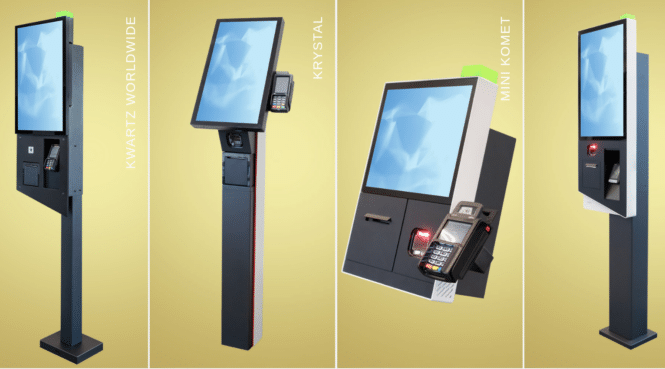
Branding Options

Determine whether the kiosk has the ability to have your branding added and what that looks like.  Also understand whether the kiosk is equipped with any signage to allow for Order Here or Check-Out Here communications. Signage like this can help guests understand the purpose of the technology and how to use it.

Off-the-shelf kiosks will not likely have any branding options directly from the manufacturer. It may be possible to add some after-market decals.

Many made-to-order kiosks offer some signage and branding options to fit your brand. Some manufacturers offer vinyl branding that can be added during manufacturing, so you receive a kiosk that is ready to go live in the field.

Industry Group Kiosks Digital Signage

Warranty and Service Agreements

You’ll want to consider post-deployment options for your kiosk program. Consider how support is delivered and their expertise in troubleshooting common kiosk issues in the field.

Next Steps

This QSR Kiosk Buyer’s Guide provides a comprehensive structure covering all major aspects from initial assessment to long-term considerations.

When considering self-service kiosks for your QSR, it’s important to recognize that you’re not simply replacing staff with technology, but rather enhancing your customer interface. The choice between a basic, low-cost solution and a robust, high-quality kiosk solution can significantly impact your guests’ experience and your business’s long-term success.

While budget-friendly options may seem attractive initially, investing in a well-designed, durable kiosk solution can provide a more reliable, efficient, and professional interaction point for your customers. This decision reflects your commitment to service quality and can influence how customers perceive your brand. Therefore, it’s crucial to carefully weigh the benefits of a more sophisticated kiosk system against the potential limitations of a simpler, less expensive alternative. Olea has collaborated with many QSR software partners, and we’ve worked with many QSR operators as well. If you’d like to discuss your QSR project or to get more information, click here.

Restaurant Kiosk Background

The restaurant point of sale business is constantly changing and kiosks always run an application which interfaces to the merchant processor and the POS system being used.  Think Tillster, TOASTTAB, Shift4, etc..  And robotics and lockers for that matter.

Here are some popular resources here

Click below to view our full line of kiosk options

VIEW KIOSKS

August 13, 2024

In healthcare, efficiency and accessibility are necessary for providing excellent patient care. Recognizing the need for an i…

Read more

Check-In Kiosk For Patients

patient check-in kiosk

New Patient Check-in  kiosk by Olea

LOS ANGELES, Calif., Aug. 14, 2024 (SEND2PRESS NEWSWIRE) — Olea Kiosks®, Inc. is excited to announce the launch of its latest advancement in healthcare technology, the Chicago Healthcare Check-In Kiosk. This innovative and inclusive solution offers a sleek, modern ADA-compliant design, elevating the user experience for all.

Photo caption: Olea Kiosks Unveils its Chicago Healthcare Check-In Kiosk.

One of the standout features of the Chicago is its commitment to accessibility. This new design includes an offset monitor to provide easier wheelchair access and a tilt bracket to assist people of all heights. For those with low vision, the unit includes the thoughtful integration of an Audio Nav system and a keyboard to improve the user experience.

“This new design is the result of conversations with many healthcare companies that are all trying to figure out how to implement self-service properly. We wanted to ensure it addressed ADA, but not just for the sake of checking boxes, but making it user-friendly and comfortable for all users,” explained Frank Olea, CEO.

“We also wanted to offer facial recognition as part of the standard product because that requirement is coming soon, so we incorporated the camera and the tilt bracket to ensure the picture can be taken properly regardless of height. You’re juggling HIPPA and several requirements into one design so we’re proud to deliver a kiosk that is better designed and includes more features and is better value than what’s on the market today,” added Olea.

The Chicago is available in three form factors: a Height-Adjustable, Freestanding and Desktop.

By streamlining the check-in process, healthcare providers can reduce wait times, optimize staff efficiency, and ultimately enhance patient satisfaction.

For more information on the Chicago Healthcare Check-In Kiosk, visit https://www.olea.com/product/chicago-healthcare/

A first-customer deployment of the Chicago kiosk is anticipated to be operational by the end of October.

About Olea Kiosks, Inc.:

Olea Kiosks® Inc., is a self-service kiosk solution provider for government, healthcare, hospitality, travel, and entertainment. Its technologically advanced, in-house manufacturing, design, and innovation have made it an industry leader. Headquartered in Los Angeles, California, customers include Cincinnati Children’s Hospital, Geisinger, Greyhound, Johns Hopkins, Kaiser Permanente, SmarteCarte, Subway Sandwiches, and Universal Studios. Olea Kiosks can be found wherever high-volume authentications and transactions are required, including 50+ major airports, amusement parks, and premier stadiums across all 5 major US sports leagues.

For more information, visit https://www.olea.com/.

More Patient Check-in Kiosk Links

Wireless Modems and Wireless Routers

wireless router modem

Wireless Kiosk Provider DPL

DPL — Wireless Kiosk Routers and Modems you can bank on. Cut site visits by up to 35% and get 50x faster time to resolution with DPL’s Hercules cellular routers and AI powered remote monitoring and management platform.

DPL sets the standard for managed wireless service providers in the ATM industry. DPL’s long history of constant innovation has allowed them to remain an industry leader for nearly two-decades and has made them a fan favorite among ATM operators.

2003 – Dial to Cellular

DPL introduced the 2G ATM 300, one of the first transaction capable, dial to cellular converters, designed specifically for use in ATMs. The ATM 300’s built-in intrusion detection features, made possible in-part by its internal battery, were the first of their kind. The ATM 300 could detect and alert ATM owners by email and SMS text message, of power disconnects, tilting, and door open events through DPL’s custom physical sensors. The ATM 300 also featured a built-in power relay which enabled ATM operators to remotely restart ATMs to resolve errors and return ATMs to “in service”. This innovation has helped ATM operators save countless hours and reduce costs related to unnecessary travel and tech dispatches.

2007 – Dial to Ethernet

DPL introduced the ATM 600, a dial to Ethernet converter which enabled dial-up ATMs to connect to the location’s local area network (LAN). This helped operators reduce costs by eliminating the need for a dedicated phone line or cellular costs to support the ATM.

2020 – GPS Tracking

DPL introduced the Hercules Shield, one of the first cellular modems to include physical and logical security features with built-in GPS tracking. The Hercules Shield also features industry-first NTrap® Ethernet ports, which can detect Ethernet tampering even if power to the ATM is cut. It also detects MAC and IP address changes; early signs of cyber attacks.

2021 – Advanced Remote Management

DPL introduced Hercules RMS, which offers ATM operators unparalleled remote management capability regardless of ATM manufacturer or payment processor. Hercules RMS eliminates the expense and complexity associated with traditional RMS setups and enables operators to perform remote actions like soft ATM reboots, configure payment processors; adjust bill counts, welcome, and marketing messages. DPL is the first and only managed wireless provider to offer this level of remote management capability to ATM

2022 – Artificial Intelligence

DPL raised the bar yet again by introducing Hercules AI, which minimizes ATM downtime by automatically fixing over 1,800 common PIN pad, bill dispenser, card reader and software related issues. ATM operators taking advantage of Hercules AI project it will save them tens-of-thousands of dollars every year in costs related to downtime, travel, and technician fees – not to mention improve their relationships with location owners leading to increased business opportunities.

1-800-561-8880

Accounting  [email protected]
Headquarters

700 Main Street, Suite 200
Moncton, NB
E1C 1E4
Canada

More Wireless Service Provider Links

More Wireless Routers Links